Clean Code
@sickn33A one-file Clean Code playbook (Robert C. Martin's rules on naming, functions, comments, errors, tests and classes) that AI coding agents follow when writing, reviewing or refactoring code.
One Markdown file: no scripts, no network access and no file writes of its own. Instruction-only.
What it looks like in Antigravity 2.0
Works (steps corrected)Installed and worked. The agent used its own install method (it downloaded only SKILL.md, which is fine for a one-file skill); the pasted prompt and the check step needed fixing.Run by us on 2026-10-13 · desktop app 2.21.1, Gemini 3.8 Flash (High), macOS
How to get this result, step by step
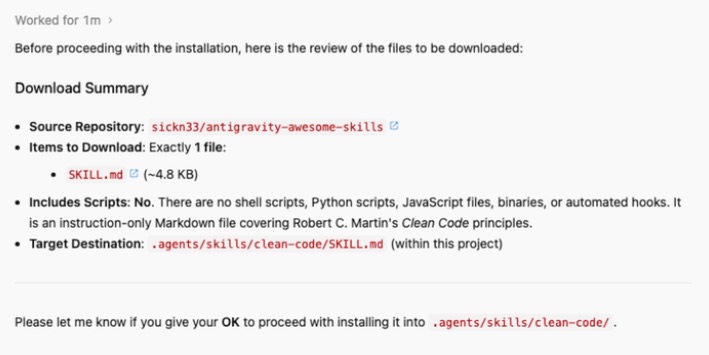
1Paste the install message into a new Antigravity conversation; reply "OK" when it lists the download.
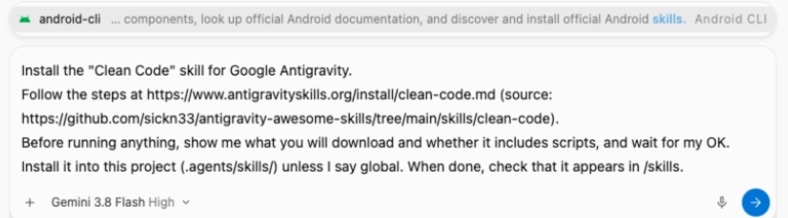
Install the "Clean Code" skill for Google Antigravity.
Follow the steps at https://www.antigravityskills.org/install/clean-code.md (source: https://github.com/sickn33/antigravity-awesome-skills/tree/main/skills/clean-code).
Before running anything, show me what you will download and whether it includes scripts, and wait for my OK.
Install it into this project (.agents/skills/) unless I say global. When done, check that Antigravity lists it as an installed skill.
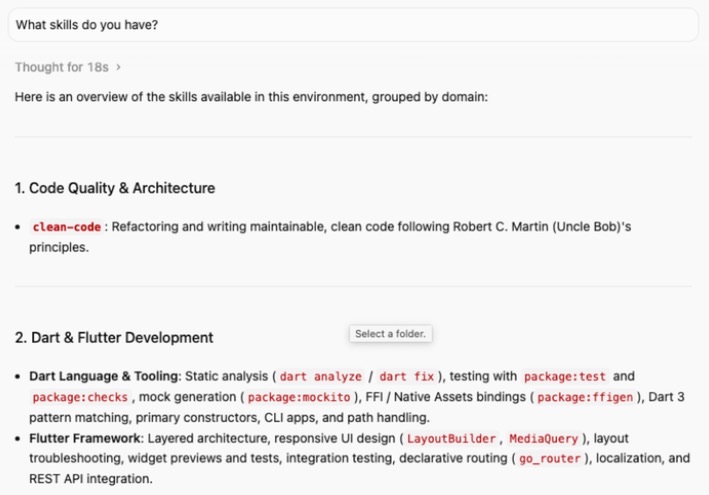
2Check it is installed: ask this in a new conversation.
What skills do you have?
Full test log
Install method: Option 1 (pasted the agent prompt into a new conversation in an empty project folder).
- The agent asked to read antigravityskills.org, raw.githubusercontent.com and api.github.com, then reported "exactly 1 file: SKILL.md (~4.8 KB)", no scripts, target .agents/skills/clean-code/SKILL.md, and waited for OK.
- It created the folder and downloaded SKILL.md directly; it used neither the npx installer nor the git clone from Option 2.
- In a new conversation, "What skills do you have?" listed clean-code first, under Code Quality & Architecture. Typing /clean found nothing before that first message and found clean-code afterwards.
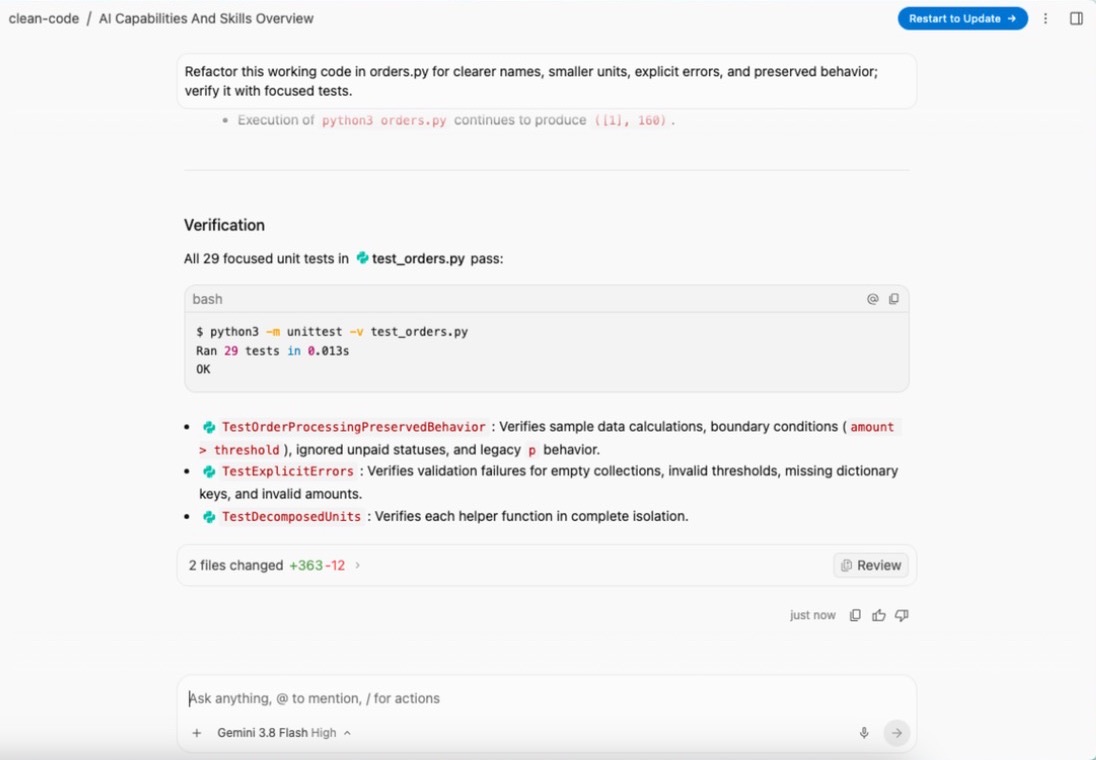
- With the example request on a small file (orders.py, a 13-line function p(d, t) that filters paid orders and sums them), the agent read clean-code/SKILL.md first, ran the original script, then refactored it and wrote tests.
What we corrected on this page
- The pasted Option 1 prompt opened the app's / menu (it ended in "/skills."), so Enter would insert a skill instead of sending. The prompt no longer contains a slash command.
- The check step said to type /skills; the 2.0 app has no such command. Changed to "What skills do you have?" for the app and /skills for the CLI.
Install Clean Code in Google Antigravity
Antigravity loads skills from .agents/skills/ in your project or ~/.gemini/config/skills/ for all projects (official docs). Full guide
Install the "Clean Code" skill for Google Antigravity.
Follow the steps at https://www.antigravityskills.org/install/clean-code.md (source: https://github.com/sickn33/antigravity-awesome-skills/tree/main/skills/clean-code).
Before running anything, show me what you will download and whether it includes scripts, and wait for my OK.
Install it into this project (.agents/skills/) unless I say global. When done, check that Antigravity lists it as an installed skill.
The agent reads the install file, shows you what it will download and waits for your OK.
Option 2: install it yourself
- 1. Option A: the project's installer
npx agentic-awesome-skills --antigravity --skills clean-code --dry-run
README, Direct skill install. Check the preview, then run the same command without --dry-run. The README says the Antigravity target is ~/.agents/skills and that the installer refuses to run without --skills, a filter or --all, because the full catalog can exhaust Antigravity's context.
- 2. Option B: copy the folder into this project
git clone --depth 1 https://github.com/sickn33/antigravity-awesome-skills.git /tmp/ag-skills && mkdir -p .agents/skills && cp -r /tmp/ag-skills/skills/clean-code .agents/skills/
Run from your project root. Antigravity loads workspace skills from .agents/skills/.
- 3. Or copy it for all projects
mkdir -p ~/.gemini/config/skills && cp -r /tmp/ag-skills/skills/clean-code ~/.gemini/config/skills/
Global skills folder from Antigravity's docs (antigravity.google/docs/skills).
- 4. Check that Antigravity sees it
Antigravity 2.0 app: start a new conversation and ask "What skills do you have?" (the app has no /skills command; typing / and the skill name also finds it, sometimes only after your first message). Antigravity CLI: run /skills; in a session that was already open, run /skills reload first. clean-code should be listed.
The README does cover Antigravity: it is the installer's default target. The repository is large (we counted 2,013 skill folders at the reviewed commit), so copy only skills/clean-code, never the whole skills/ folder, into a folder Antigravity watches.
Using Claude Code, Cursor or Codex? See other assistants below.
What is Clean Code?
How to use Clean Code?
Key features of Clean Code
- ✓Naming rules with concrete examples: elapsedTimeInDays instead of d, nouns for classes, verbs for methods, no Manager or Data class names
- ✓Function rules: small, do one thing, one level of abstraction, 0 arguments ideal and 3+ only with strong justification, no hidden side effects
- ✓Comment rules: rewrite bad code instead of explaining it, with a Python before/after example
- ✓Error handling: exceptions instead of return codes, do not return or pass null
- ✓Unit tests: the Three Laws of TDD and the F.I.R.S.T. principles
- ✓Classes and objects: single responsibility, the Stepdown Rule and the Law of Demeter
- ✓Six-item pre-delivery checklist, including a 20-line limit per function
When to use Clean Code
- 1Skill example (from SKILL.md): "Refactor this working code for clearer names, smaller units, explicit errors, and preserved behavior; verify it with focused tests." The agent restructures the code without changing what it does and adds focused tests.
- 2Our example: "Review this pull request diff with the clean-code skill and list problems by section." Expect findings grouped as Meaningful Names, Functions, Error Handling and so on, each tied to a rule in SKILL.md, such as a function with four arguments or a method that returns null.
- 3Our example: "Write the CSV import with clean-code rules and keep every function under 20 lines." The agent should split parsing, validation and saving into separate small functions and start with a failing test.
Source and files
- Repository
- sickn33/antigravity-awesome-skills (MIT)
- Upstream risk label
- safe
- Added upstream
- 2026-02-27
- SKILL.md size
- 4.7 KB
- Files in the skill folder
- SKILL.md
- Listing synced
- 2026-10-05 from commit bdacd76
Installation & Setup Guide
Agent Rules / Prompt SetupFollow these steps (taken from the project's own docs) to configure Clean Code in your development environment.
npx agentic-awesome-skills --claude --skills clean-code
README, Choose Your Tool and How do I install it? (--claude flag); the repo's docs/users/claude-code-skills.md names .claude/skills/ as the target. Always pass --skills: the README says non-Antigravity targets copy the full catalog when no selector is given. Add --dry-run first to preview.
npx agentic-awesome-skills --cursor --skills clean-code
README, Choose Your Tool (npx agentic-awesome-skills --cursor); docs/users/cursor-skills.md names .cursor/skills/.
npx agentic-awesome-skills --codex --skills clean-code
README, Choose Your Tool (npx agentic-awesome-skills --codex); docs/users/codex-cli-skills.md checks .codex/skills or ~/.codex/skills.
git clone --depth 1 https://github.com/sickn33/antigravity-awesome-skills.git /tmp/ag-skills && cp -r /tmp/ag-skills/skills/clean-code <your-skills-folder>/
Our manual alternative: the skill is one SKILL.md, so copying the folder is all the installer does for it. Avoids running the npm installer, which we did not review.
Usage Example & Verification
"Refactor this working code for clearer names, smaller units, explicit errors, and preserved behavior; verify it with focused tests." (the example request in the skill's SKILL.md)
After installing, ask "What skills do you have?" in a new Antigravity 2.0 conversation (or run /skills in the Antigravity CLI); clean-code should be listed. Then paste a function with five parameters and ask for a clean-code review: the answer should quote the arguments rule (0 ideal, 1-2 okay, 3+ needs strong justification).
Security Review
Static reviewOne Markdown file: no scripts, no network access and no file writes of its own. Instruction-only.
Full review: scope, findings, risks
Static review on 2026-10-13 of sickn33/antigravity-awesome-skills (also reachable as sickn33/agentic-awesome-skills), skills/clean-code at commit 342019cb09fdbd66921bea74dc6f995aff746b64. The folder contains a single SKILL.md of 4,835 bytes: YAML frontmatter plus nine sections of Clean Code rules, a checklist, one example request and a Limitations section. It contains no code to execute (the only code block is a two-line Python illustration), no commands, no network or credential instructions and no file operations. The file is identical at HEAD cb30121 (2026-10-12). Static inspection only: we did not run the installer or the skill.
Operational Notes & Known Limitations
Known Limitations
- •A summary, not the book: 724 words (we counted). Of SOLID it covers only single responsibility; there is nothing on DRY, KISS, YAGNI, concurrency or language-specific idioms.
- •One code example only (Python, in the Comments section); everything else is rules in prose.
- •Nothing is enforced: the skill does not run linters, formatters or tests. Check the result with your own linter and test suite.
- •Rules such as "functions under 20 lines" and "0 arguments is ideal" are style opinions; applied blindly they can split simple code into too many tiny functions.
- •Difference from a similar skill (we counted): the sibling clean-code-guard skill in the same repository has 8 files (a 17,065-byte SKILL.md plus 7 reference files) covering Clean Code, SOLID, DRY, KISS, YAGNI and LLM failure modes, and is labelled risk: critical. clean-code is the lightweight, risk: safe option.
- •skills/clean-code is unchanged between the reviewed commit 342019c and HEAD cb30121 (2026-10-12).
Frequently Asked Questions
Is the Clean Code skill safe?
In our static review it is one Markdown file with no scripts, no network access and no file access of its own. It only changes how the agent writes and reviews code.
How do I install Clean Code in Antigravity?
Run npx agentic-awesome-skills --antigravity --skills clean-code, or copy skills/clean-code from the repository into .agents/skills/ (this project) or ~/.gemini/config/skills/ (all projects), then ask "What skills do you have?" (Antigravity CLI: /skills).
Clean Code or clean-code-guard?
clean-code is a 724-word summary for everyday use. clean-code-guard has a 17,065-byte SKILL.md (about 3.5 times larger) plus seven reference files and adds SOLID, DRY, KISS, YAGNI and LLM-specific checks; pick it for strict reviews.
Does it work in Cursor and Codex?
Yes. The README lists --cursor and --codex installer targets; add --skills clean-code so you do not install the whole catalog.
Which languages does it support?
The rules are language-agnostic. The only code example is Python.
Supported Platforms
Keep exploring this topic
Browse the full Antigravity skills directory for more source-linked skills with install steps and static safety reviews.
Related Skills
Rust Best Practices
@apollographql
Apollo GraphQL's rust-best-practices skill: makes your agent write and review Rust by Apollo's handbook (ownership, errors, Clippy, tests, generics).
Cursor Code Review (Superpowers)
@obra
Superpowers' requesting-code-review skill: the agent sends a git diff to a reviewer subagent and gets Critical/Important/Minor findings and a verdict.
Web Accessibility (a11y)
@addyosmani
Addy Osmani's WCAG 2.2 accessibility skill: audit workflow, code patterns, testing checklist and issues ranked by impact.
Popular Skills
View All →Agent Manager
@sickn33
Manage multiple local CLI agents via tmux sessions.
Systematic Debugging
@sickn33
Debug systematically, not randomly. Find and fix bugs methodically.
Browser Automation (Playwright)
@sickn33
Expert browser automation for cleaning scraping and reliable testing.