Data Visualization
@anthropicsAnthropic's data-visualization skill: pick the right chart and write clean, accessible Python charts with matplotlib, seaborn and plotly.
Very low risk: a Markdown-only guide with plotting code examples and no network access.
What it looks like in Antigravity 2.0
Works (steps corrected)Installed and worked, but the agent skipped the Python library step, so the matplotlib code was never run.Run by us on 2026-10-13 · desktop app 2.21.1, Gemini 3.8 Flash (High), macOS
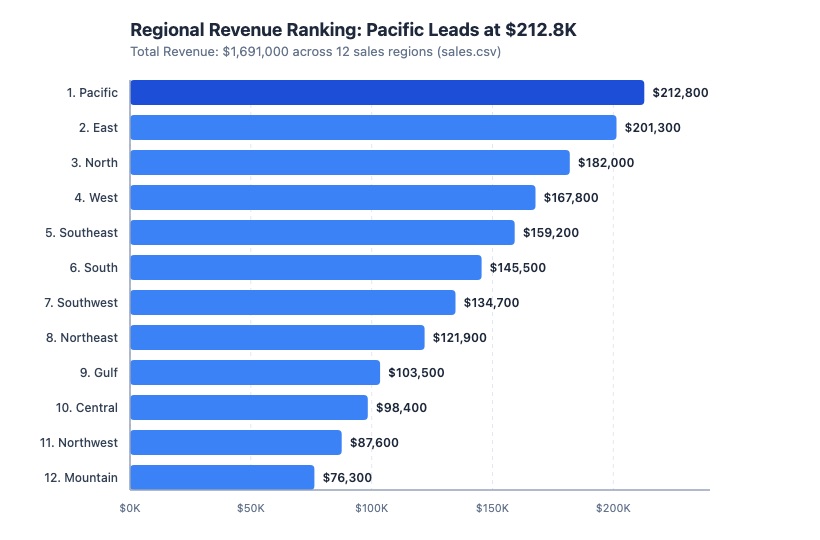
How to get this result, step by step
1Paste the install message into a new Antigravity conversation; reply "OK" when it lists the download.
Install the "Data Visualization" skill for Google Antigravity.
Follow the steps at https://www.antigravityskills.org/install/data-visualization.md (source: https://github.com/anthropics/knowledge-work-plugins/tree/main/data/skills/data-visualization).
Before running anything, show me what you will download and whether it includes scripts, and wait for my OK.
Install it into this project (.agents/skills/) unless I say global. When done, check that Antigravity lists it as an installed skill.
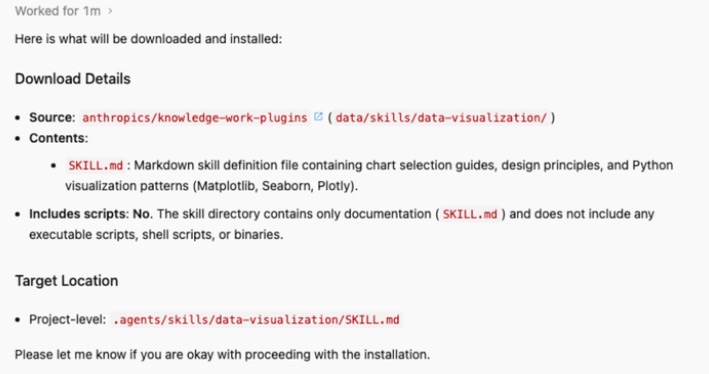
2Ask for a chart in plain words — the agent loads the skill without you naming it.
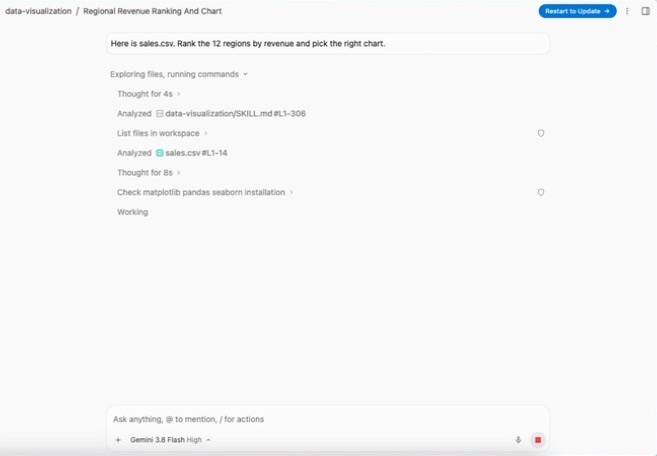
Here is sales.csv. Rank the 12 regions by revenue and pick the right chart.
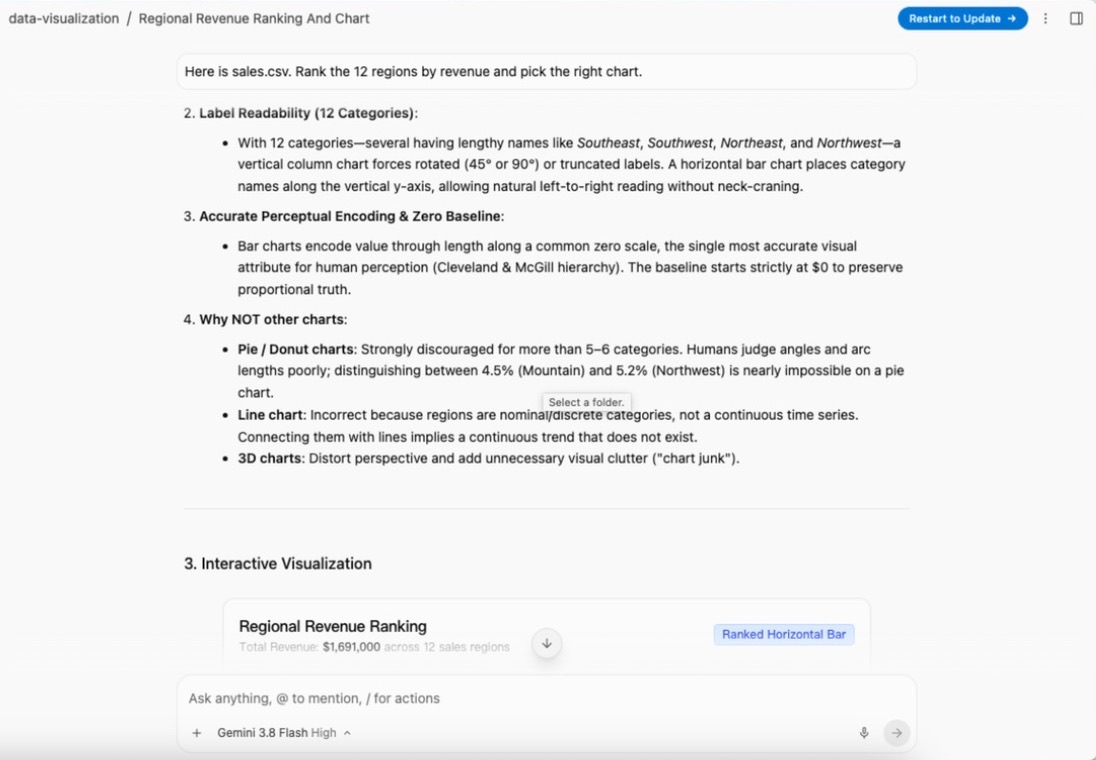
3It explains why it picked this chart type.
Full test log
Install method: Option 1 (pasted the agent prompt into a new conversation in an empty project folder).
- The agent asked to read antigravityskills.org, github.com and raw.githubusercontent.com, then reported one file (SKILL.md), no scripts, target .agents/skills/data-visualization/SKILL.md, and waited for OK.
- It cloned anthropics/knowledge-work-plugins and copied the skill folder (the Option 2 route). It did not run step 4 (pip install matplotlib seaborn pandas numpy plotly); matplotlib was still missing afterwards.
- With the prompt below and a 12-row sales.csv we made, the agent read data-visualization/SKILL.md on its own (306 lines) and checked whether matplotlib, pandas and seaborn were installed.
- It wrote plot_sales.py (matplotlib, horizontal bars) but, without matplotlib, produced the chart with a second, standard-library script that writes regional_revenue_ranking.svg.
What we corrected on this page
- The agent skipped the pip install step when following Option 1. Run it yourself, or tell the agent to do it, if you want the matplotlib, seaborn or plotly code to run. Added to the step.
- The check step said to run /skills; the 2.0 app has no such command. Changed to "What skills do you have?" for the app and /skills for the CLI.
Install Data Visualization in Google Antigravity
Antigravity loads skills from .agents/skills/ in your project or ~/.gemini/config/skills/ for all projects (official docs). Full guide
Install the "Data Visualization" skill for Google Antigravity.
Follow the steps at https://www.antigravityskills.org/install/data-visualization.md (source: https://github.com/anthropics/knowledge-work-plugins/tree/main/data/skills/data-visualization).
Before running anything, show me what you will download and whether it includes scripts, and wait for my OK.
Install it into this project (.agents/skills/) unless I say global. When done, check that Antigravity lists it as an installed skill.
The agent reads the install file, shows you what it will download and waits for your OK.
Option 2: install it yourself
- 1. Clone the source repository
git clone --depth 1 https://github.com/anthropics/knowledge-work-plugins /tmp/kwp
Clone the repository to a temporary folder so you can copy the skill folder out of it.
- 2. Copy into your workspace (this project only)
mkdir -p .agents/skills && cp -r /tmp/kwp/data/skills/data-visualization .agents/skills/data-visualization
Run this from your project root. Antigravity reads workspace skills from <project>/.agents/skills/<folder>/.
- 3. Or copy globally (all projects)
mkdir -p ~/.gemini/config/skills && cp -r /tmp/kwp/data/skills/data-visualization ~/.gemini/config/skills/data-visualization
Use this instead of the workspace step if you want the skill available in every project. Antigravity reads global skills from ~/.gemini/config/skills/<folder>/.
- 4. Install the Python libraries
pip install matplotlib seaborn pandas numpy plotly
The code patterns import these; plotly is only needed for interactive charts. In our Antigravity 2.0 test the agent skipped this step when following Option 1, so run it yourself (or ask the agent to) if you want the matplotlib, seaborn or plotly code to run.
- 5. Check that Antigravity sees it
Antigravity 2.0 app: start a new conversation and ask "What skills do you have?" (the app has no /skills command; typing / and the skill name also finds it, sometimes only after your first message). Antigravity CLI: run /skills; in a session that was already open, run /skills reload first. data-visualization should be listed.
The repository README does not mention Antigravity; these are Antigravity's standard skill folders. No API keys needed. Copy /tmp/kwp/data/skills/create-viz as well if you want the step-by-step charting workflow.
Using Claude Code, Cursor or Codex? See other assistants below.
What is Data Visualization?
How to use Data Visualization?
Key features of Data Visualization
- ✓Chart selection table by data relationship (trend, comparison, ranking, composition, distribution, correlation, geography, flow, KPIs)
- ✓Guidance on charts to avoid (pie with many categories, 3D, careless dual axes)
- ✓Code patterns for line, bar, histogram, heatmap and small-multiple charts
- ✓Number-formatting helpers and interactive plotly examples
- ✓Colourblind-friendly categorical, sequential and diverging palettes
- ✓Accessibility checklist (colour blindness, screen readers)
When to use Data Visualization
- 1Plot a metric trend by category over time
- 2Rank categories with a sorted horizontal bar chart
- 3Show a distribution with mean and median lines
- 4Build a correlation heatmap
- 5Create an interactive scatter chart with hover data
Installation & Setup Guide
Agent Rules / Prompt SetupFollow these steps (taken from the project's own docs) to configure Data Visualization in your development environment.
claude plugin marketplace add anthropics/knowledge-work-plugins
Source: data/README.md, Installation.
claude plugin install data@knowledge-work-plugins
Source: data/README.md. Installs data-visualization together with create-viz, build-dashboard, sql-queries and the other data skills, plus the connector list in .mcp.json.
$skill-installer install https://github.com/anthropics/knowledge-work-plugins/tree/main/data/skills/data-visualization
Not documented by Anthropic for this repo. Source: openai/skills README ("provide the GitHub directory URL") and its skill-installer SKILL.md, which installs into $CODEX_HOME/skills (default ~/.codex/skills). Restart Codex afterwards.
The repository README names Claude Cowork and Claude Code only, so we do not list a Cursor command.
Usage Example & Verification
1) README example (data/README.md, Ad-Hoc Analysis): "/analyze What was our monthly revenue trend for the past 12 months, broken down by product line?"
-> What happens (Claude Code with the data plugin): the agent writes the SQL, runs it if a warehouse MCP is connected, and draws a trend chart; data-visualization supplies the line-chart pattern and style.

2) Our example: "Here is sales.csv. Rank the 12 regions by revenue and pick the right chart."
-> What happens: following the selection table, the agent picks a sorted horizontal bar chart, uses the barh code pattern with value labels and saves bar_chart.png in the working folder.

3) Our example: "Make this chart readable for colour-blind readers."
-> What happens: the agent applies the accessibility checklist: different line styles or direct labels instead of colour alone, sns.color_palette("colorblind"), labelled axes with units.Ask "What skills do you have?" in Antigravity (Antigravity CLI: /skills) and look for data-visualization. Then ask "Which chart should I use to compare 3 categories over 12 months, and which charts should I avoid?" An answer that cites the selection table (line chart, no 3D, careful with dual axes) shows the skill is loaded.
Security Review
Static reviewVery low risk: a Markdown-only guide with plotting code examples and no network access.
Full review: scope, findings, risks
data/skills/data-visualization/ contains only SKILL.md (305 lines). Its Python snippets import matplotlib, seaborn, pandas, numpy and plotly and save charts with plt.savefig to files such as trend_chart.png, bar_chart.png and heatmap.png. There are no shell commands, HTTP requests, environment variables or credentials. The frontmatter sets user-invocable: false, so the skill is applied from context. Connectors for data warehouses belong to the wider data plugin, not this skill.
Operational Notes & Known Limitations
Known Limitations
- •Python only: needs matplotlib, seaborn, pandas and numpy (plotly for interactive charts); it installs nothing for you
- •Guidance plus code patterns, not a charting service; the agent must be able to run Python to render images
- •user-invocable is false, so it activates from context rather than as a slash command
- •Data warehouse access (Snowflake, BigQuery and others) comes from the data plugin's .mcp.json connectors (8 entries, two with empty URLs to fill in), not from this skill
- •No Antigravity, Cursor or Codex instructions in the repository; the README targets Claude Cowork and Claude Code
Frequently Asked Questions
Is the Data Visualization skill safe?
Yes, in our static review it is a single SKILL.md with no scripts. Its code examples only plot data and save files such as trend_chart.png in the working folder; they make no network calls and need no API keys.
How do I install data-visualization in Antigravity?
Clone anthropics/knowledge-work-plugins and copy data/skills/data-visualization into .agents/skills/ (workspace) or ~/.gemini/config/skills/ (global), install the Python libraries, then check by asking "What skills do you have?" (Antigravity CLI: /skills).
Which libraries does it use?
matplotlib and seaborn for static charts, plotly (express and graph_objects) for interactive charts, with pandas and numpy for data handling.
Does it make dashboards?
No, it covers individual charts. The same data plugin has build-dashboard (HTML dashboards with Chart.js per the README) and create-viz for an end-to-end chart workflow.
Supported Platforms
Keep exploring this topic
Browse the full Antigravity skills directory for more source-linked skills with install steps and static safety reviews.
Related Skills
DuckDB CLI
@duckdb
Official DuckDB skills: query files and databases with the duckdb CLI, read CSV/Parquet/JSON, search DuckDB docs and install extensions.
Finance Tools (Financial Analysis)
@anthropics
Anthropic's financial-analysis plugin: 13 skills and 7 slash commands for DCF, comps, LBO and 3-statement models in Excel, spreadsheet audits and pitch-deck checks.
HTML Slides
@nextlevelbuilder
Skill from the UI UX Pro Max repo for strategic HTML presentations with Chart.js, design tokens, layout patterns and copy formulas.
Popular Skills
View All →Agent Manager
@sickn33
Manage multiple local CLI agents via tmux sessions.
Systematic Debugging
@sickn33
Debug systematically, not randomly. Find and fix bugs methodically.
Browser Automation (Playwright)
@sickn33
Expert browser automation for cleaning scraping and reliable testing.