shadcn/ui
@shadcn-uiOfficial shadcn/ui skill: project-aware rules for adding, searching, composing and styling shadcn components via the shadcn CLI.
Official shadcn skill: one read-only script, no API keys; the agent runs shadcn CLI commands that download packages and write component files into your project.
What it looks like in Antigravity 2.0
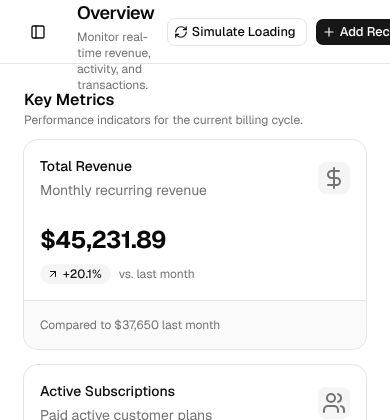
Works (steps corrected)Installed with Option 1 in about 2 minutes and the agent followed the skill's rules. In an empty folder the example prompt only produced a dashboard component file; after one follow-up asking it to create a Vite + React app with shadcn init, it built and ran a working dashboard (sidebar, 4 stat cards, data table) in about 10 more minutes.Run by us on 2026-10-18 · desktop app, Gemini 3.8 Flash (High), Windows
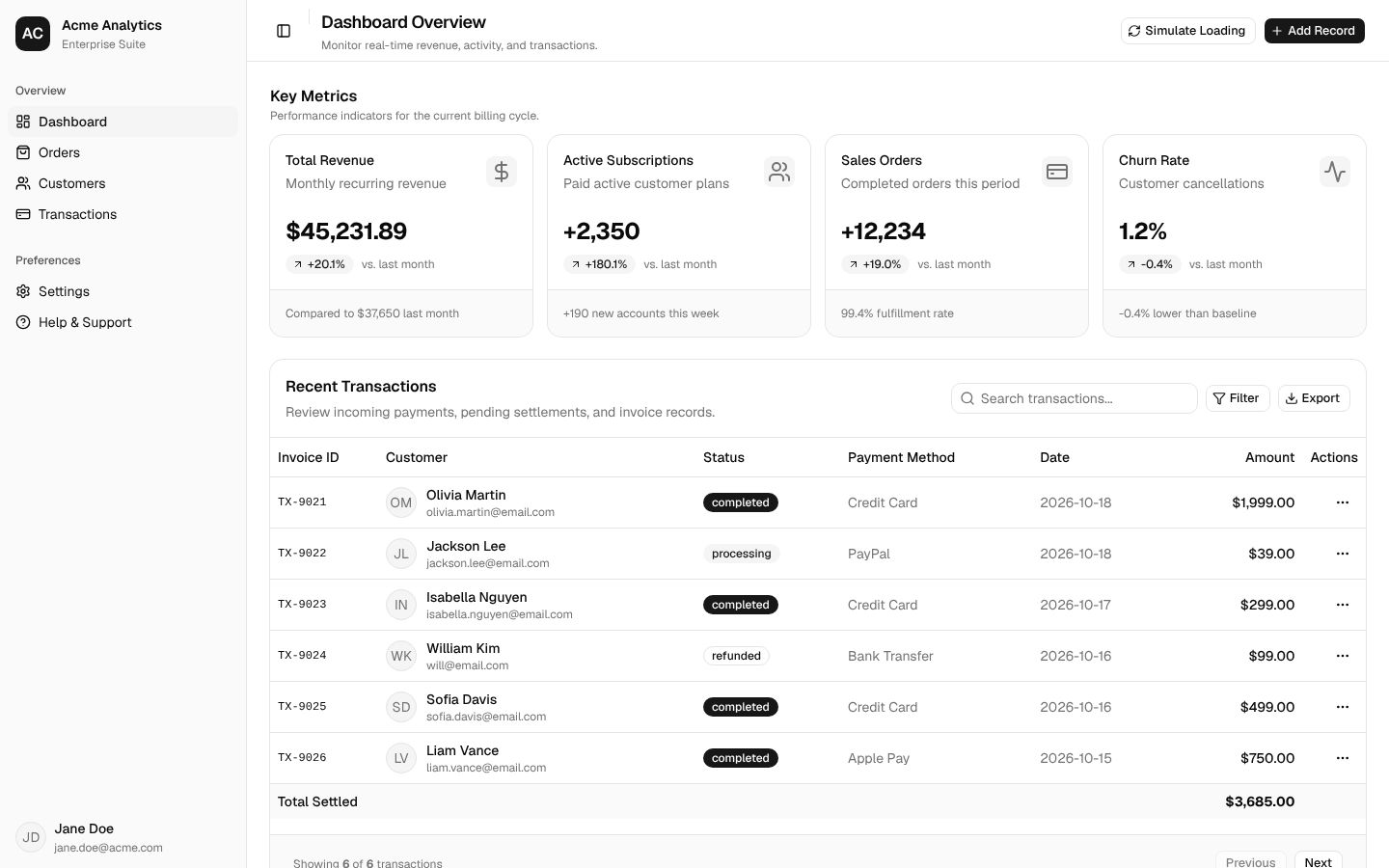
How to get this result, step by step
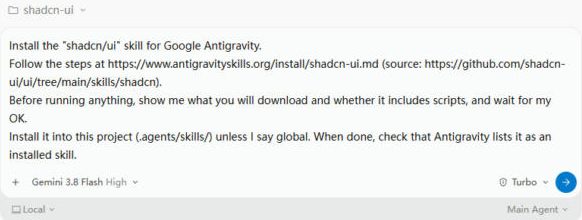
1Open your project folder, start a new conversation and paste the install message. Press Enter.
Install the "shadcn/ui" skill for Google Antigravity.
Follow the steps at https://www.antigravityskills.org/install/shadcn-ui.md (source: https://github.com/shadcn-ui/ui/tree/main/skills/shadcn).
Before running anything, show me what you will download and whether it includes scripts, and wait for my OK.
Install it into this project (.agents/skills/) unless I say global. When done, check that Antigravity lists it as an installed skill.
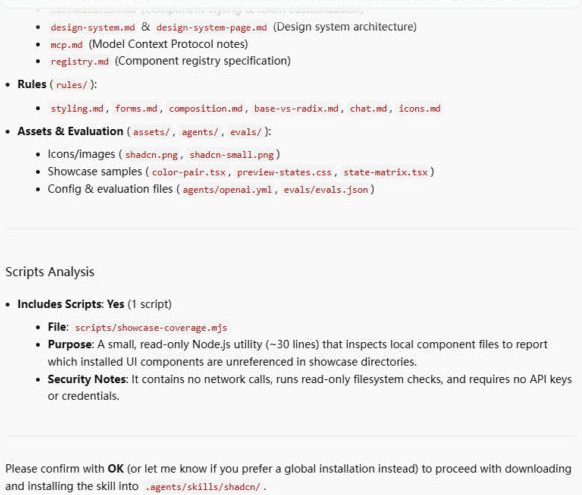
2The agent lists the files and the one read-only script, then waits. Reply "OK".
OK
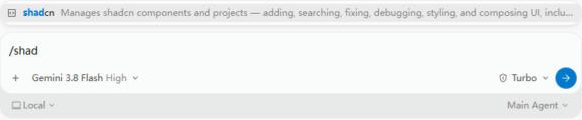
3Check it is installed: in a new conversation type /shad and the skill shows up.
/shad
4Ask for the UI in plain words.
Build a dashboard with a sidebar, stats cards, and a data table.

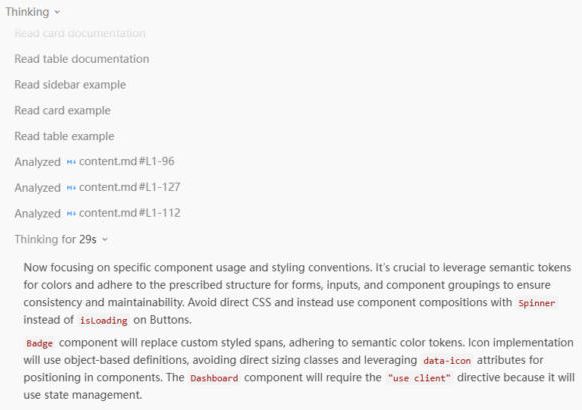
5It reads the shadcn docs and applies the skill's rules. Allow ui.shadcn.com when asked.
6No app yet? Paste this follow-up. If it stalls after shadcn init, tell it init has finished.
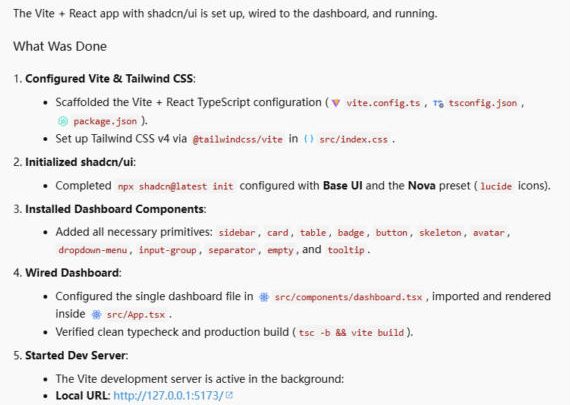
There is no app in this folder yet. Create a Vite + React app here with shadcn (npx shadcn@latest init), add the components the dashboard needs, keep one dashboard file, and start the dev server so I can open it in the browser.
Full test log
Install method: Option 1 (pasted the agent prompt into a new conversation in an empty project folder).
- The agent read our install page and the GitHub folder, listed 21 files and said there is one script (scripts/showcase-coverage.mjs, read-only, no network). We replied OK.
- It copied the skill to .agents/skills/shadcn/ (21 files, 196 KB) and confirmed Antigravity registers it. In a new conversation, /shad shows shadcn in the menu.
- With the example prompt it read SKILL.md, ran shadcn info, read the sidebar, card and table docs from ui.shadcn.com (Antigravity asks to allow that site) and wrote a 640-line dashboard.tsx using SidebarProvider, Card, Table, InputGroup, Skeleton and Empty, as the rules require.
- There was no app in the folder, so nothing could run. We asked it to create a Vite + React app with npx shadcn@latest init. It picked Base UI and the Nova preset, added sidebar, card, table, badge and 9 more components, passed tsc -b && vite build and started the dev server on http://127.0.0.1:5173/.
What we corrected on this page
- Start in a project that already has components.json, or ask for the app first (see the second prompt). In an empty folder the example prompt gives you a component file that cannot run.
- After shadcn init finished, the agent kept waiting for the command to exit. Its output already said "Project initialization completed"; telling the agent so made it continue.
- It left a second copy of dashboard.tsx in components/ at the project root; delete it. On a phone-width screen the header buttons run off the edge; the rest of the layout stacks fine.
- Names, emails and amounts in the dashboard are invented sample data.
Install shadcn/ui in Google Antigravity
Antigravity loads skills from .agents/skills/ in your project or ~/.gemini/config/skills/ for all projects (official docs). Full guide
Install the "shadcn/ui" skill for Google Antigravity.
Follow the steps at https://www.antigravityskills.org/install/shadcn-ui.md (source: https://github.com/shadcn-ui/ui/tree/main/skills/shadcn).
Before running anything, show me what you will download and whether it includes scripts, and wait for my OK.
Install it into this project (.agents/skills/) unless I say global. When done, check that Antigravity lists it as an installed skill.
The agent reads the install file, shows you what it will download and waits for your OK.
Option 2: install it yourself
- 1. Download the repository
git clone --depth 1 https://github.com/shadcn-ui/ui /tmp/shadcn-ui
The skill lives in skills/shadcn. A sparse checkout also works: git clone --depth 1 --filter=blob:none --sparse https://github.com/shadcn-ui/ui /tmp/shadcn-ui && git -C /tmp/shadcn-ui sparse-checkout set skills
- 2. Copy the skill into this project (workspace skill)
mkdir -p .agents/skills && cp -r /tmp/shadcn-ui/skills/shadcn .agents/skills/
Run from your project root. Antigravity then reads .agents/skills/shadcn/SKILL.md.
- 3. Or install it for all projects (global skill)
mkdir -p ~/.gemini/config/skills && cp -r /tmp/shadcn-ui/skills/shadcn ~/.gemini/config/skills/
Use this instead of the previous step. For the Antigravity CLI the global folder is ~/.gemini/antigravity-cli/skills/.
- 4. Check that Antigravity sees it
Antigravity 2.0 app: start a new conversation and ask "What skills do you have?" (the app has no /skills command). Antigravity CLI: run /skills; in a session that was already open, run /skills reload first. The skill is listed as shadcn.
The shadcn docs name only Claude Code as an example and install with npx skills add shadcn/ui; Antigravity is not mentioned anywhere in the repository. Needs Node.js; no API keys. The skill is active in projects with a components.json file.
Using Claude Code, Cursor or Codex? See other assistants below.
What is shadcn/ui?
How to use shadcn/ui?
Key features of shadcn/ui
- ✓We counted at ba1503c: 21 files, 158,662 bytes; SKILL.md has 296 lines and the frontmatter sets user-invocable: false, so it loads automatically
- ✓We counted: 6 rule files (forms, styling, composition, icons, chat, base-vs-radix) with incorrect/correct examples, plus 8 evals in evals/evals.json; rules/chat.md now also covers Trace (assistant activity rows) and CodeBlock, added in 4233ed1 (2026-10-14)
- ✓New since our 2026-10-06 review (commit 2d3f1cd, 2026-10-09): a DESIGN.md workflow, 2 guides (386 and 268 lines), 3 showcase templates and a coverage script; the agent scaffolds an app from a preset, runs add --all and builds a design system page
- ✓README says (skills docs page): project context comes from shadcn info --json; we counted 6 named presets (nova, vega, maia, lyra, mira, luma) and 6 templates (next, vite, start, react-router, astro, laravel)
- ✓Component picker table: Dialog vs Sheet vs Drawer vs AlertDialog, ToggleGroup for 2-5 options, Empty for empty states
When to use shadcn/ui
- 1Add a login or settings form
- 2Dashboard with sidebar, stats cards and data table
- 3Switch a project to another preset
- 4Turn a DESIGN.md into a themed shadcn app
Installation & Setup Guide
Agent Rules / Prompt SetupFollow these steps (taken from the project's own docs) to configure shadcn/ui in your development environment.
npx skills add shadcn/ui
Documented on the shadcn/ui Skills docs page (apps/v4/content/docs/(root)/skills.mdx), which uses Claude Code as its example assistant.
Not documented by the project for the skill. The docs only describe the shadcn MCP server for Cursor (.cursor/mcp.json, apps/v4/content/docs/(root)/mcp.mdx), and the repo ships a .cursor-plugin/plugin.json manifest.
Usage Example & Verification
1) README example (docs page skills.mdx): "Build a dashboard with a sidebar, stats cards, and a data table."
-> The agent checks which components are installed, adds missing ones with npx shadcn@latest add, and composes Sidebar + Card + Chart + Table with semantic colors.

2) README example (same page): "Switch to --preset [CODE]"
-> It asks overwrite / partial / merge / skip, then runs npx shadcn@latest apply <code> (or init --preset) as you chose.

3) Our example: "Apply this DESIGN.md to a new Vite app and build a design system page."
-> Triggers the design-system workflow: init with a preset, add --all, map tokens to the theme variables, then a page of color roles and state matrices.
Security Review
Static reviewOfficial shadcn skill: one read-only script, no API keys; the agent runs shadcn CLI commands that download packages and write component files into your project.
Full review: scope, findings, risks
Static review at ba1503c (diff from 954ce95 limited to SKILL.md and rules/chat.md, Markdown only). skills/shadcn/ has 21 files: SKILL.md, cli.md, customization.md, registry.md, mcp.md, design-system.md, design-system-page.md, 6 rules/*.md, evals/evals.json, agents/openai.yml, 2 PNG icons, 3 showcase templates (2 .tsx, 1 .css) and scripts/showcase-coverage.mjs. The script only reads a ui directory and showcase sources and prints how many components are shown (no network, no writes, no subprocess). SKILL.md sets allowed-tools to Bash(npx shadcn@latest *), Bash(pnpm dlx shadcn@latest *) and Bash(bunx --bun shadcn@latest *) and embeds !`npx shadcn@latest info --json`. The agent is told to run init, add, search, docs, apply and preset commands, which download the shadcn package and registry items and write files; design-system.md also has it run npm install for @fontsource-variable font packages and add --all -y. SKILL.md requires explicit user approval before --overwrite and says to read and verify third-party registry code after adding it. No API keys or environment variables.
Operational Notes & Known Limitations
Known Limitations
- •Needs Node.js and a project with components.json; every command goes through npx, pnpm dlx or bunx and downloads the latest shadcn package
- •SKILL.md injects project context with the !`npx shadcn@latest info --json` syntax; if your agent does not run that, ask it to run the command itself
- •The DESIGN.md workflow tells the agent to run npm install for font packages (@fontsource-variable/...) and add --all -y
- •React and shadcn/ui only; the repo does not mention Antigravity (we searched)
Frequently Asked Questions
Is the shadcn/ui skill safe?
In our static review of commit ba1503c it is Markdown, images, one small read-only script (showcase-coverage.mjs) and evals. It tells the agent to run the shadcn CLI, limited by allowed-tools to npx, pnpm dlx and bunx shadcn@latest, which downloads packages and writes component files into your project.
How do I install shadcn/ui skill in Antigravity?
Clone github.com/shadcn-ui/ui, copy skills/shadcn into .agents/skills/ (or ~/.gemini/config/skills/), and ask "What skills do you have?" (CLI: /skills). Use it in a project with a components.json.
Is this the official shadcn skill?
Yes. It lives in the shadcn-ui/ui repository under skills/shadcn and is documented on the shadcn/ui Skills page.
Does it need the shadcn MCP server?
No. It works through the CLI; mcp.md only documents the optional MCP server.
Supported Platforms
Keep exploring this topic
Browse the full Antigravity skills directory for more source-linked skills with install steps and static safety reviews.
Related Skills
UI Styling
@nextlevelbuilder
Companion skill from the UI UX Pro Max repo for shadcn/ui components, Tailwind CSS styling, dark mode, theming and canvas visuals.
Design System
@nextlevelbuilder
Design token skill from the UI UX Pro Max repo: three-layer tokens, component specs, Tailwind integration and token-based HTML slides.
UI/UX Pro Max
@nextlevelbuilder
Comprehensive UI/UX design intelligence skill for AI coding assistants. Injects structured design tokens, color theory, typography scales, accessibility guidelines, and component patterns into Claude Code, Cursor, and Windsurf.
Popular Skills
View All →Agent Manager
@sickn33
Manage multiple local CLI agents via tmux sessions.
Systematic Debugging
@sickn33
Debug systematically, not randomly. Find and fix bugs methodically.
Browser Automation (Playwright)
@sickn33
Expert browser automation for cleaning scraping and reliable testing.