UI/UX Pro Max
@nextlevelbuilderComprehensive UI/UX design intelligence skill for AI coding assistants. Injects structured design tokens, color theory, typography scales, accessibility guidelines, and component patterns into Claude Code, Cursor, and Windsurf.
The core UI/UX Pro Max search scripts are offline, standard-library Python that only read bundled data and write files on explicit --persist, but the plugin and CLI also install companion design skills whose optional scripts call external AI image APIs with your keys or run npx.
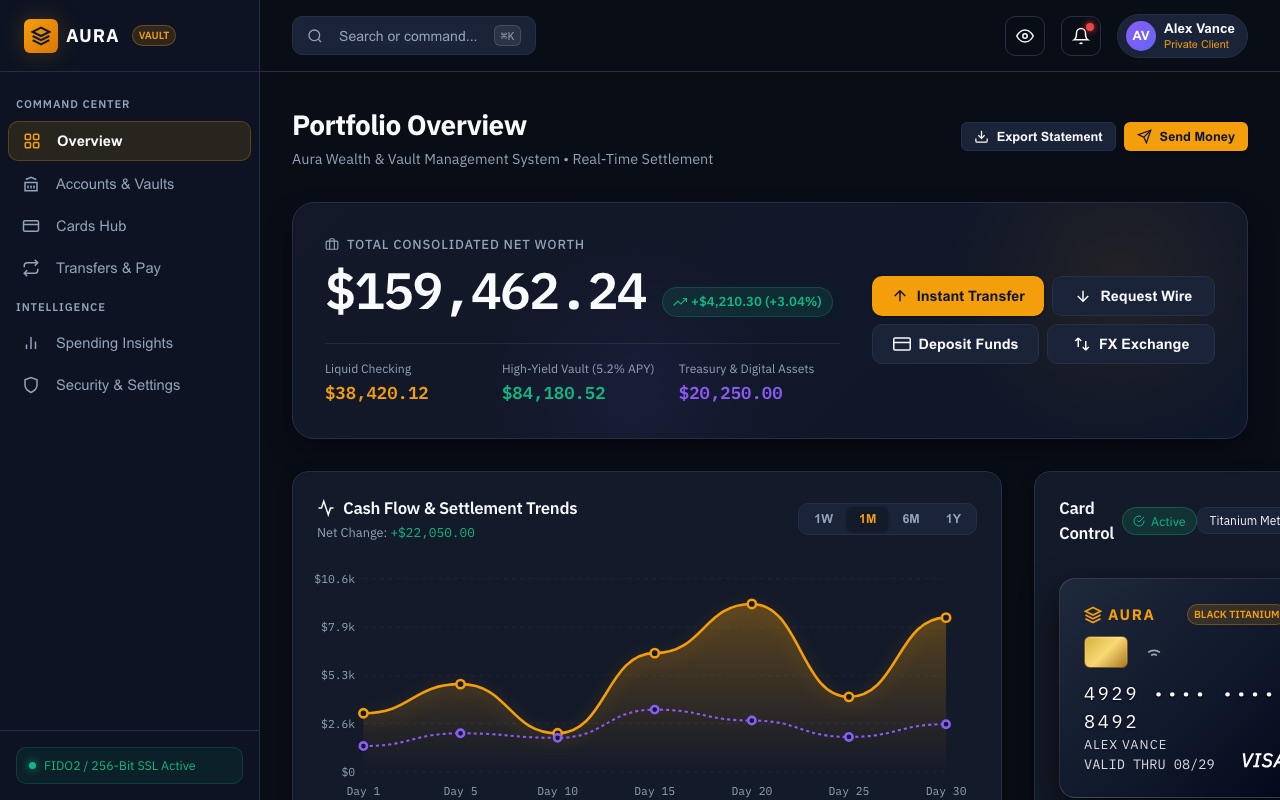
What it looks like in Antigravity 2.0
Works (steps corrected)Installed and worked; three steps on this page did not match what we saw and are fixed below.Run by us on 2026-10-13 · desktop app 2.21.1, Gemini 3.8 Flash (High), macOS
How to get this result, step by step
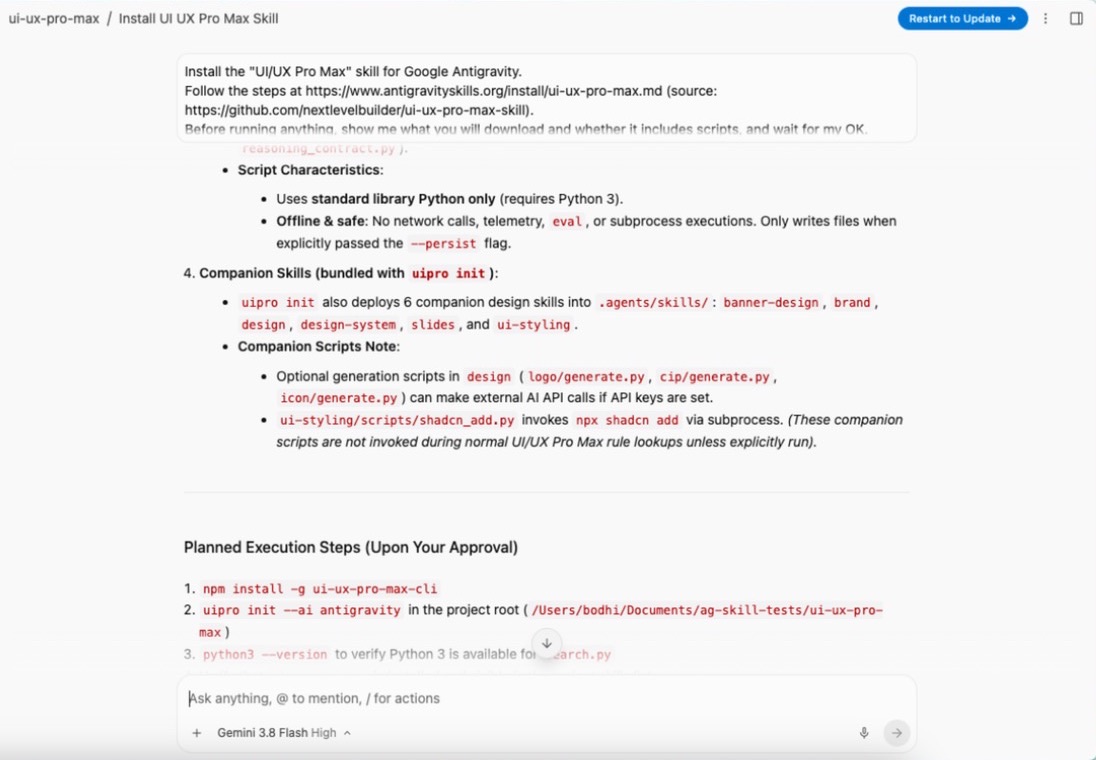
1Open a new conversation in Antigravity, paste the install message into the chat box and press Enter. The agent lists what it will download and waits — reply "OK".
Install the "UI/UX Pro Max" skill for Google Antigravity.
Follow the steps at https://www.antigravityskills.org/install/ui-ux-pro-max.md (source: https://github.com/nextlevelbuilder/ui-ux-pro-max-skill).
Before running anything, show me what you will download and whether it includes scripts, and wait for my OK.
Install it into this project (.agents/skills/) unless I say global. When done, check that Antigravity lists it as an installed skill.
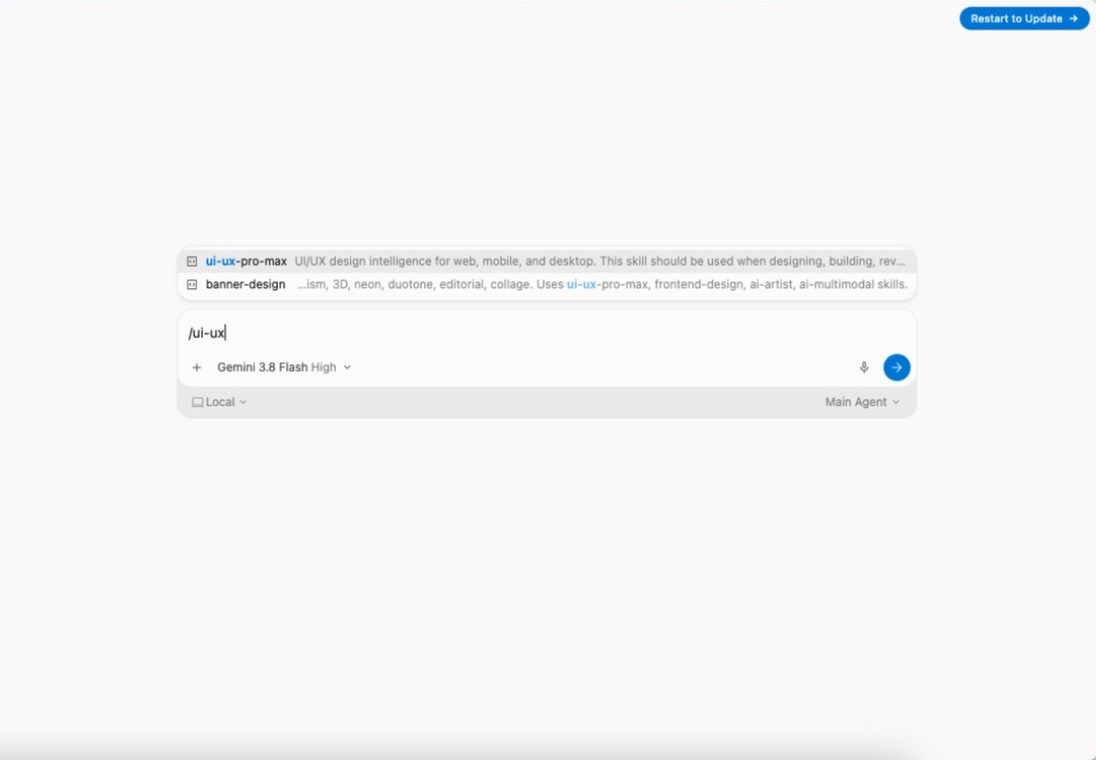
2Check it is installed: in a new conversation type /ui-ux — the skill shows up in the menu.
/ui-ux
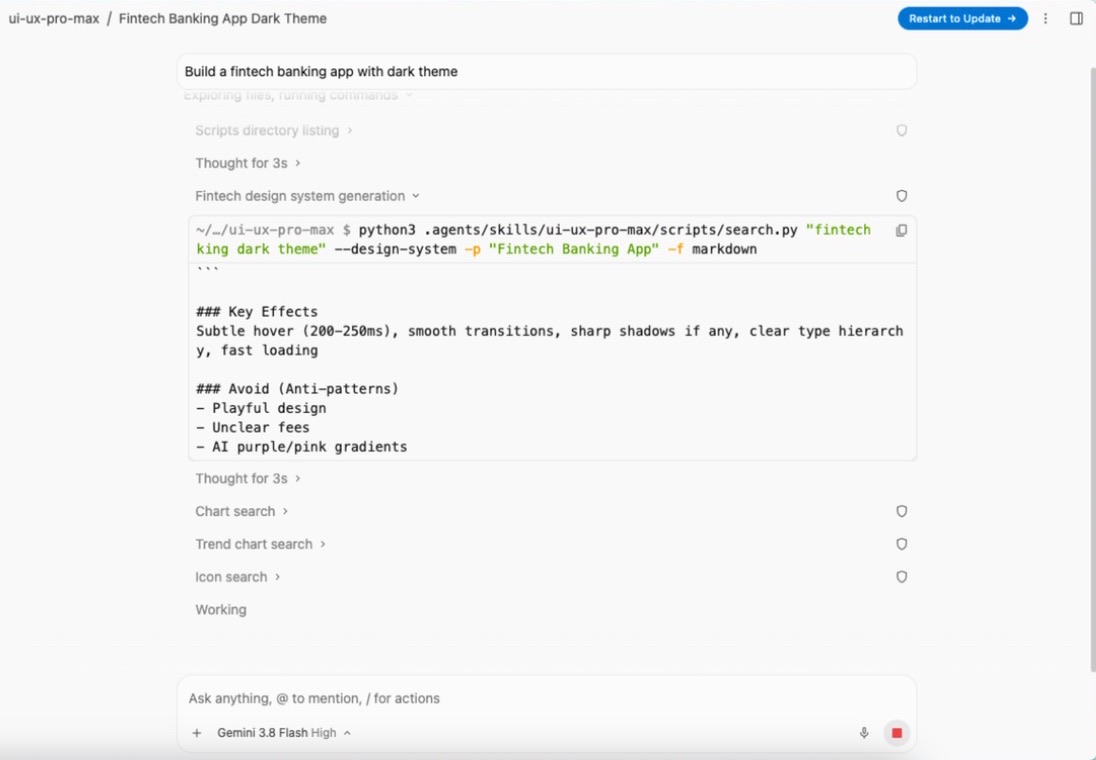
3Ask for a UI in plain words. The agent picks the skill by itself and builds the design system first.
Build a fintech banking app with dark theme
Full test log
Install method: Option 1 (pasted the agent prompt into a new conversation in an empty project folder).
- The agent asked to read antigravityskills.org and raw.githubusercontent.com, then listed what it would download: the npm CLI, the ui-ux-pro-max skill with its Python scripts, and the six companion skills, including the optional scripts that call image APIs or run npx. It waited for our OK.
- It asked for permission to run npm install -g ui-ux-pro-max-cli (version 2.15.0 was installed) and uipro init --ai antigravity, then checked python3 --version.
- uipro init wrote seven folders to .agents/skills/ (4.8 MB): ui-ux-pro-max, banner-design, brand, design, design-system, slides and ui-styling.
- In a new conversation, typing /ui-ux showed ui-ux-pro-max in the skill menu.
- With the README prompt, the agent read ui-ux-pro-max/SKILL.md on its own, ran scripts/search.py with --design-system, saved the result to design-system/aura-banking/MASTER.md (plus pages/dashboard.md) and built index.html, css/styles.css, js/data.js and js/app.js (4,590 added lines in total).
What we corrected on this page
- Pasting the Option 1 prompt opened the app's / menu because the prompt ended in "/skills."; pressing Enter inserted a different skill (android-cli) instead of sending. We changed the prompt so it no longer contains a slash command.
- The app has no /skills command: typing /skills only searches skills and commands by name. The check step now says to ask "What skills do you have?" in the app and use /skills in the CLI.
- This page said uipro init also creates a .shared folder. It did not (uipro 2.15.0, in both the app and the CLI test). Removed.
What it looks like in Antigravity CLI
Works (steps corrected)Installed and worked; the skill only appeared after /skills reload in the open session.Run by us on 2026-10-13 · agy 1.3.4, Gemini 3.8 Flash (High), macOS
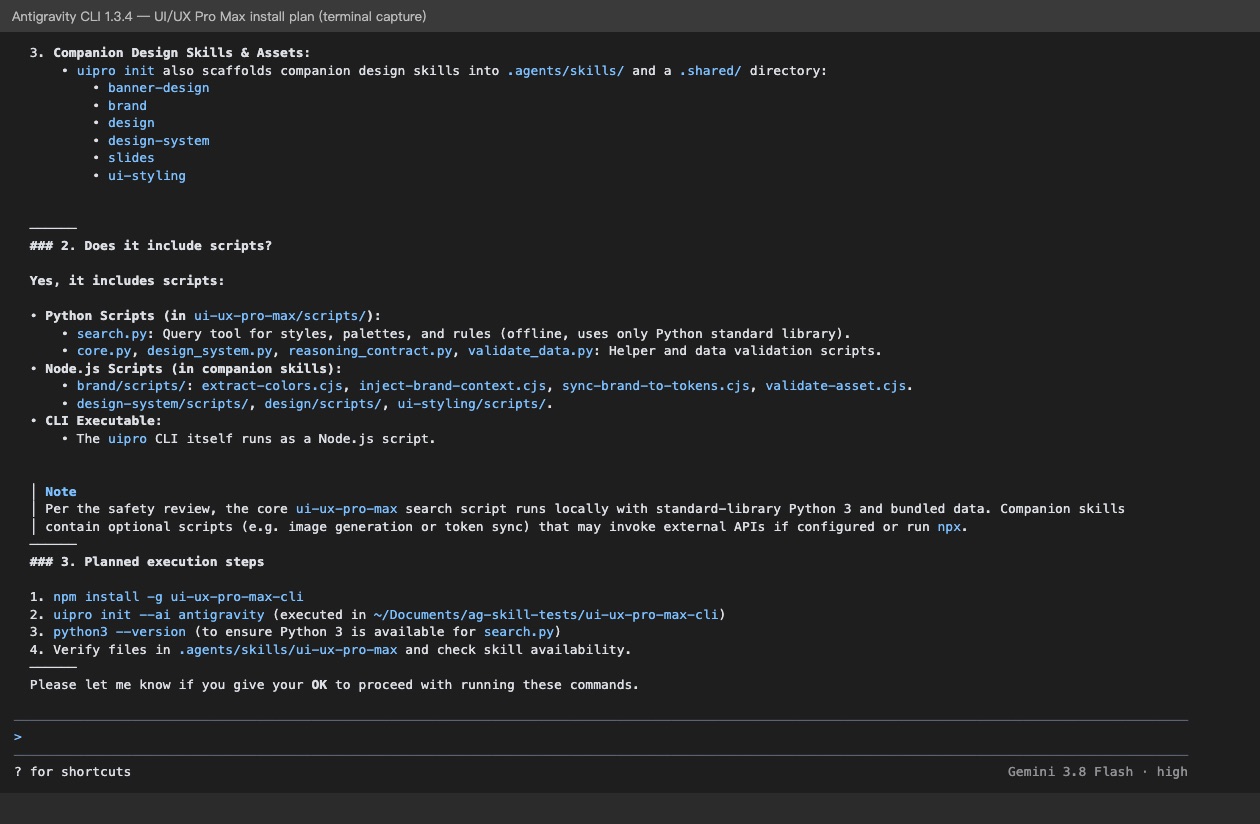
How to get this result, step by step
1In the Antigravity CLI, paste the install message. It lists the downloads and waits for your OK.
Install the "UI/UX Pro Max" skill for Google Antigravity.
Follow the steps at https://www.antigravityskills.org/install/ui-ux-pro-max.md (source: https://github.com/nextlevelbuilder/ui-ux-pro-max-skill).
Before running anything, show me what you will download and whether it includes scripts, and wait for my OK.
Install it into this project (.agents/skills/) unless I say global. When done, check that Antigravity lists it as an installed skill.
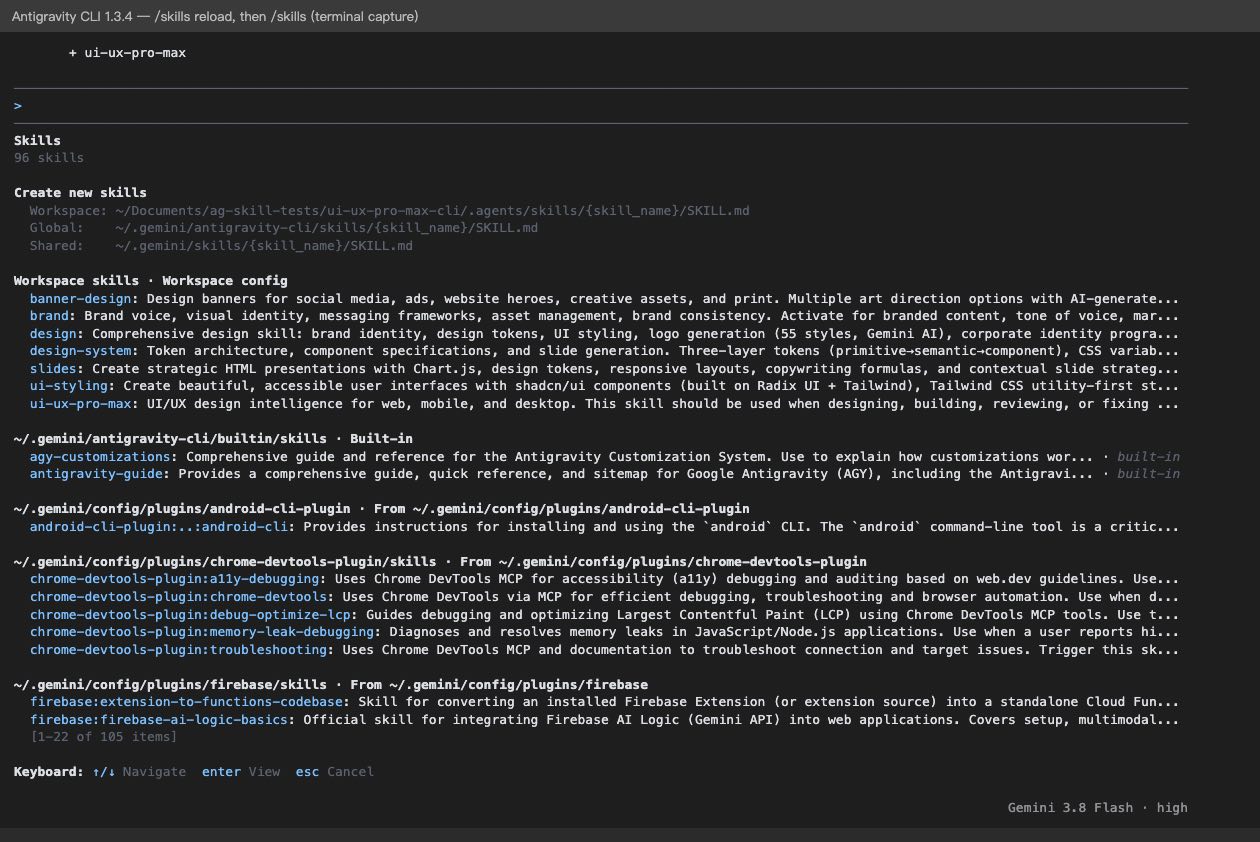
2Reload and list skills to check it is there.
/skills reload
/skills
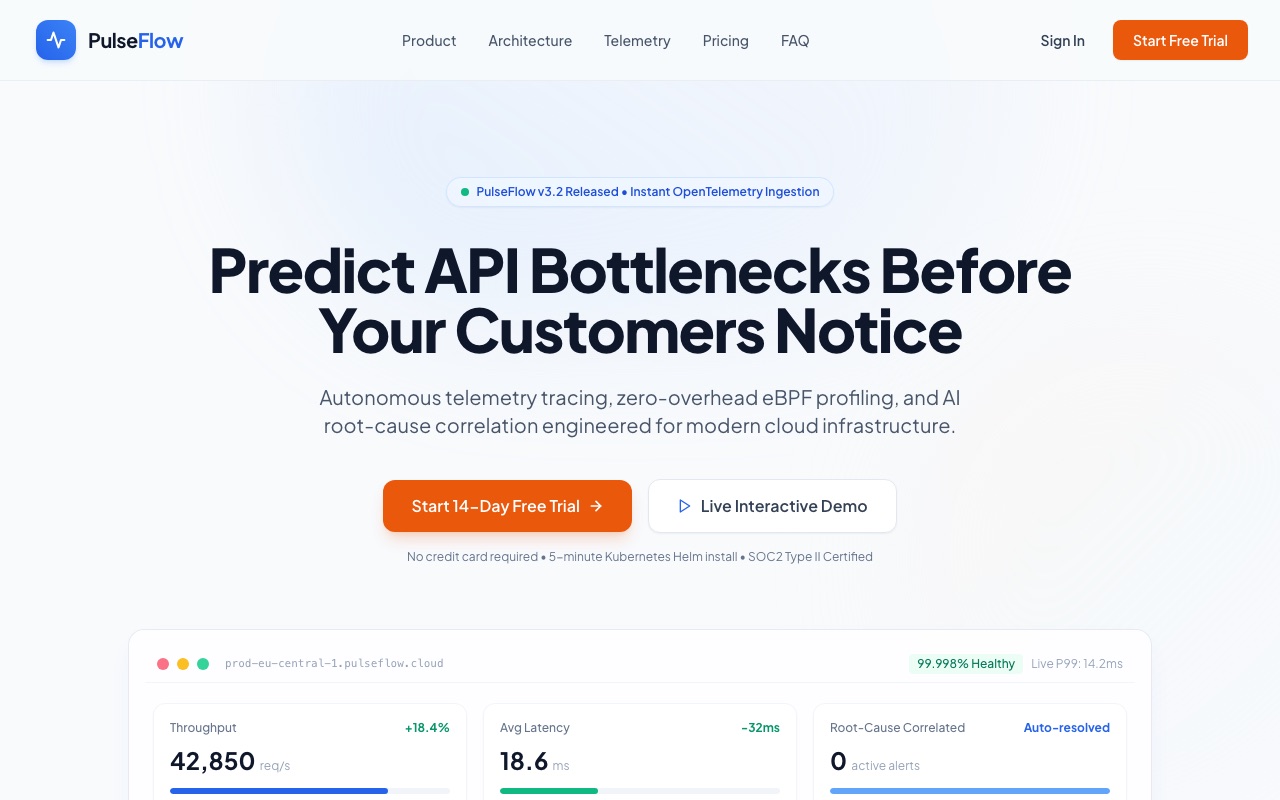
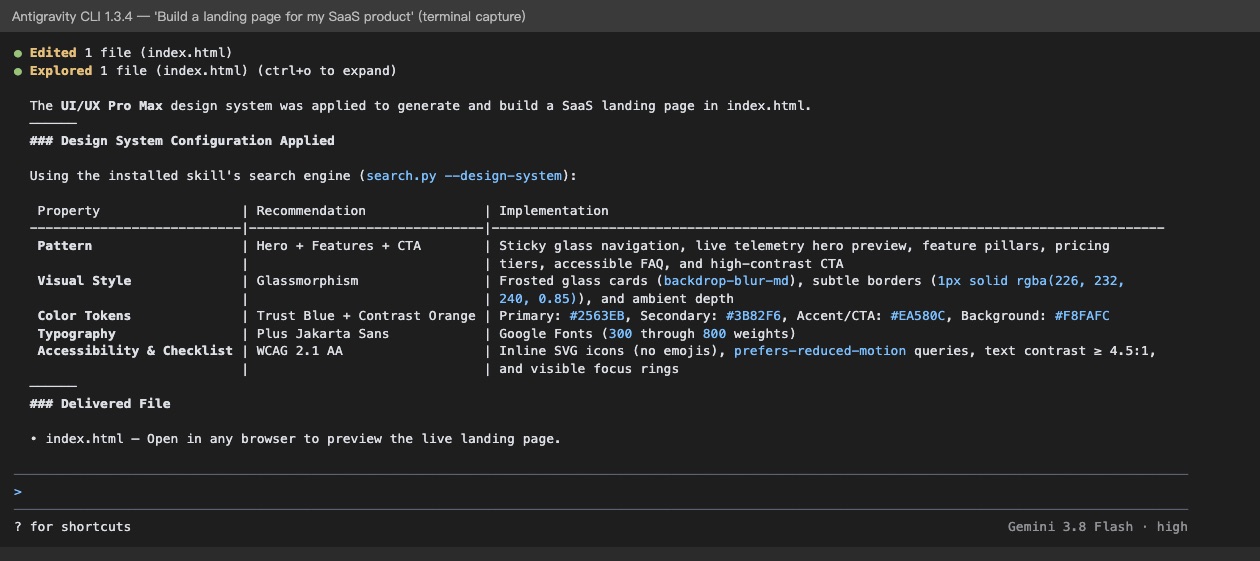
3Ask for a page; the CLI summarises what it built.
Build a landing page for my SaaS product
Full test log
Install method: Option 1 (same prompt, in a fresh empty project folder).
- The CLI asked before each URL it read (antigravityskills.org, raw.githubusercontent.com, registry.npmjs.org, api.github.com), then listed the scripts it would install and waited for OK.
- Each command needed approval: npm install -g ui-ux-pro-max-cli, uipro init --ai antigravity, python3 --version, ls, search.py --help. The same seven skill folders were written to .agents/skills/; again no .shared folder.
- To check the install it tried to start a second agy process (which agy, then agy -p "What skills do you have?"). We declined and ran /skills reload ourselves: "Reloaded 96 skills: 7 added". /skills then listed all seven under Workspace skills.
- With the README prompt it read SKILL.md, ran search.py "saas b2b software platform" --design-system -p "SaaS Landing Page" and asked before creating index.html (33.8 KB, Tailwind via CDN, Plus Jakarta Sans).
What we corrected on this page
- An already-open CLI session does not pick up a newly installed skill; run /skills reload (or start a new session). Added to the check step.
- The /skills screen lists the CLI's own global folders as ~/.gemini/antigravity-cli/skills/ and ~/.gemini/skills/. We only tested the workspace folder .agents/skills/.
Install UI/UX Pro Max in Google Antigravity
Antigravity loads skills from .agents/skills/ in your project or ~/.gemini/config/skills/ for all projects (official docs). Full guide
Install the "UI/UX Pro Max" skill for Google Antigravity.
Follow the steps at https://www.antigravityskills.org/install/ui-ux-pro-max.md (source: https://github.com/nextlevelbuilder/ui-ux-pro-max-skill).
Before running anything, show me what you will download and whether it includes scripts, and wait for my OK.
Install it into this project (.agents/skills/) unless I say global. When done, check that Antigravity lists it as an installed skill.
The agent reads the install file, shows you what it will download and waits for your OK.
Option 2: install it yourself
- 1. Install the UI UX Pro Max CLI
npm install -g ui-ux-pro-max-cli
The README recommends the CLI. The npm package is ui-ux-pro-max-cli and installs the uipro command (older uipro-cli releases are stale).
- 2. Install the skill into your Antigravity project
cd /path/to/your/project && uipro init --ai antigravity
Documented in the README for Antigravity. In our test (uipro 2.15.0, 2026-10-13) it wrote seven folders to .agents/skills/ (the workspace folder Antigravity reads): ui-ux-pro-max plus the six companion skills, 4.8 MB in total.
- 3. Make sure Python 3 is installed
python3 --version
The skill runs scripts/search.py; it needs Python 3 and only the standard library.
- 4. Check that Antigravity sees it
Antigravity 2.0 app: start a new conversation and ask "What skills do you have?" (the app has no /skills command; typing / and the skill name also finds it, sometimes only after your first message). Antigravity CLI: run /skills; in a session that was already open, run /skills reload first. Then ask for UI work, for example the README prompt "Build a fintech banking app with dark theme".
The README documents --global only for claude, cursor, zcode and universal (~/.agents/skills/), not for antigravity, so use the per-project install above. Without npm you can copy .claude/skills/ui-ux-pro-max from the repository into .agents/skills/ yourself; that folder is the one the plugin manifest points to. Note: uipro init also installs six companion skills (see the safety review below).
Using Claude Code, Cursor or Codex? See other assistants below.
What is UI/UX Pro Max?
How to use UI/UX Pro Max?
Key features of UI/UX Pro Max
- ✓Design system generator (search.py --design-system) that outputs pattern, style, colors, typography, effects, anti-patterns and a pre-delivery checklist in ASCII, Markdown or JSON
- ✓Domain search across product, style, color, typography, google-fonts, landing, chart, ux, icons, gsap, react and web datasets
- ✓Stack-specific guideline CSVs for 22 stacks, including React, Next.js, Vue, Svelte, SwiftUI, Flutter, Jetpack Compose, Laravel, WPF and Avalonia
- ✓Optional --variance, --motion and --density dials (1-10) that bias style choice, attach a GSAP snippet, and change spacing tokens
- ✓--persist mode that saves MASTER.md and page override files, skipping existing files unless --force is passed
- ✓Installer CLI (ui-ux-pro-max-cli, command uipro) that generates the skill folder for 20+ assistants from bundled templates
What is inside the UI/UX Pro Max skill folder
Folder listing read from the upstream repository at commit 477bcb2 (the commit of our safety review; the skill folder is unchanged on upstream main as of 2026-10-26). 73 files, about 3.6 MB in total. uipro init copies this folder into .agents/skills/ui-ux-pro-max/ (Antigravity), .cursor/skills/ui-ux-pro-max/ (Cursor) or .claude/skills/ui-ux-pro-max/ (Claude Code), next to six companion skills.
- SKILL.md
- The instructions the agent loads: when to apply the skill, rule categories by priority, and how to call the search script.
- scripts/search.py
- Command-line entry point: --design-system, --domain, --stack, --persist, --json.
- scripts/core.py
- Loads the CSV files and ranks results with BM25 plus regex matching.
- scripts/design_system.py
- Combines product, style, color, landing-pattern and typography matches into one recommended design system; writes MASTER.md only with --persist.
- scripts/reasoning_contract.py
- Reads the decision rules from ui-reasoning.csv.
- scripts/validate_data.py and scripts/tests/
- Maintainer tools: a data-integrity check and 13 test files with fixtures. A search does not need them.
- data/ (17 CSV/JSON files)
- styles.csv, products.csv, colors.csv, typography.csv, google-fonts.csv, ux-guidelines.csv, landing.csv, charts.csv, icons.csv, motion.csv, ui-reasoning.csv, app-interface.csv, react-performance.csv, plus catalog-summary.json, data-provenance.json, google-font-licenses.json and phosphor-icons-upstream.json.
- data/stacks/ (22 CSV files)
- One guideline file per stack: angular, astro, avalonia, flutter, html-tailwind, javafx, jetpack-compose, laravel, nextjs, nuxt-ui, nuxtjs, react-native, react, shadcn, svelte, swiftui, threejs, uno, uwp, vue, winui, wpf.
- references/
- quick-reference.md (full rule text per category, read on demand) and pro-rules.md (pre-delivery checklist, scoped to native/mobile app UI).
When to use UI/UX Pro Max
- 1Building a landing page for a SaaS product
- 2Creating a dashboard for healthcare analytics
- 3Designing a portfolio website with dark mode
- 4Making a mobile app UI for e-commerce
- 5Reviewing or fixing existing UI for accessibility, text-layout and interaction issues
Installation & Setup Guide
Agent Rules / Prompt SetupFollow these steps (taken from the project's own docs) to configure UI/UX Pro Max in your development environment.
/plugin marketplace add nextlevelbuilder/ui-ux-pro-max-skill
Run this inside Claude Code to register the plugin marketplace.
/plugin install ui-ux-pro-max@ui-ux-pro-max-skill
Installs the plugin from the marketplace added in step 1.
npm install -g ui-ux-pro-max-cli
The README calls the CLI the recommended method. The npm package is ui-ux-pro-max-cli and it installs the uipro command; the README says older uipro-cli releases are stale.
uipro init --ai claude
Run from your project root. Replace claude with cursor, windsurf, antigravity, copilot, kiro, codex, qoder, roocode, gemini, trae, opencode, continue, codebuddy, droid, kilocode, warp, augment, codewhale, zcode, universal, or all.
uipro init --ai claude --global
Installs to ~/.claude/skills/ so the skill is available in all projects (the README also lists --global for cursor, zcode and universal).
npx ui-ux-pro-max-cli init --ai claude
Documented in the README troubleshooting section for when a global npm install fails with a permission error.
python3 --version
The search scripts require Python 3.x (standard library only). Install it yourself if missing; the README says agents are instructed not to install software for you.
Install UI/UX Pro Max in Claude Code, Cursor, Codex and OpenCode
uipro 2.15.0 wrote seven skill folders, not one: banner-design, brand, design, design-system, slides, ui-styling and ui-ux-pro-max. Delete the six companions if you only want UI UX Pro Max. The search script needs Python 3.
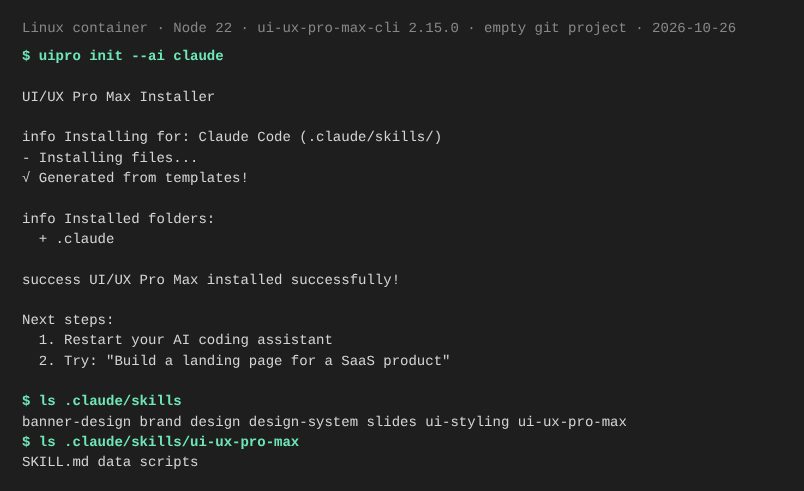
Install in Claude Code
Tested 2026-10-26 · Linux container, Node 22, ui-ux-pro-max-cli 2.15.0 (installed with npm into a local folder rather than -g), empty git project · checked: installer + Claude Code CLI lists the skills
npm install -g ui-ux-pro-max-cli
uipro init --ai claude
The installer exited without errors and created .claude/skills/ (172 files, 4.7 MB). Inside .claude/skills/ui-ux-pro-max/ are SKILL.md, data/ and scripts/. We then started Claude Code (CLI 2.1.310) in that project and asked it to list its skills; it named all seven installed folders. For all projects the README documents uipro init --ai claude --global (~/.claude/skills/) and a plugin route (/plugin marketplace add nextlevelbuilder/ui-ux-pro-max-skill, then /plugin install ui-ux-pro-max@ui-ux-pro-max-skill); we did not test those two.
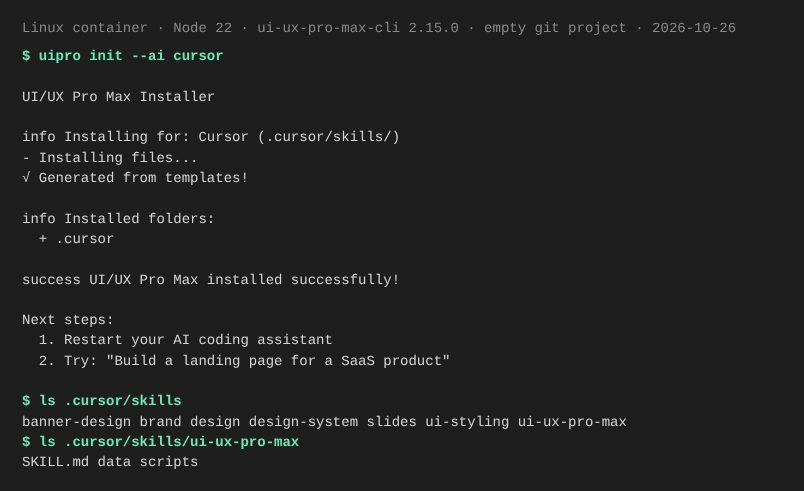
Install in Cursor
Tested 2026-10-26 · Linux container, Node 22, ui-ux-pro-max-cli 2.15.0 (installed with npm into a local folder rather than -g), empty git project · checked: installer only
npm install -g ui-ux-pro-max-cli
uipro init --ai cursor
The installer exited without errors and created .cursor/skills/ (172 files, 4.7 MB). Inside .cursor/skills/ui-ux-pro-max/ are SKILL.md, data/ and scripts/. We could not open Cursor in this environment, so this confirms what the installer writes, not that Cursor loads it. The README documents --global for Cursor (~/.cursor/skills/).
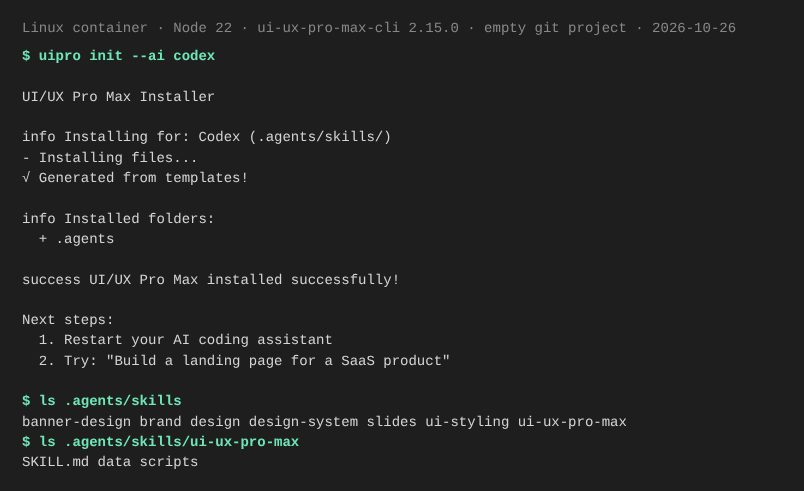
Install in Codex
Tested 2026-10-26 · Linux container, Node 22, ui-ux-pro-max-cli 2.15.0 (installed with npm into a local folder rather than -g), empty git project · checked: installer only
npm install -g ui-ux-pro-max-cli
uipro init --ai codex
The installer exited without errors and created .agents/skills/ (172 files, 4.6 MB). Inside .agents/skills/ui-ux-pro-max/ are SKILL.md, data/ and scripts/. This is the same .agents/skills/ folder Antigravity reads, so one install serves both. We did not open Codex itself; this confirms what the installer writes.
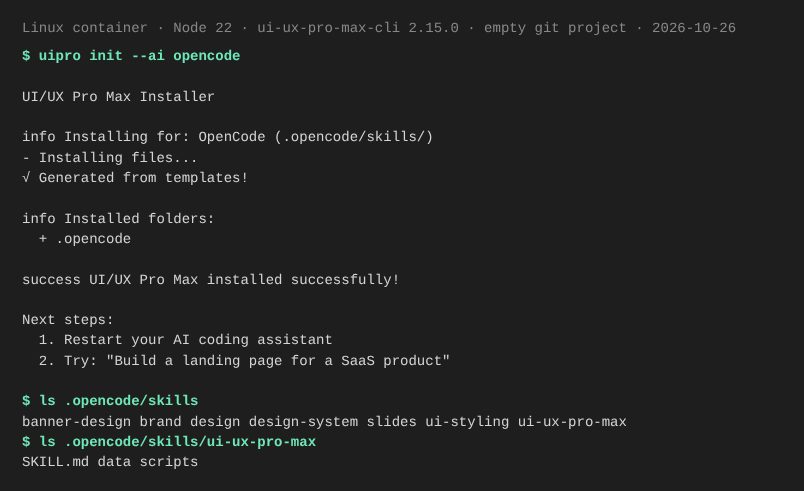
Install in OpenCode
Tested 2026-10-26 · Linux container, Node 22, ui-ux-pro-max-cli 2.15.0 (installed with npm into a local folder rather than -g), empty git project · checked: installer only
npm install -g ui-ux-pro-max-cli
uipro init --ai opencode
The installer exited without errors and created .opencode/skills/ (172 files, 4.6 MB). Inside .opencode/skills/ui-ux-pro-max/ are SKILL.md, data/ and scripts/. We did not open OpenCode itself; this confirms what the installer writes.
Usage Example & Verification
"Build a fintech banking app with dark theme" (quoted from the Example Prompts section of the README).
Ask the assistant: "What color palettes and typography scales do you recommend for a B2B SaaS dashboard under UI/UX Pro Max rules?" The assistant should reference the structured design token guidelines rather than giving arbitrary suggestions.
Security Review
Static reviewThe core UI/UX Pro Max search scripts are offline, standard-library Python that only read bundled data and write files on explicit --persist, but the plugin and CLI also install companion design skills whose optional scripts call external AI image APIs with your keys or run npx.
Full review: scope, findings, risks
The skill the agent loads is .claude/skills/ui-ux-pro-max/SKILL.md, which runs scripts/search.py; that script and its modules core.py, design_system.py and reasoning_contract.py import only standard-library modules (csv, json, re, pathlib, argparse and similar) and contain no network, subprocess, eval or exec calls. File writes happen only with --persist, in design_system.py, which writes under design-system/ in --output-dir or the current working directory, uses safe_slug() to block path traversal, and refuses to overwrite MASTER.md or page files without --force. The npm CLI (cli/package.json) has no postinstall script; its only lifecycle script is prepublishOnly, and its runtime dependencies are chalk, commander, ora and prompts. The default uipro init (cli/src/commands/init.ts) installs from bundled assets; network access to api.github.com happens only for --legacy installs, uipro versions and uipro update (cli/src/utils/github.ts), which send UI_PRO_MAX_GITHUB_TOKEN or GITHUB_TOKEN as a bearer token if set, and uipro update may run npm install -g automatically (cli/src/commands/update.ts). Both the Claude Code plugin (.claude-plugin/plugin.json) and the CLI (copySubSkills in cli/src/utils/template.ts) also install the companion skills banner-design, brand, design, design-system, slides and ui-styling. Of these, .claude/skills/design/scripts/logo/generate.py loads .env files from the skills folder and ~/.claude and calls Gemini, api.atlascloud.ai or api.muapi.ai with your API keys; cip/generate.py and icon/generate.py call Gemini through google-genai; and ui-styling/scripts/shadcn_add.py runs npx shadcn via subprocess. No telemetry or analytics code was found in cli/src or the skill scripts. The GitHub release workflow (.github/workflows/release.yml) publishes to npm with an NPM_TOKEN secret, and refresh-catalogs.yml runs with read-only repository permissions.
Operational Notes & Known Limitations
Known Limitations
- •Requires Python 3.x on the machine to run scripts/search.py; the skill does not install Python for you.
- •Recommendations come only from the bundled CSV data; the SKILL.md tells the agent to retry once and then say no verified match was found rather than invent results.
- •Human-readable output truncates long fields at 300 characters; use --json for full data (per the README troubleshooting section).
- •The README states that brand identity, logo, CIP, banner, slide and icon asset generation with AI image models are part of a separate Premium version; the open-source core skill only produces text guidance and design-system files.
- •The full GitHub repository ZIP exceeds Claude.ai's 200-file skill upload limit, and the project does not publish a separate manual-upload ZIP for Claude.ai.
Frequently Asked Questions
Is the UI/UX Pro Max skill safe?
In our static review of commit 477bcb2, the core ui-ux-pro-max scripts (search.py, core.py, design_system.py, reasoning_contract.py) use only the Python standard library, read local CSV/JSON files, make no network calls and run no subprocesses; the only file writes happen when you pass --persist, into a design-system/ folder with a sanitized folder name. Be aware that the Claude Code plugin and the CLI also install six companion skills, and some of their optional scripts call external image-generation APIs with your API keys or run npx shadcn.
How do I install the UI UX Pro Max skill in Antigravity?
Install the CLI with npm install -g ui-ux-pro-max-cli, then run uipro init --ai antigravity from your project root. The CLI puts the skill in .agents/skills/ui-ux-pro-max/, which is the workspace skills folder Google Antigravity reads. Start a new conversation and ask "What skills do you have?" (Antigravity CLI: /skills) to check that it is listed. You need Python 3 for the search scripts.
How do I install UI UX Pro Max in Cursor?
From your project root run uipro init --ai cursor (after npm install -g ui-ux-pro-max-cli). To make it available in every project, the README documents uipro init --ai cursor --global, which installs to ~/.cursor/skills/. To remove it later, delete .cursor/skills/ui-ux-pro-max or run uipro uninstall.
How do I install UI UX Pro Max in Claude Code?
Run /plugin marketplace add nextlevelbuilder/ui-ux-pro-max-skill and then /plugin install ui-ux-pro-max@ui-ux-pro-max-skill inside Claude Code. Alternatively, install the CLI with npm install -g ui-ux-pro-max-cli and run uipro init --ai claude in your project, or uipro init --ai claude --global to install to ~/.claude/skills/.
Does UI UX Pro Max work with Cursor/Codex/other assistants?
Yes, according to the README the CLI installs it for Cursor, Windsurf, Antigravity, GitHub Copilot, Kiro, Codex CLI, Qoder, Roo Code, Gemini CLI, Trae, OpenCode, Continue, CodeBuddy, Droid (Factory), KiloCode, Warp, Augment, CodeWhale, ZCode and a universal .agents/skills/ layout. Kiro, GitHub Copilot, Roo Code and KiloCode use the /ui-ux-pro-max slash command; Trae needs SOLO mode.
Can I run the design system generator without an AI assistant?
Yes. The README documents running it directly, for example python3 .claude/skills/ui-ux-pro-max/scripts/search.py "beauty spa wellness" --design-system -p "Serenity Spa", with -f markdown for Markdown output and --domain or --stack for focused searches.
How do I remove UI UX Pro Max?
Run uipro uninstall from the project root (auto-detects the platform), uipro uninstall --ai claude for a specific platform, or uipro uninstall --global for a global install. The README also lists manual removal, such as rm -rf .claude/skills/ui-ux-pro-max.
UI UX Pro Max vs the frontend design skill: which should I use?
They do different jobs. UI UX Pro Max ships a searchable local database (79 UI styles, 192 color palettes, 74 font pairings, 119 UX guidelines, counted from its data files) plus Python scripts that pick a design system for your product. Anthropic's frontend-design skill is a single SKILL.md of design instructions with no data or scripts. Many people use UI UX Pro Max to choose the style and tokens, and a frontend skill to build the UI.
Supported Platforms
Keep exploring this topic
Browse the full Antigravity skills directory for more source-linked skills with install steps and static safety reviews.
Related Skills
Impeccable
@pbakaus
Paul Bakaus's Impeccable design skill: one /impeccable skill with 24 design commands, live browser iteration and a 59-rule detector for AI-generated frontend patterns.
Frontend Design (Anthropic)
@anthropics
Anthropic's official frontend-design skill: guidance for distinctive, intentional UI design, typography and copy that avoids templated AI defaults.
Canvas Design
@anthropics
Anthropic's official canvas-design skill: turns a poster or art request into a written design philosophy, then a one-page PNG or PDF, with 29 bundled font families.
Popular Skills
View All →Agent Manager
@sickn33
Manage multiple local CLI agents via tmux sessions.
Systematic Debugging
@sickn33
Debug systematically, not randomly. Find and fix bugs methodically.
Browser Automation (Playwright)
@sickn33
Expert browser automation for cleaning scraping and reliable testing.