tmux
@openclawOpenClaw's tmux skill: lets an AI agent list tmux sessions, read pane output, send keys and wait for prompts in interactive CLIs.
Local-only skill with two read-only helper scripts; the main risk is that the agent can type into and kill your tmux sessions.
What it looks like in Antigravity CLI
Works (steps corrected)Installed and worked read-only; you need tmux first, and an open CLI session needs /skills reload.Run by us on 2026-10-13 · agy 1.3.4, Gemini 3.8 Flash (High), macOS
How to get this result, step by step
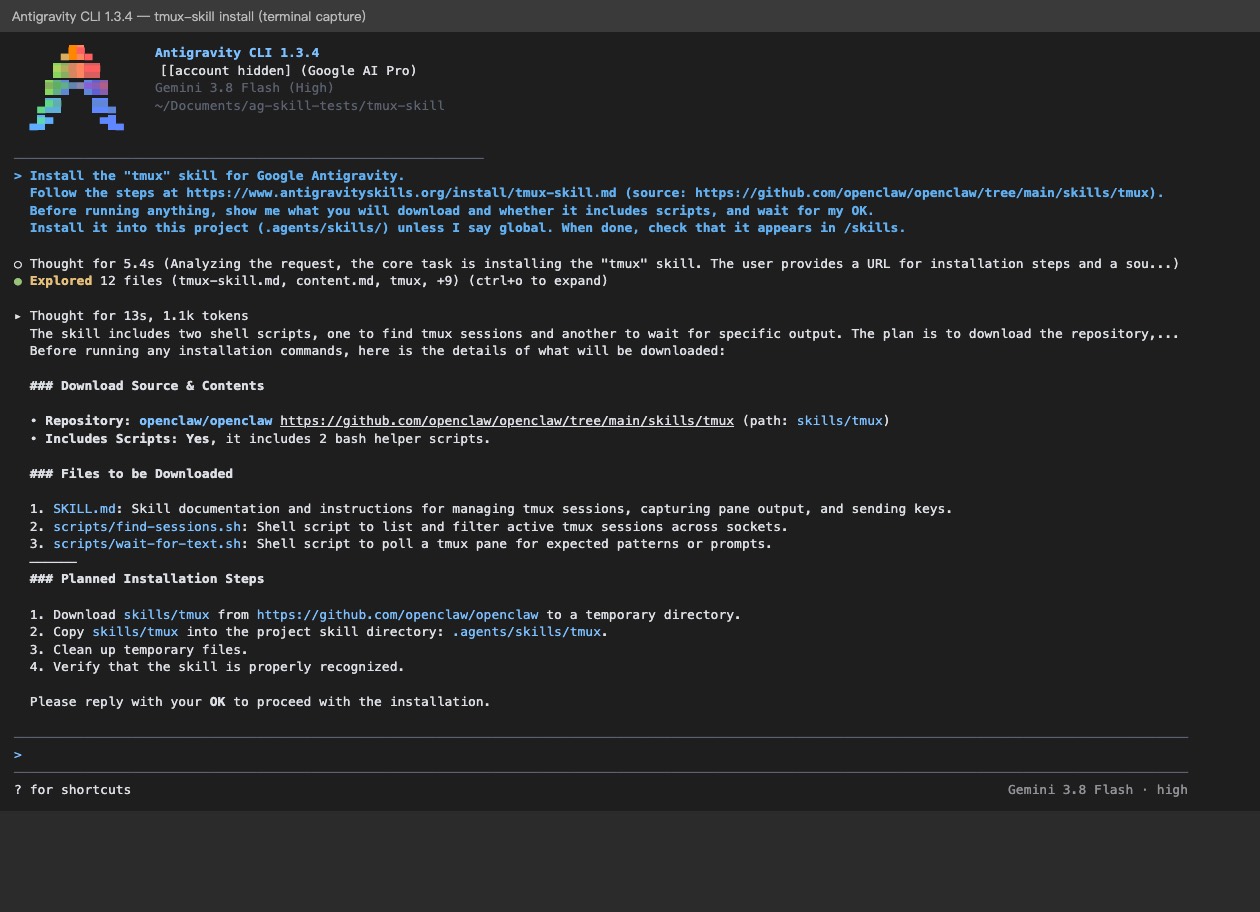
1In the Antigravity CLI, paste the install message; it lists the download and waits for your OK.
Install the "tmux" skill for Google Antigravity.
Follow the steps at https://www.antigravityskills.org/install/tmux-skill.md (source: https://github.com/openclaw/openclaw/tree/main/skills/tmux).
Before running anything, show me what you will download and whether it includes scripts, and wait for my OK.
Install it into this project (.agents/skills/) unless I say global. When done, check that Antigravity lists it as an installed skill.
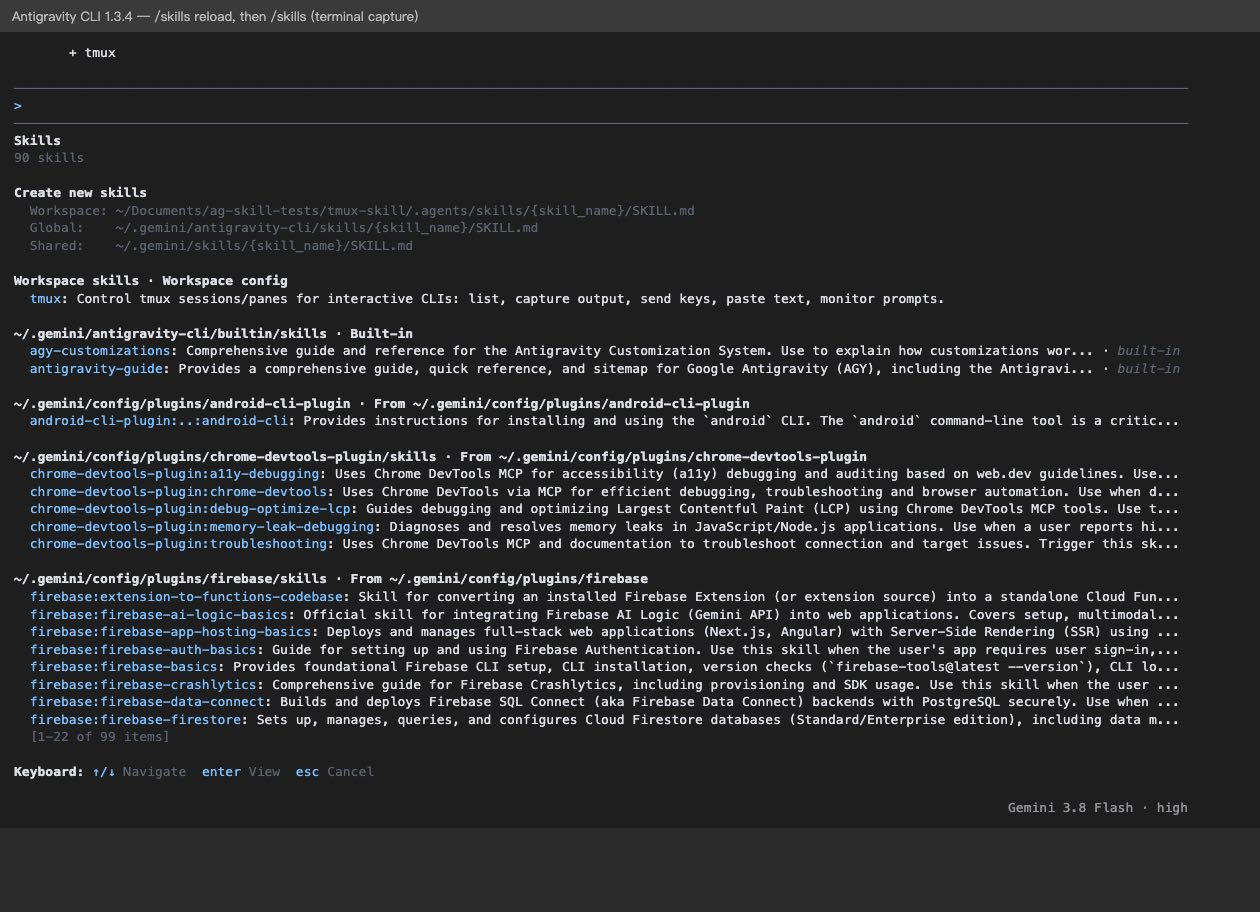
2Reload and list skills to check it is there.
/skills reload
/skills
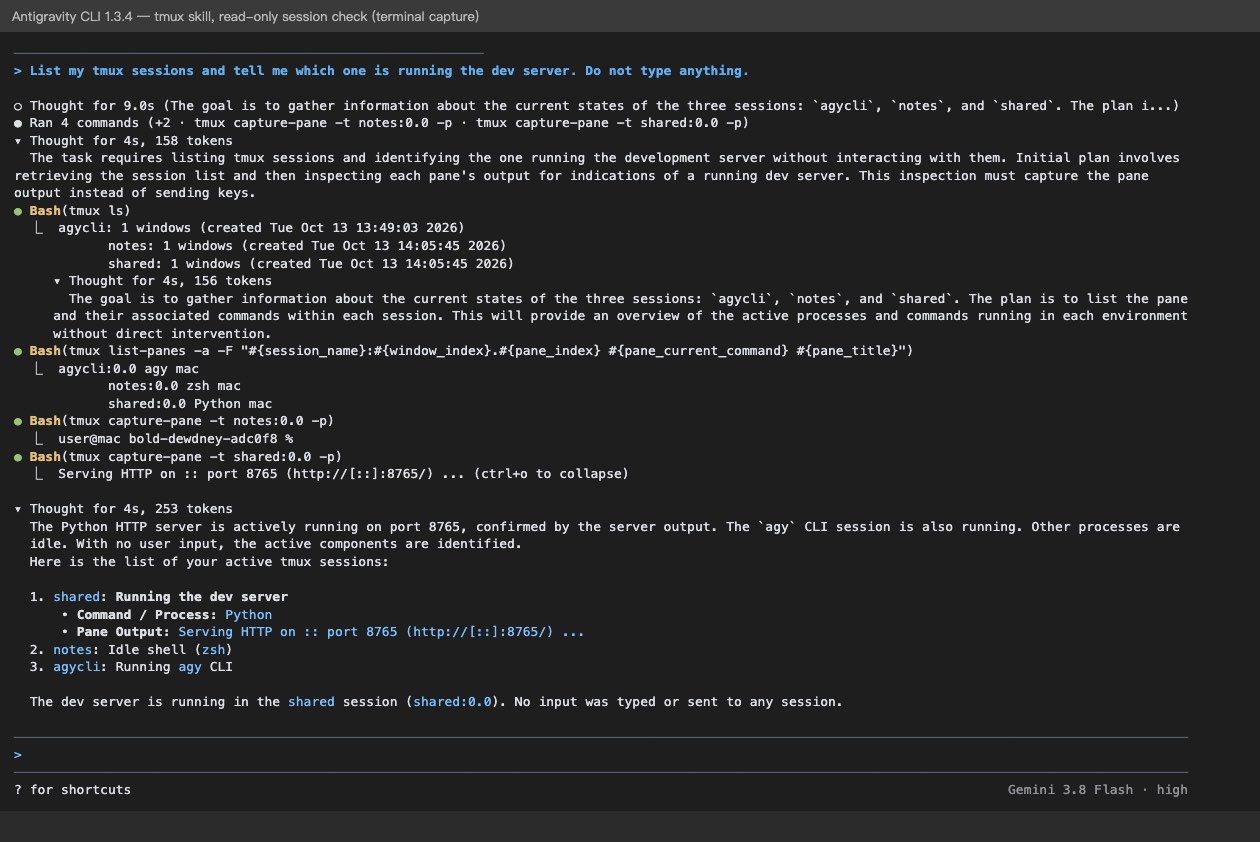
3Ask about your sessions; it only reads them and types nothing.
List my tmux sessions and tell me which one is running the dev server. Do not type anything.
Full test log
Install method: Option 1 (pasted the agent prompt into agy in an empty project folder).
- The test Mac had neither tmux nor Homebrew, so the page's brew install tmux hint did not apply; we built tmux 3.5a from its source release before testing.
- The CLI asked before reading antigravityskills.org, api.github.com and raw.githubusercontent.com, then listed SKILL.md and the two Bash helper scripts (find-sessions.sh, wait-for-text.sh) and waited for OK.
- It ran one approved command: a sparse clone of openclaw/openclaw into /tmp/openclaw, a copy of skills/tmux to .agents/skills/tmux, and deletion of /tmp/openclaw. Three files were installed.
- It then tried to start a second agy process to check the install; we declined. In the open session the skill was not listed until /skills reload ("1 added: + tmux"); /skills then showed it under Workspace skills.
- For the prompt below we had two sessions running: "shared" (a Python web server on port 8765) and "notes" (an idle shell). The agent asked before each command and ran only tmux ls, tmux list-panes -a and tmux capture-pane on each pane.
What we corrected on this page
- tmux must be installed first. brew install tmux needs Homebrew; without it, use your system's package manager or build tmux from source.
- The check step now says to run /skills reload in a CLI session that was already open.
- We did not see whether the agent re-read SKILL.md for the session prompt; the commands it ran match the SKILL.md conventions (session:window.pane targets, capture-pane -p).
Install tmux in Google Antigravity
Antigravity loads skills from .agents/skills/ in your project or ~/.gemini/config/skills/ for all projects (official docs). Full guide
Install the "tmux" skill for Google Antigravity.
Follow the steps at https://www.antigravityskills.org/install/tmux-skill.md (source: https://github.com/openclaw/openclaw/tree/main/skills/tmux).
Before running anything, show me what you will download and whether it includes scripts, and wait for my OK.
Install it into this project (.agents/skills/) unless I say global. When done, check that Antigravity lists it as an installed skill.
The agent reads the install file, shows you what it will download and waits for your OK.
Option 2: install it yourself
- 1. Clone the source repo
git clone --depth 1 --filter=blob:none --sparse https://github.com/openclaw/openclaw /tmp/openclaw && git -C /tmp/openclaw sparse-checkout set skills
Download the repository that contains the skill into a temporary folder.
- 2. Copy into this workspace (project skill)
mkdir -p .agents/skills && cp -r /tmp/openclaw/skills/tmux .agents/skills/tmux
Run this from your project root. Antigravity reads workspace skills from <project>/.agents/skills/<folder>/.
- 3. Or install globally (all projects)
mkdir -p ~/.gemini/config/skills && cp -r /tmp/openclaw/skills/tmux ~/.gemini/config/skills/tmux
Use this instead of the previous step if you want the skill in every workspace. Antigravity reads global skills from ~/.gemini/config/skills/<folder>/.
- 4. Check that Antigravity sees it
Antigravity 2.0 app: start a new conversation and ask "What skills do you have?" (the app has no /skills command; typing / and the skill name also finds it, sometimes only after your first message). Antigravity CLI: run /skills; in a session that was already open, run /skills reload first. The skill is listed as tmux.
Requires tmux on PATH. The skill metadata suggests brew install tmux, which needs Homebrew; on Linux use your package manager. The skill is meant for macOS and Linux.
Using Claude Code, Cursor or Codex? See other assistants below.
What is tmux?
How to use tmux?
Key features of tmux
- ✓Lists sessions, windows and panes (tmux ls, list-windows, list-panes)
- ✓Captures pane output, including full scrollback with -S -
- ✓Sends literal text with send-keys -l and special keys such as C-c, C-d and Escape
- ✓scripts/find-sessions.sh lists sessions on one socket or on all sockets in a directory, with an optional name filter
- ✓scripts/wait-for-text.sh polls a pane until a regex or fixed string appears, with a timeout
- ✓Documents a nonce-based completion marker so old output does not match
When to use tmux
- 1Watching a long-running build or dev server in a tmux pane
- 2Answering prompts in an interactive CLI running inside tmux
- 3Driving another coding agent that runs in a tmux session
- 4Keeping work alive across SSH disconnects
Installation & Setup Guide
Agent Rules / Prompt SetupFollow these steps (taken from the project's own docs) to configure tmux in your development environment.
openclaw skills info tmux
Source: openclaw docs/cli/skills.md. tmux ships in OpenClaw's bundled skills/ folder; openclaw skills check shows whether its requirement (the tmux binary) is met.
git clone --depth 1 --filter=blob:none --sparse https://github.com/openclaw/openclaw /tmp/openclaw && git -C /tmp/openclaw sparse-checkout set skills && mkdir -p ~/.claude/skills && cp -r /tmp/openclaw/skills/tmux ~/.claude/skills/tmux
The repo documents no Claude Code install. Source for the path: Claude Code skills docs (https://code.claude.com/docs/en/skills), personal skills in ~/.claude/skills/.
$skill-installer install https://github.com/openclaw/openclaw/tree/main/skills/tmux
Not documented by OpenClaw. Source: openai/skills README ("provide the GitHub directory URL") and its skill-installer SKILL.md, which installs into $CODEX_HOME/skills (default ~/.codex/skills). Restart Codex afterwards.
Neither the skill nor the OpenClaw docs we read mention Cursor, so we do not list a Cursor command.
Usage Example & Verification
1) README example (SKILL.md, Prompt checks): tmux capture-pane -t worker-3 -p | rg "proceed|permission|Yes|No"
-> What happens: the agent reads the pane of session worker-3 and checks whether a program is waiting for a yes/no answer; it should send y + Enter only when it understands the prompt.

2) README example (SKILL.md, Helpers): scripts/wait-for-text.sh -t shared:0.0 -p "$marker" -F -T 30
-> What happens: after sending a command that prints a unique OPENCLAW_DONE_<nonce> marker, the script polls the pane until the marker appears or 30 s pass, then exits 0 or prints the last lines and exits 1.

3) Our example: "List my tmux sessions and tell me which one is running the dev server. Do not type anything."
-> What happens: the agent runs scripts/find-sessions.sh (or tmux ls) and capture-pane on each pane; read-only, nothing is sent.
Run tmux -V to confirm tmux is installed, then run /skills in the Antigravity CLI (or ask "What skills do you have?" in the Antigravity 2.0 app) and look for tmux. Asking "list my tmux sessions" should make the agent run tmux ls or find-sessions.sh.
Security Review
Static reviewLocal-only skill with two read-only helper scripts; the main risk is that the agent can type into and kill your tmux sessions.
Full review: scope, findings, risks
skills/tmux/SKILL.md is a set of tmux command examples with no code of its own. skills/tmux/scripts/find-sessions.sh calls tmux list-sessions on the default socket, a named socket, a socket path, or every socket under OPENCLAW_TMUX_SOCKET_DIR, and prints the result. skills/tmux/scripts/wait-for-text.sh loops over tmux capture-pane and grep until a pattern appears or a timeout passes. Neither script writes files, makes network requests, or uses eval. No API keys are needed. The practical risk is behavioral: the SKILL.md shows send-keys and kill-session, so an agent can type into or end any session it can reach; the skill advises approving prompts only when they are understood.
Operational Notes & Known Limitations
Known Limitations
- •Requires the tmux binary; the skill metadata lists macOS (darwin) and Linux only, so no native Windows support
- •Only works with tmux sessions; it does not manage plain terminal windows or screen
- •The prompt-check example pipes output to rg, so ripgrep must be installed for that example
- •find-sessions.sh --all scans OPENCLAW_TMUX_SOCKET_DIR (default ${TMPDIR:-/tmp}/openclaw-tmux-sockets), an OpenClaw-specific location; outside OpenClaw use the default socket or -L/-S
- •wait-for-text.sh also matches echoed input and scrollback, which is why the SKILL.md insists on the split nonce marker for completion checks
Frequently Asked Questions
Is the tmux skill safe?
The two Bash scripts only call tmux, grep, date and sleep: no network, no file writes, no eval, no API keys. The real risk is what it enables: the agent can type into any tmux pane it can reach and the SKILL.md documents tmux kill-session. It advises approving prompts only when they are understood.
How do I install the tmux skill in Antigravity?
Sparse-clone openclaw/openclaw (skills/), copy skills/tmux to .agents/skills/tmux or ~/.gemini/config/skills/tmux, then ask "What skills do you have?" (Antigravity CLI: /skills) to confirm. Or paste the one-line agent prompt above.
Does it start new tmux sessions?
It documents new-session -d, rename-session and kill-session, but it is meant for existing interactive sessions; one-shot jobs should use a normal shell.
Does it work on Windows?
The skill metadata lists only darwin and linux. tmux itself is not a native Windows program.
Supported Platforms
Keep exploring this topic
Browse the full Antigravity skills directory for more source-linked skills with install steps and static safety reviews.
Related Skills
mcporter
@openclaw
OpenClaw's one-file mcporter skill: lets an AI agent list, configure, authenticate and call MCP servers from the shell through the mcporter CLI.
Playwright CLI
@microsoft
Microsoft's playwright-cli skill: an AI agent drives a real browser with short shell commands to test pages, mock requests and write Playwright tests.
HubSpot CRM
@hubspot
HubSpot's official skills that teach AI agents to look up, update and report on CRM records with the hubspot agent CLI.
Popular Skills
View All →Agent Manager
@sickn33
Manage multiple local CLI agents via tmux sessions.
Systematic Debugging
@sickn33
Debug systematically, not randomly. Find and fix bugs methodically.
Browser Automation (Playwright)
@sickn33
Expert browser automation for cleaning scraping and reliable testing.