Taste
@LeonxlnxOpen-source agent skill (design-taste-frontend) that gives coding agents an art direction, real pictures and a browser check so landing pages look less generic.
Instructions plus local Node scripts that launch a headless browser, fetch pictures from public collections and write to the project and ~/.taste-skill; no API keys needed.
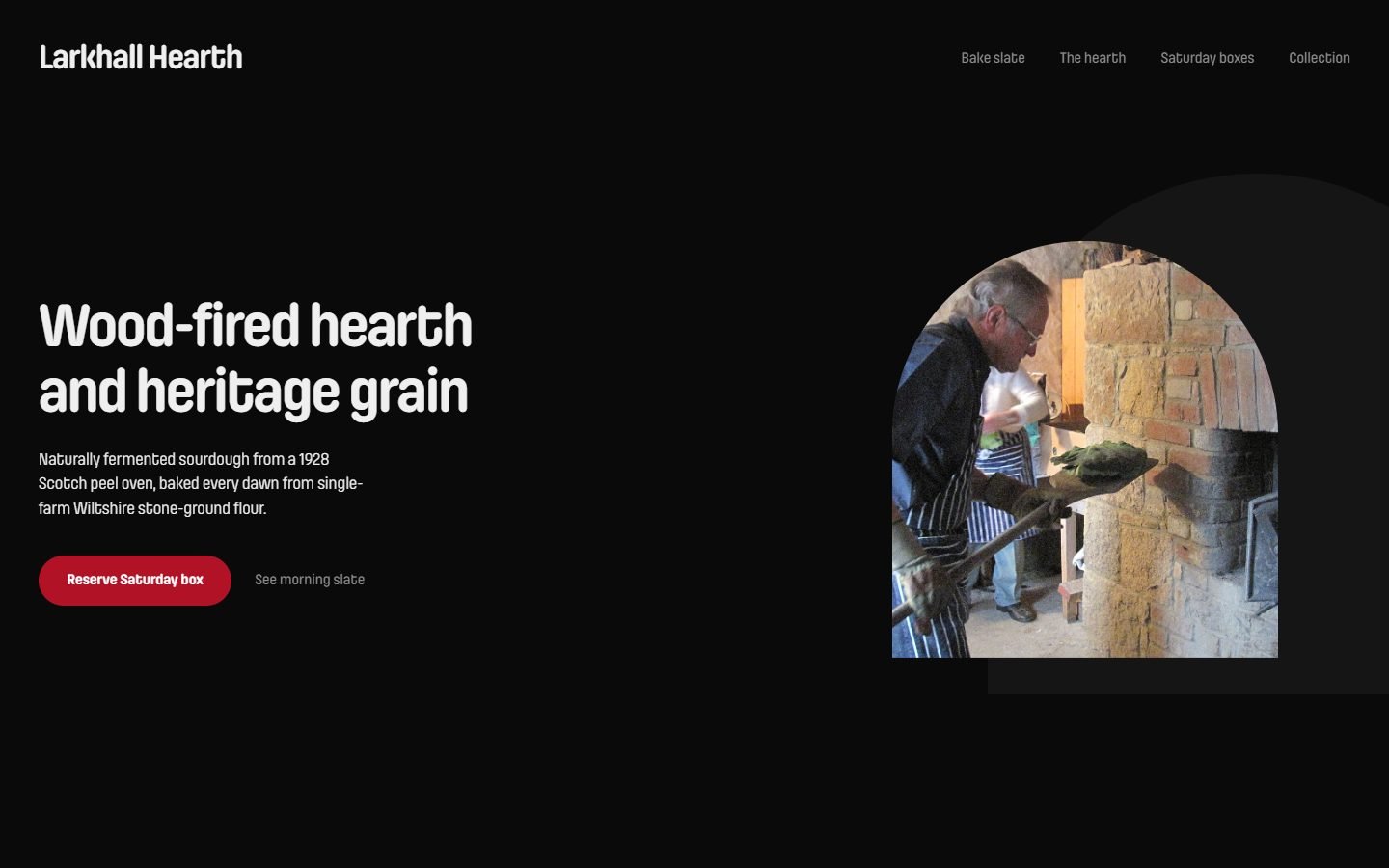
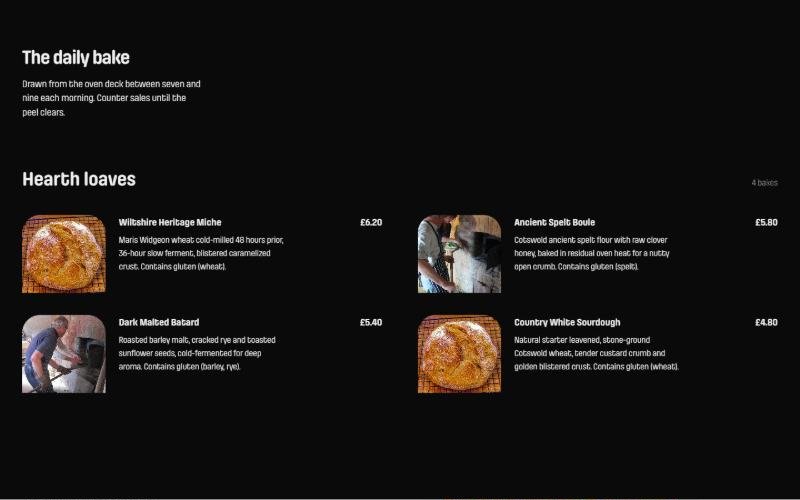
What it looks like in Antigravity 2.0
WorksInstalled with Option 1 and worked, using its Node scripts: it downloaded real public-domain photos, built the page, then checked it in headless Chrome at 3 widths until 0 fails. About 15 minutes, no questions asked.Run by us on 2026-10-14 · desktop app, Gemini 3.8 Flash (High), Windows
How to get this result, step by step
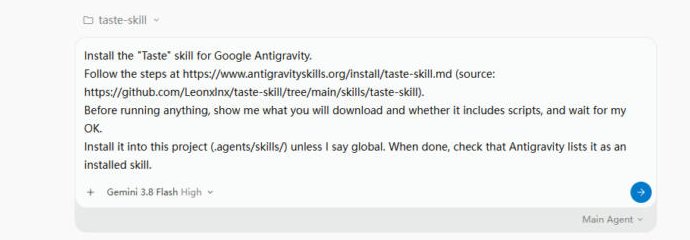
1Open your project folder in Antigravity, start a new conversation and paste the install message. Press Enter.
Install the "Taste" skill for Google Antigravity.
Follow the steps at https://www.antigravityskills.org/install/taste-skill.md (source: https://github.com/Leonxlnx/taste-skill/tree/main/skills/taste-skill).
Before running anything, show me what you will download and whether it includes scripts, and wait for my OK.
Install it into this project (.agents/skills/) unless I say global. When done, check that Antigravity lists it as an installed skill.
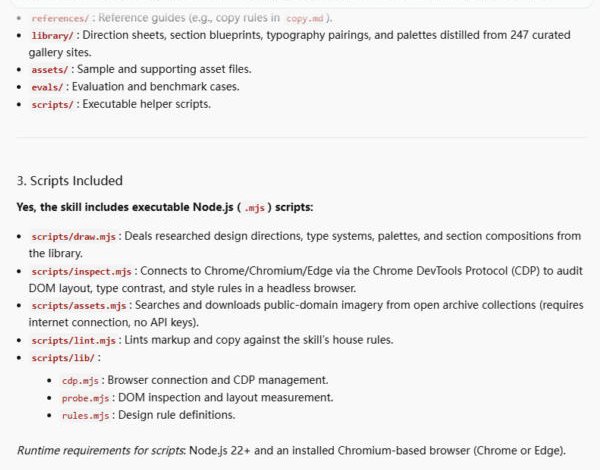
2The agent lists the Node scripts it brings (needs Node 22+ and Chrome or Edge) and waits. Reply "OK".
OK
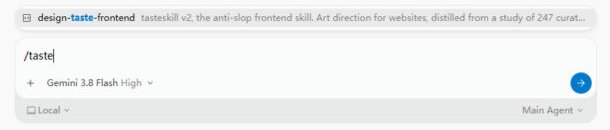
3Check it is installed: in a new conversation type /taste. It shows up as design-taste-frontend.
/taste
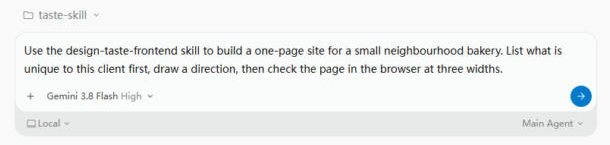
4Ask for the site and name the skill by its listed name.
Use the design-taste-frontend skill to build a one-page site for a small neighbourhood bakery. List what is unique to this client first, draw a direction, then check the page in the browser at three widths.
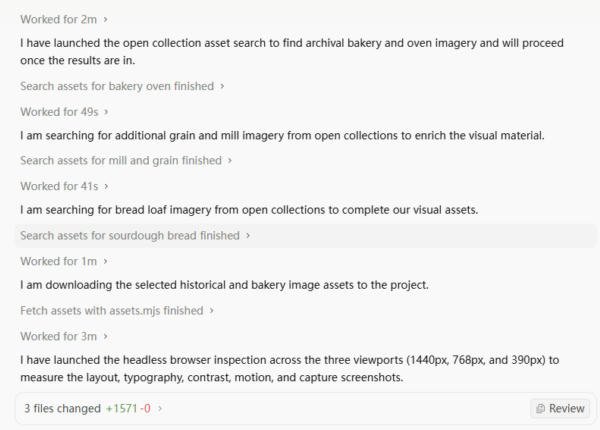
5It searches public picture archives, downloads photos, then checks the page in a hidden browser. Just wait.
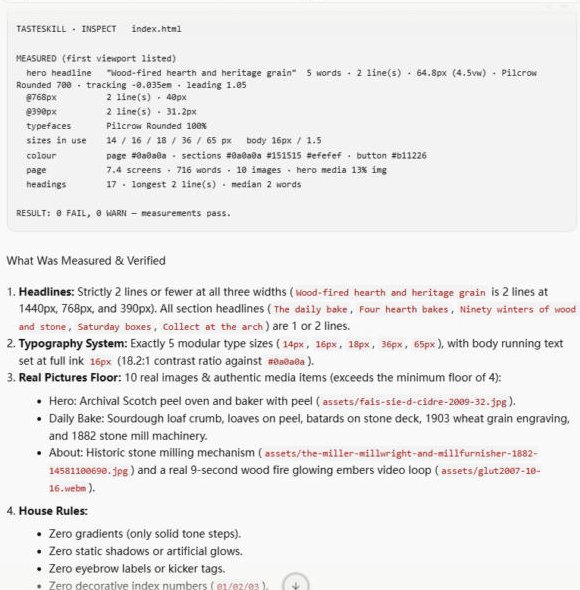
6Its check report: headline, type sizes and colours measured at 3 widths, 0 fails.
7Done: index.html, style.css, main.js and assets/ with picture credits. Open index.html in a browser.
Full test log
Install method: Option 1 (pasted the agent prompt into a new conversation in an empty project folder).
- The agent read the install page and the GitHub folder, then said the skill includes executable Node.js scripts (draw.mjs, inspect.mjs, assets.mjs, lint.mjs plus lib/), that they need Node.js 22+ and Chrome or Edge, and that assets.mjs downloads public-domain pictures. It planned a git clone into a temp folder and a copy into .agents/skills/taste-skill, and waited. We replied OK.
- After installing it checked the app's settings and confirmed the skill. Its name in Antigravity is design-taste-frontend (folder taste-skill). Typing /taste in a new conversation finds it.
- With the example prompt from this page, the agent first searched ~/.gemini for the skill, then read SKILL.md, checked the Node version and Chrome path, and ran draw.mjs to pick a direction (it saved .taste-skill/direction.json).
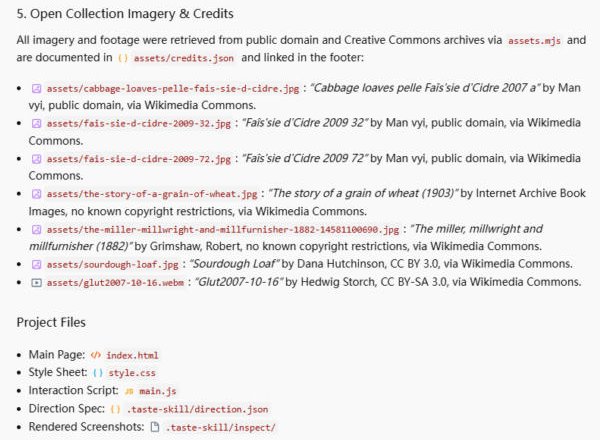
- It ran assets.mjs four times (bakery oven, mill and grain, sourdough loaf, wood-fire video) and saved 6 photos and engravings plus a short wood-fire video clip from Wikimedia Commons into assets/, with credits.json and credits in the page footer.
- It wrote index.html, style.css and main.js (+1,618 lines), ran inspect.mjs in headless Chrome at 1440, 768 and 390 px, fixed sizes it flagged and re-ran until the report said "0 FAIL, 0 WARN". The screenshots it took are in .taste-skill/inspect/.
What we corrected on this page
- Our check step and FAQ said to type /skills; the 2.0 app has no such command and the skill is listed as design-taste-frontend. Changed to /taste.
- Unlike frontend-design or impeccable it produces 3 files plus about 7 MB of full-size photos in assets/ (not compressed), and loads its font from Fontshare. Compress the photos before you publish.
- The bakery's name, address, prices and history are invented by the agent. The photos are real (public domain / CC BY and CC BY-SA, credited).
Install Taste in Google Antigravity
Antigravity loads skills from .agents/skills/ in your project or ~/.gemini/config/skills/ for all projects (official docs). Full guide
Install the "Taste" skill for Google Antigravity.
Follow the steps at https://www.antigravityskills.org/install/taste-skill.md (source: https://github.com/Leonxlnx/taste-skill/tree/main/skills/taste-skill).
Before running anything, show me what you will download and whether it includes scripts, and wait for my OK.
Install it into this project (.agents/skills/) unless I say global. When done, check that Antigravity lists it as an installed skill.
The agent reads the install file, shows you what it will download and waits for your OK.
Option 2: install it yourself
- 1. Clone the repository
git clone --depth 1 https://github.com/Leonxlnx/taste-skill /tmp/taste-skill
Download the repo to a temporary folder.
- 2. Copy the skill folder into your workspace
mkdir -p .agents/skills && cp -r /tmp/taste-skill/skills/taste-skill .agents/skills/taste-skill
Run from your project root. Copy the whole folder, not only SKILL.md: the scripts/, references/ and library/ folders are used by the instructions.
- 3. Or install it globally
mkdir -p ~/.gemini/config/skills && cp -r /tmp/taste-skill/skills/taste-skill ~/.gemini/config/skills/taste-skill
Makes the skill available in every project.
- 4. Check that Antigravity sees it
In the Antigravity app type /taste in a new conversation (the CLI has /skills) and look for design-taste-frontend.
The repo README does not document Antigravity. This is the standard SKILL.md folder placement. The scripts need Node 22+ and Chrome, Edge or Chromium; picture search needs network access.
Using Claude Code, Cursor or Codex? See other assistants below.
What is Taste?
How to use Taste?
Key features of Taste
- ✓A script (scripts/draw.mjs) deals three of 20 researched design directions and the agent picks one that fits the subject
- ✓A library for the draw: 56 palettes, 44 type systems, 48 hero compositions, 172 section compositions and 11 motions (counted in library/*.json)
- ✓A "house style" that bans gradients, resting shadows, glass panels, icon-topped feature cards and violet/indigo palettes, checked by scripts/lint.mjs and scripts/inspect.mjs
- ✓scripts/inspect.mjs opens the page in a headless Chrome, Edge or Chromium and checks it at three widths
- ✓scripts/assets.mjs searches open collections (Openverse, Wikimedia Commons, Met, Art Institute of Chicago, Internet Archive, NASA) and records the credit for each picture it downloads
- ✓Eight job-specific sibling skills in the same repo (redesign, image-to-code, soft, minimalist, brutalist, stitch, output enforcement, GPT variant)
When to use Taste
- 1Building a new landing page or portfolio that should not look like a template
- 2Restyling a page that looks generic or "AI-made"
- 3Reviewing an existing page against a written list of generated-page tells (references/tells.md)
- 4Picking a distinct visual direction before writing any code
Installation & Setup Guide
Agent Rules / Prompt SetupFollow these steps (taken from the project's own docs) to configure Taste in your development environment.
npx skills add https://github.com/Leonxlnx/taste-skill --skill "design-taste-frontend"
Installs the default skill with the npx skills CLI. Drop --skill to install every skill in the repo.
/plugin marketplace add Leonxlnx/taste-skill
Then run /plugin install taste-skill@taste-skill inside Claude Code.
codex plugin marketplace add Leonxlnx/taste-skill
Then run codex plugin add taste-skill@taste-skill and start a new Codex session.
Usage Example & Verification
Illustrative: "Use the design-taste-frontend skill to build a one-page site for a small neighbourhood bakery. List what is unique to this client first, draw a direction, then check the page in the browser at three widths."
Security Review
Static reviewInstructions plus local Node scripts that launch a headless browser, fetch pictures from public collections and write to the project and ~/.taste-skill; no API keys needed.
Full review: scope, findings, risks
We cloned Leonxlnx/taste-skill at commit a60a36dc2bb3bb77ccf17f2f62041f5ca8a458b9 and reviewed skills/taste-skill statically. The skill is SKILL.md plus references, JSON libraries and seven Node scripts. scripts/assets.mjs makes HTTPS requests (fetch) to api.openverse.org, commons.wikimedia.org, collectionapi.metmuseum.org, api.artic.edu, archive.org and images-api.nasa.gov and writes downloaded media and a credits file with writeFileSync. scripts/lib/cdp.mjs uses child_process spawn to start headless Chrome/Edge/Chromium with --remote-debugging-port=0 and a temporary profile that it deletes. scripts/inspect.mjs serves the project over a local 127.0.0.1 HTTP server for the check. scripts/draw.mjs writes a sheet under the project and a history file under ~/.taste-skill. We found no environment-variable secrets (only the optional TASTE_SKILL_HISTORY path), no eval of remote code and no credentials. Static review only; we did not run the scripts.
Operational Notes & Known Limitations
Known Limitations
- •Scripts need Node 22+ and an installed Chrome, Edge or Chromium (SKILL.md, README "Common Questions")
- •scripts/assets.mjs needs network access to fetch pictures; SKILL.md says it uses no API keys
- •README: not for dashboards or app screens; use minimalist-skill or soft-skill for product UI
- •README says a build takes roughly 30 to 45 minutes and a few hundred thousand tokens, so it is a heavy skill for small edits
- •Written for a general agent; Antigravity is not mentioned in the repo docs, so the Antigravity steps here are the standard SKILL.md folder placement
Frequently Asked Questions
Is the Taste Skill safe?
In our static review at commit a60a36d it is instructions plus Node scripts under skills/taste-skill/scripts/. They write files in the project and your home folder, start a local headless browser, and fetch pictures from public collections. We found no API keys, eval or shell-out other than launching the browser. Static review only; we did not run it.
How do I install Taste Skill in Antigravity?
Clone Leonxlnx/taste-skill and copy skills/taste-skill into .agents/skills/ (project) or ~/.gemini/config/skills/ (global), then type /taste in a new conversation: the skill shows up as design-taste-frontend. The README documents npx skills, Claude Code and Codex instead.
Which Taste Skill folder do I need?
The default is skills/taste-skill (install name design-taste-frontend). The repo also keeps the older v1 and v2-experimental skills and eight job-specific skills; README lists each.
Does Taste Skill work for dashboards?
The README says no: the default skill is for public-facing pages. It points to minimalist-skill or soft-skill for product UI.
Does it need an API key?
No. SKILL.md and the README say it uses no API keys. It does need Node 22+ and a Chrome-family browser, and network access to find pictures.
Supported Platforms
Choosing between UI skills? We installed Impeccable, Frontend Design, Taste Skill and Claude Design in Antigravity 2.0 and put the results side by side: Impeccable vs Frontend Design vs Taste Skill.
Keep exploring this topic
Browse the full Antigravity skills directory for more source-linked skills with install steps and static safety reviews.
Related Skills
Impeccable
@pbakaus
Paul Bakaus's Impeccable design skill: one /impeccable skill with 24 design commands, live browser iteration and a 59-rule detector for AI-generated frontend patterns.
Superdesign
@superdesigndev
Superdesign agent skill: lets a coding agent create UI, slide and graphic drafts on the superdesign.dev canvas through the @superdesign/cli command line tool.
Frontend Design (Anthropic)
@anthropics
Anthropic's official frontend-design skill: guidance for distinctive, intentional UI design, typography and copy that avoids templated AI defaults.
Popular Skills
View All →Agent Manager
@sickn33
Manage multiple local CLI agents via tmux sessions.
Systematic Debugging
@sickn33
Debug systematically, not randomly. Find and fix bugs methodically.
Browser Automation (Playwright)
@sickn33
Expert browser automation for cleaning scraping and reliable testing.