Frontend Design (Anthropic)
@anthropicsAnthropic's official frontend-design skill: guidance for distinctive, intentional UI design, typography and copy that avoids templated AI defaults.
Instruction-only Anthropic skill with no scripts, network calls or credentials; it only guides how the agent designs and writes frontend code.
What it looks like in Antigravity 2.0
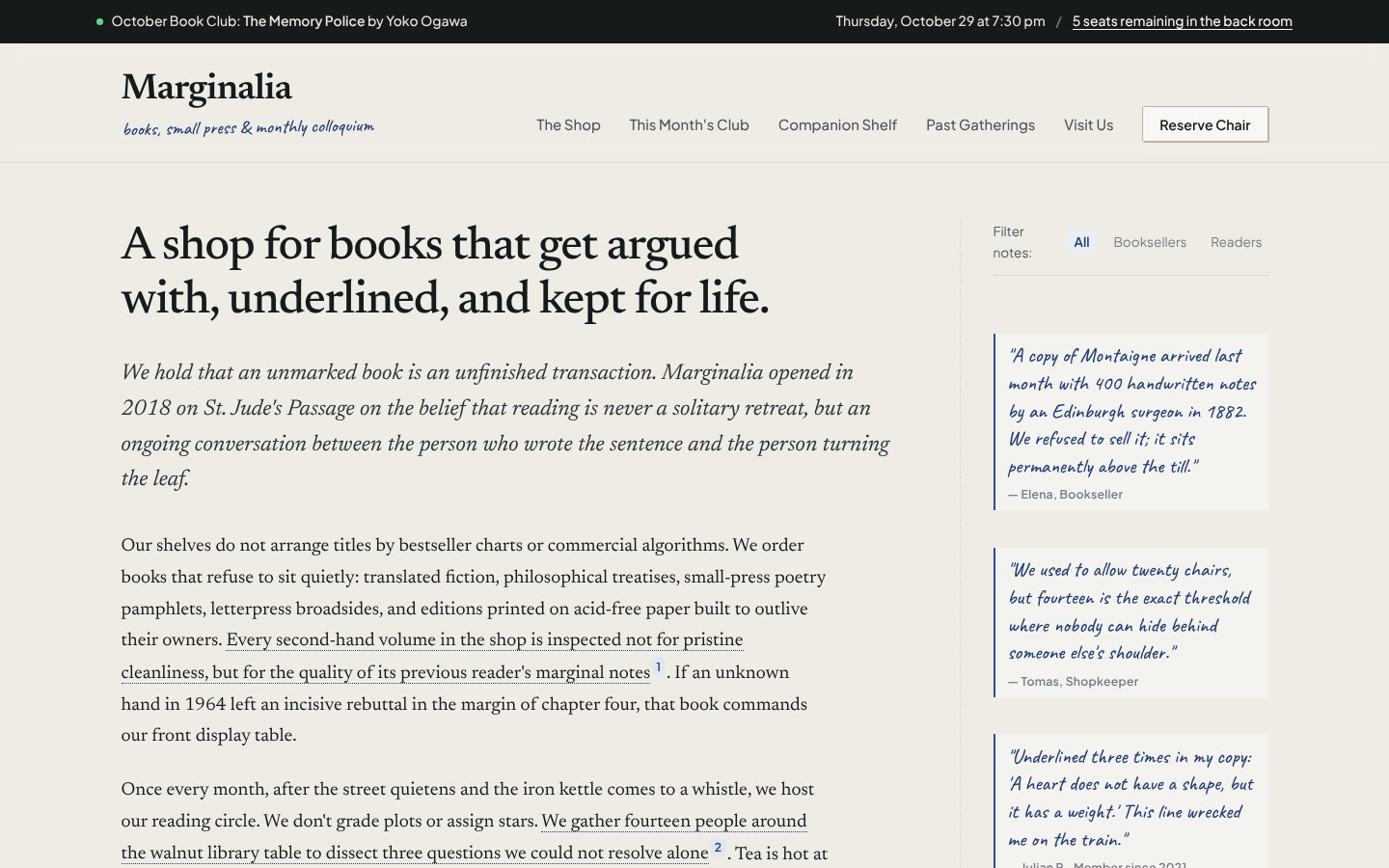
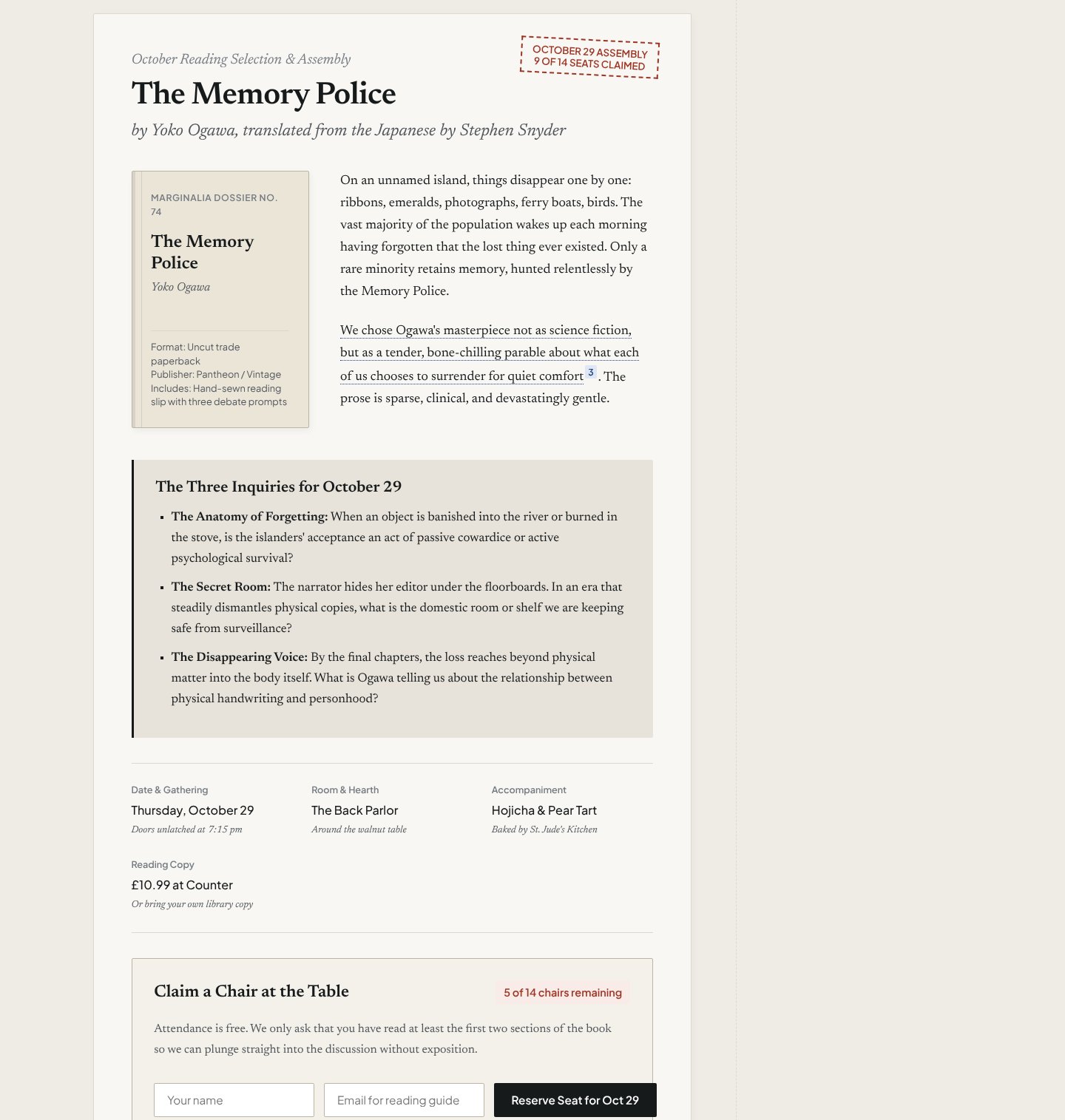
WorksInstalled with Option 1 in about a minute and worked. One sentence gave a finished one-page site in about 5 minutes, with no questions asked.Run by us on 2026-10-14 · desktop app, Gemini 3.8 Flash (High), Windows
How to get this result, step by step
1Open your project folder in Antigravity, start a new conversation and paste the install message. Press Enter.
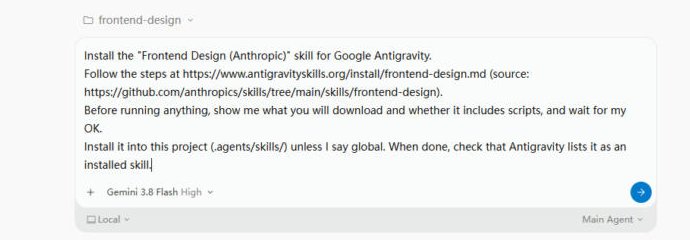
Install the "Frontend Design (Anthropic)" skill for Google Antigravity.
Follow the steps at https://www.antigravityskills.org/install/frontend-design.md (source: https://github.com/anthropics/skills/tree/main/skills/frontend-design).
Before running anything, show me what you will download and whether it includes scripts, and wait for my OK.
Install it into this project (.agents/skills/) unless I say global. When done, check that Antigravity lists it as an installed skill.
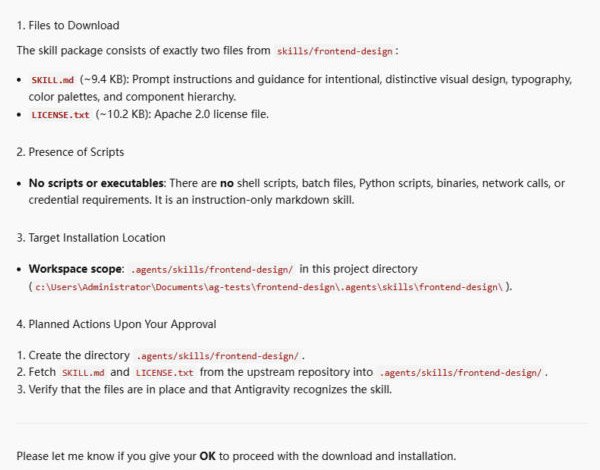
2The agent shows the 2 files it will copy (no scripts) and waits. Reply "OK".
OK
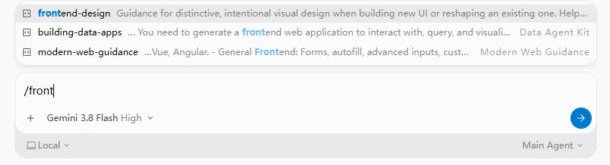
3Check it is installed: in a new conversation type /front and frontend-design shows up first.
/front
4Describe the page in one sentence and name the skill.
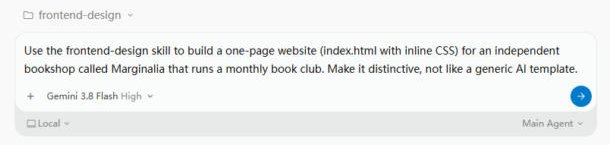
Use the frontend-design skill to build a one-page website (index.html with inline CSS) for an independent bookshop called Marginalia that runs a monthly book club. Make it distinctive, not like a generic AI template.
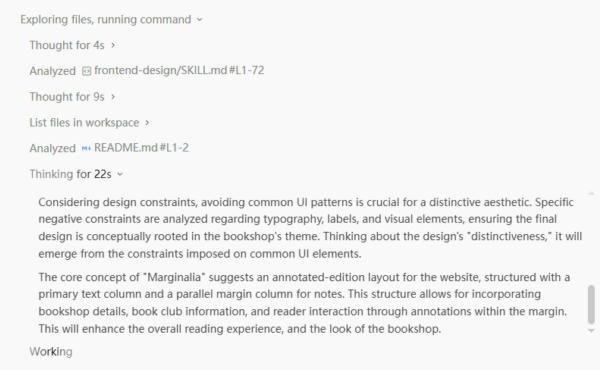
5It reads the skill first, then picks a design idea. No questions; just wait.
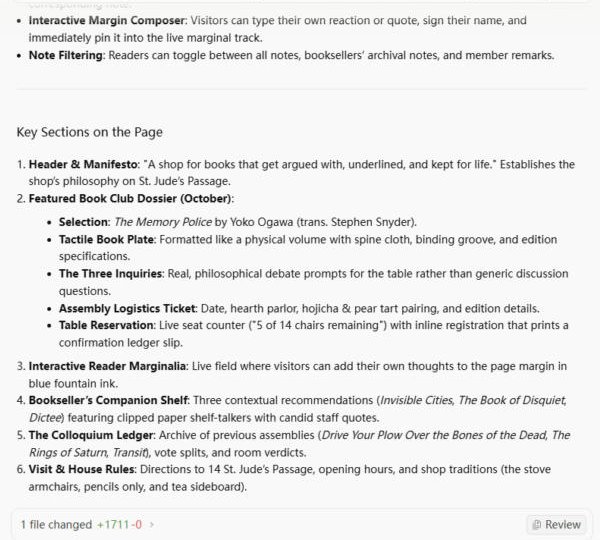
6Done after about 5 minutes: open index.html from your folder in a browser.
Full test log
Install method: Option 1 (pasted the agent prompt into a new conversation in an empty project folder).
- The agent read the install page and the GitHub folder, then listed exactly 2 files (SKILL.md about 9.4 KB, LICENSE.txt about 10.2 KB), said there are no scripts, network calls or keys, and waited. We replied OK.
- It copied both files into .agents/skills/frontend-design/ and started a helper agent ("Skill Verifier") to confirm Antigravity sees the skill. In a new conversation, typing /front showed frontend-design first in the menu.
- With the prompt below, the agent read frontend-design/SKILL.md first, planned an "annotated edition" layout (main text column plus a margin column for notes), then wrote index.html (+1,711 lines) and re-read parts of it to check.
What we corrected on this page
- Nothing on our install page had to change. "Inline CSS" still loads three Google Fonts (Caveat, Newsreader, Plus Jakarta Sans).
- The shop's story, quotes, address, prices and dates are invented by the agent. The books it chose are real titles. Replace the copy before you publish.
Install Frontend Design (Anthropic) in Google Antigravity
Antigravity loads skills from .agents/skills/ in your project or ~/.gemini/config/skills/ for all projects (official docs). Full guide
Install the "Frontend Design (Anthropic)" skill for Google Antigravity.
Follow the steps at https://www.antigravityskills.org/install/frontend-design.md (source: https://github.com/anthropics/skills/tree/main/skills/frontend-design).
Before running anything, show me what you will download and whether it includes scripts, and wait for my OK.
Install it into this project (.agents/skills/) unless I say global. When done, check that Antigravity lists it as an installed skill.
The agent reads the install file, shows you what it will download and waits for your OK.
Option 2: install it yourself
- 1. Download the repository
git clone --depth 1 https://github.com/anthropics/skills /tmp/anthropic-skills && git -C /tmp/anthropic-skills log -1 --format=%h -- skills/frontend-design
The last change to the skill folder at our review was 41bbe19 (2026-09-03); a different hash means the skill changed after our review.
- 2. Copy the skill into this project (workspace skill)
mkdir -p .agents/skills && cp -r /tmp/anthropic-skills/skills/frontend-design .agents/skills/
Run from your project root. Antigravity then reads .agents/skills/frontend-design/SKILL.md.
- 3. Or install it for all projects (global skill)
mkdir -p ~/.gemini/config/skills && cp -r /tmp/anthropic-skills/skills/frontend-design ~/.gemini/config/skills/
Use this instead of the previous step. For the Antigravity CLI the global folder is ~/.gemini/antigravity-cli/skills/.
- 4. Check that Antigravity sees it
Antigravity 2.0 app: start a new conversation and ask "What skills do you have?" (the app has no /skills command). Antigravity CLI: run /skills; in a session that was already open, run /skills reload first. The skill is listed as frontend-design.
Anthropic documents only Claude Code, Claude.ai and the API; Antigravity is not mentioned. No API keys, binaries or scripts are needed: the folder holds only SKILL.md and LICENSE.txt (Apache 2.0).
Using Claude Code, Cursor or Codex? See other assistants below.
What is Frontend Design (Anthropic)?
How to use Frontend Design (Anthropic)?
Key features of Frontend Design (Anthropic)
- ✓We counted at 683bc88: 2 files only, SKILL.md (71 lines, 1,505 words, 9,390 bytes) and LICENSE.txt; no scripts, commands or URLs
- ✓We counted: 5 clusters of AI-default design traits to avoid (for example cream #F4F1EA with terracotta #D97757) and 3 typographic treatments to avoid
- ✓We counted: a 4-part plan before any code (4-6 named hex colors, type roles, layout with ASCII wireframes, principles), then a review pass against the brief
- ✓We compared checksums on 2026-10-14: the same SKILL.md is byte-identical in anthropics/skills, anthropics/claude-code and anthropics/claude-plugins-official
- ✓Also covers interface copy: active-voice buttons, one action name through a flow, useful errors and empty states
When to use Frontend Design (Anthropic)
- 1Landing page with a distinct identity
- 2Dashboard or settings screen without the generic card-grid look
- 3Redesign a UI that reads as templated
Installation & Setup Guide
Agent Rules / Prompt SetupFollow these steps (taken from the project's own docs) to configure Frontend Design (Anthropic) in your development environment.
/plugin install frontend-design@claude-plugins-official
The anthropics/claude-plugins-official README documents installing with `/plugin install {plugin-name}@claude-plugins-official`, or browsing for the plugin in `/plugin > Discover`. Its plugins/frontend-design folder contains the same SKILL.md.
/plugin marketplace add anthropics/skills
/plugin install example-skills@anthropic-agent-skills
Documented in the anthropics/skills README. frontend-design is one of the skills in the example-skills plugin (.claude-plugin/marketplace.json), so this installs it together with the other example skills.
The anthropics/skills README says its example skills are already available to paid Claude.ai plans; custom uploads follow Anthropic's 'Using skills in Claude' guide.
Usage Example & Verification
1) README example (Claude Code plugin README): "Create a dashboard for a music streaming app"
-> The agent names subject and audience, writes a plan with 4-6 named hex colors, typefaces and an ASCII wireframe, revises anything that looks like a default, then codes.

2) Our example: "Build a landing page for a neighborhood bakery. Use the frontend-design skill and show me the plan before any code."
-> You get the token plan first; expect one bold choice, not effects on every section.

3) Our example: "Rewrite the button labels, errors and empty states in this settings page."
-> The copy rules apply: "Save changes" instead of "Submit", one verb in the button and its confirmation, errors that say what happened and how to fix it.
Security Review
Static reviewInstruction-only Anthropic skill with no scripts, network calls or credentials; it only guides how the agent designs and writes frontend code.
Full review: scope, findings, risks
Static review at commit 683bc88 (unchanged at HEAD dbd4588). skills/frontend-design contains SKILL.md (71 lines) and LICENSE.txt (Apache License 2.0) and nothing else. The frontmatter has name, description and license only. The body is Markdown guidance with no shell commands, no URLs and no code blocks to run. It asks the agent to plan a design (palette, type, layout, principles), review the plan against the brief, write the code and critique it, taking screenshots only if the environment supports it, and to use any memory of the client's preferences as a hint. The Claude Code plugin copy (anthropics/claude-code plugins/frontend-design, plugin.json version 1.1.0, authors Prithvi Rajasekaran and Alexander Bricken) and the anthropics/claude-plugins-official copy have the identical SKILL.md; no hooks, commands, agents or MCP servers are included.
Operational Notes & Known Limitations
Known Limitations
- •Instruction-only: no components, data or scripts. UI/UX Pro Max (our page) ships searchable style and palette data plus Python scripts; this is one page of judgement rules
- •Screenshot self-critique only happens if your environment can take screenshots (SKILL.md)
- •anthropics/skills README says its skills are for demonstration and educational purposes; neither it nor the plugin README mentions Antigravity (we searched)
- •A modified community copy in sickn33/antigravity-awesome-skills adds a DFII score and is not the original
Frequently Asked Questions
What is the frontend design skill?
Anthropic's official frontend-design skill: one SKILL.md that makes an agent plan a brief-specific design, check it, then build and self-critique instead of using templated defaults.
How do I install the frontend design skill in Antigravity?
Clone github.com/anthropics/skills and copy skills/frontend-design into .agents/skills/ in your project, or into ~/.gemini/config/skills/ for all projects. Then ask "What skills do you have?" (CLI: /skills).
Is the frontend design skill safe?
In our static review of commit 683bc88 the folder holds only SKILL.md and LICENSE.txt: no scripts, commands, URLs or API keys. It only shapes how the agent designs and writes frontend code.
Frontend design or UI/UX Pro Max?
Different jobs. UI/UX Pro Max ships data and scripts that pick a design system; frontend-design is judgement rules for making a design distinctive. They can be used together.
Is the frontend design skill the same file in Claude Code and Antigravity?
Yes. On 2026-10-14 we compared checksums: the same SKILL.md is byte-identical in anthropics/skills, anthropics/claude-code and anthropics/claude-plugins-official. Only the folder you copy it into differs (.agents/skills/ for an Antigravity workspace). Community copies, such as the one in sickn33/antigravity-awesome-skills, can be modified and are not the original.
Supported Platforms
Choosing between UI skills? We installed Impeccable, Frontend Design, Taste Skill and Claude Design in Antigravity 2.0 and put the results side by side: Impeccable vs Frontend Design vs Taste Skill.
Keep exploring this topic
Browse the full Antigravity skills directory for more source-linked skills with install steps and static safety reviews.
Related Skills
Impeccable
@pbakaus
Paul Bakaus's Impeccable design skill: one /impeccable skill with 24 design commands, live browser iteration and a 59-rule detector for AI-generated frontend patterns.
Taste
@Leonxlnx
Open-source agent skill (design-taste-frontend) that gives coding agents an art direction, real pictures and a browser check so landing pages look less generic.
UI/UX Pro Max
@nextlevelbuilder
Comprehensive UI/UX design intelligence skill for AI coding assistants. Injects structured design tokens, color theory, typography scales, accessibility guidelines, and component patterns into Claude Code, Cursor, and Windsurf.
Popular Skills
View All →Agent Manager
@sickn33
Manage multiple local CLI agents via tmux sessions.
Systematic Debugging
@sickn33
Debug systematically, not randomly. Find and fix bugs methodically.
Browser Automation (Playwright)
@sickn33
Expert browser automation for cleaning scraping and reliable testing.