Web Design Guidelines
@vercel-labsVercel's review skill: fetches Vercel's Web Interface Guidelines at run time, checks the files you name and lists violations as file:line findings.
No scripts or credentials, but the skill fetches its rule set from a remote GitHub raw URL on every run, so the instructions it follows can change.
What it looks like in Antigravity 2.0
WorksInstalled with Option 1 and worked. On a 1,710-line page it fetched the latest guidelines from GitHub and returned a long file:line list in about 3 minutes; the line numbers we spot-checked were right.Run by us on 2026-10-14 · desktop app, Gemini 3.8 Flash (High), Windows
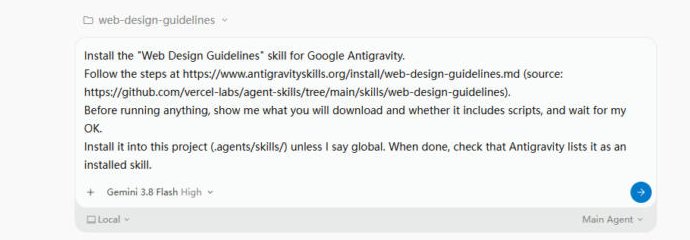
How to get this result, step by step
1Open the project with the UI you want checked, start a new conversation and paste the install message. Press Enter.
Install the "Web Design Guidelines" skill for Google Antigravity.
Follow the steps at https://www.antigravityskills.org/install/web-design-guidelines.md (source: https://github.com/vercel-labs/agent-skills/tree/main/skills/web-design-guidelines).
Before running anything, show me what you will download and whether it includes scripts, and wait for my OK.
Install it into this project (.agents/skills/) unless I say global. When done, check that Antigravity lists it as an installed skill.
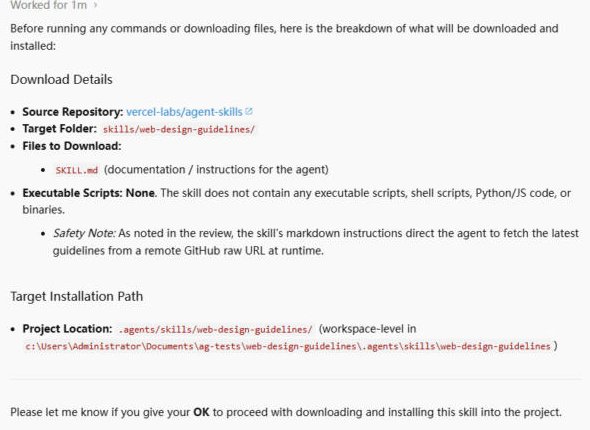
2The agent shows the single file it will copy and waits. Reply "OK".
OK
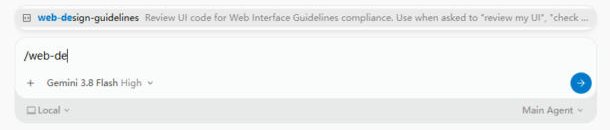
3Check it is installed: in a new conversation type /web-de and the skill shows up.
/web-de
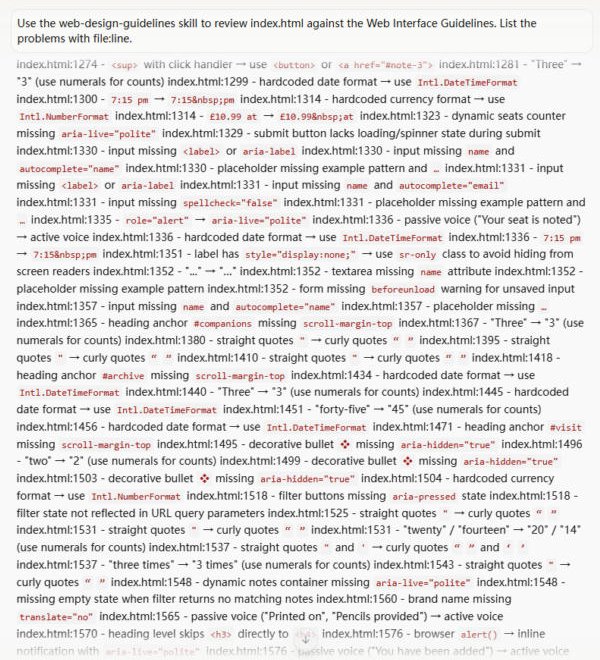
4Name the file to review and ask for file:line output.
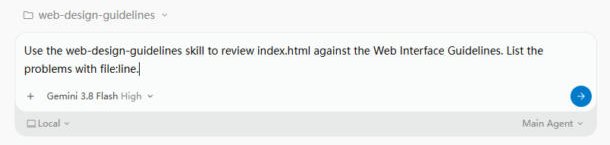
Use the web-design-guidelines skill to review index.html against the Web Interface Guidelines. List the problems with file:line.
5It downloads the current guidelines, then reads your file. Just wait.
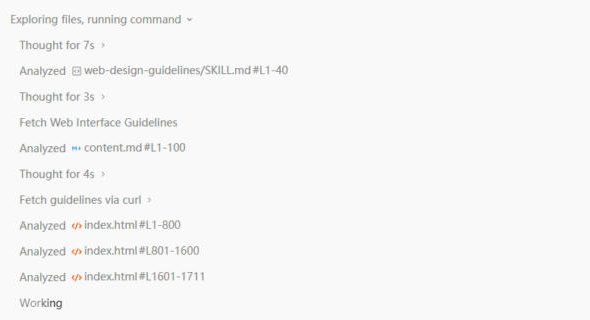
6Done in about 3 minutes. Work through the list, accessibility items first.
Full test log
Install method: Option 1 (pasted the agent prompt into a new conversation in a project folder with one existing index.html to review).
- The agent read the install page and the GitHub folder, then listed one file (SKILL.md), said there are no scripts, and noted that the instructions fetch the latest guidelines from a GitHub raw URL each time. We replied OK.
- It installed to .agents/skills/web-design-guidelines/ and started a helper agent to confirm Antigravity sees it. In a new conversation, /web-de shows web-design-guidelines in the menu.
- For the test file we used the bookshop page from our frontend-design test (index.html, 1,710 lines). With the prompt below, the agent read SKILL.md, fetched the guidelines (it used curl), read index.html in three chunks and searched it for quotes, modals, images, touch and meta settings and prefers-reduced-motion.
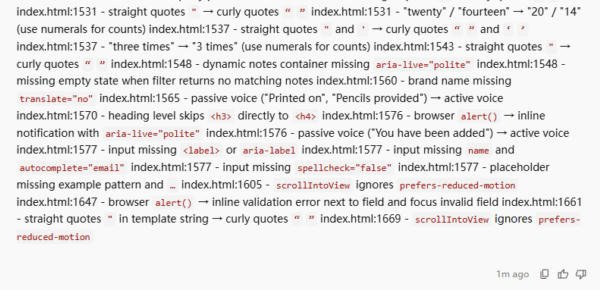
- It answered with findings in the form index.html:LINE - problem → fix. We checked five of them against the file (lines 1314, 1351, 1352, 1576, 1647): all pointed at the right code (a hard-coded price, a label hidden with display:none, a textarea without name, a form using alert(), an alert() for validation).
What we corrected on this page
- Nothing on our install page had to change.
- It only reviews and changes nothing. The list came back as one long block of text, not a tidy list; copy it into an editor to work through it. Many items are copy style (curly quotes, numerals instead of words), so pick the accessibility ones first.
Install Web Design Guidelines in Google Antigravity
Antigravity loads skills from .agents/skills/ in your project or ~/.gemini/config/skills/ for all projects (official docs). Full guide
Install the "Web Design Guidelines" skill for Google Antigravity.
Follow the steps at https://www.antigravityskills.org/install/web-design-guidelines.md (source: https://github.com/vercel-labs/agent-skills/tree/main/skills/web-design-guidelines).
Before running anything, show me what you will download and whether it includes scripts, and wait for my OK.
Install it into this project (.agents/skills/) unless I say global. When done, check that Antigravity lists it as an installed skill.
The agent reads the install file, shows you what it will download and waits for your OK.
Option 2: install it yourself
- 1. Download the repository
git clone --depth 1 https://github.com/vercel-labs/agent-skills /tmp/vercel-agent-skills && git -C /tmp/vercel-agent-skills log -1 --format=%h -- skills/web-design-guidelines
The repository holds 9 skill folders under skills/ at our review commit; you only need web-design-guidelines. The last change to that folder at our review was ba46938 (2026-01-16); a different hash means the skill changed after our review.
- 2. Copy the skill into this project (workspace skill)
mkdir -p .agents/skills && cp -r /tmp/vercel-agent-skills/skills/web-design-guidelines .agents/skills/
Run from your project root. Antigravity loads workspace skills from .agents/skills/, so you end up with .agents/skills/web-design-guidelines/SKILL.md. Copy the folder, not the web-design-guidelines.zip next to it (an older packaging whose frontmatter differs).
- 3. Or install it for all projects (global skill)
mkdir -p ~/.gemini/config/skills && cp -r /tmp/vercel-agent-skills/skills/web-design-guidelines ~/.gemini/config/skills/
Use this instead of the previous step. For the Antigravity CLI the global folder is ~/.gemini/antigravity-cli/skills/.
- 4. Check that Antigravity sees it
Antigravity 2.0 app: start a new conversation and ask "What skills do you have?" (the app has no /skills command). Antigravity CLI: run /skills; in a session already open run /skills reload first. The skill is listed as web-design-guidelines. Then ask for a review and name a file.
The skill's README does not mention Antigravity, but the rules repo does: its install.sh has an Antigravity branch that writes the rules (command.md, with a name line added) to ~/.gemini/antigravity/global_skills/web-interface-guidelines/SKILL.md. That is a static local copy, so reviews need no download, at the price of going stale. We document the .agents/skills and ~/.gemini/config/skills folders above because they are the paths we use for every skill. No API keys; the agent must be allowed to fetch the raw.githubusercontent.com URL in the normal copy.
Using Claude Code, Cursor or Codex? See other assistants below.
What is Web Design Guidelines?
How to use Web Design Guidelines?
Key features of Web Design Guidelines
- ✓Fetches the current rules from raw.githubusercontent.com/vercel-labs/web-interface-guidelines/main/command.md before every review
- ✓104 bullet rules in 17 sections (we counted at 434b7f9): accessibility, focus states, forms, animation, typography, content handling, images, performance, navigation and state, touch, safe areas, dark mode, locale, hydration, hover states, copy, plus a 14-item anti-pattern list
- ✓Anti-patterns it flags by name, e.g. user-scalable=no, blocked paste, transition: all, outline-none without a focus replacement, div with a click handler instead of a button
- ✓Output is file:line, grouped by file and clickable in VS Code; passing files get a check mark
- ✓Takes a file or pattern argument; asks for files when none are given
When to use Web Design Guidelines
- 1Audit a React or Next.js component folder for missing aria-labels, unlabeled inputs and missing focus styles before release
- 2Check forms, animation and typography details against one consistent checklist
- 3Run a quick pre-PR design-hygiene pass on the files you changed
- 4Give a second agent a fixed review rubric after a generator skill such as frontend-design or ui-ux-pro-max has built the UI
Installation & Setup Guide
Agent Rules / Prompt SetupFollow these steps (taken from the project's own docs) to configure Web Design Guidelines in your development environment.
npx skills add https://github.com/vercel-labs/agent-skills --skill web-design-guidelines
The command the rules repo's README documents under "Review Command". The agent-skills README documents `npx skills add vercel-labs/agent-skills`, which installs all of the repository's skills.
curl -fsSL https://raw.githubusercontent.com/vercel-labs/web-interface-guidelines/main/install.sh -o install.sh
The rules repo ships an install.sh that neither README mentions, so read it before running it with bash. It copies command.md into ~/.claude/commands/ for Claude Code and ~/.cursor/commands/ for Cursor; then you run /web-interface-guidelines <file>. It also detects Amp, OpenCode, Windsurf, Antigravity and Gemini CLI. We read the script; we did not run it.
Usage Example & Verification
1) README example (the skill's "Use when" phrases): "Review my UI" or "Check my site against best practices"
-> What should happen: the agent asks which files to review, fetches command.md, then answers with file:line findings.

2) Our example: "Review src/components/**/*.tsx against the web design guidelines."
-> What should happen: one section per file, for example src/Modal.tsx:12 - missing overscroll-behavior: contain, and "✓ pass" for files with no issues. The format is taken from command.md.

3) Our example: "Review pricing.html against the web design guidelines, then fix only the accessibility findings."
-> What should happen: the skill produces the findings; the fixing is your follow-up instruction, because the skill itself only reports.
Security Review
Static reviewNo scripts or credentials, but the skill fetches its rule set from a remote GitHub raw URL on every run, so the instructions it follows can change.
Full review: scope, findings, risks
Static review at commit 063bee9 (skill) and 434b7f9 (rules repo); nothing was executed. skills/web-design-guidelines/ contains only SKILL.md (1,231 bytes). It instructs the agent to use WebFetch on https://raw.githubusercontent.com/vercel-labs/web-interface-guidelines/main/command.md, read the user-specified files and output findings. No scripts, subprocesses, file writes or environment variables are involved. The fetched command.md (191 lines, 8,055 bytes) contains review rules and an output format, no commands to execute. Because the content is fetched live from the main branch, a future change to that file changes what the agent is told to do; teams that want a fixed rule set can save a copy locally or fetch it from a commit-pinned raw URL. Separate from the skill, the rules repo ships install.sh, which copies command.md into agent folders (~/.claude/commands, ~/.cursor/commands, ~/.config/opencode/commands, ~/.gemini/commands as TOML, ~/.gemini/antigravity/global_skills/web-interface-guidelines/SKILL.md and others) using curl and sed; we read it and did not run it. Licenses: MIT in both repositories (agent-skills README License section, web-interface-guidelines LICENSE).
Operational Notes & Known Limitations
Known Limitations
- •Needs network access and a web-fetch tool in the agent at review time (SKILL.md says "Use WebFetch"); the rules are not in the skill folder, so it cannot run offline as written
- •The agent follows whatever command.md says on the day of the review: later edits to that file change the results, and the skill does not pin a commit
- •It fetches command.md (104 bullets) only. The same repo's README is a longer, human-readable list (130 bullets we counted, 198 lines) that includes items command.md lacks, such as APCA contrast, optimistic updates, tooltip timing and layered shadows; those are not part of the review
- •Some rules are Vercel house style, not universal: Title Case for headings and buttons, "&" instead of "and". The guidelines README labels its copywriting section as Vercel-specific preferences; the review skill applies them to your UI anyway
- •Rules use React and Tailwind examples (focus-visible:ring-*, htmlFor, onPaste); plain HTML projects get fewer meaningful hits
- •Review only: no fixes, no screenshots, no running the app. It reads code, so it cannot see rendered contrast or real keyboard behavior
- •Difference from other UI skills on our site: frontend-design and UI/UX Pro Max help you build a design; this one checks finished code against a fixed list. Impeccable's audit command is broader and runs an engine and a detector; this one is a single page of instructions plus a remote list
Frequently Asked Questions
What is the Web Design Guidelines skill?
Vercel's review skill in vercel-labs/agent-skills. It fetches Vercel's Web Interface Guidelines (104 bullet rules in command.md), checks the files you name and reports violations as file:line lines.
How do I install it in Antigravity?
Clone github.com/vercel-labs/agent-skills and copy skills/web-design-guidelines into .agents/skills/ in your project, or into ~/.gemini/config/skills/ for all projects. Then ask "What skills do you have?" (CLI: /skills) and request a review of a file.
Is the Web Design Guidelines skill safe?
The folder is a single SKILL.md with no scripts. Its one notable behavior is that it tells the agent to download its rules from raw.githubusercontent.com on every review, so the instructions come from a remote file that can change.
Does it work offline?
Not as written: SKILL.md says to fetch fresh guidelines before each review. A local copy of command.md, such as the one install.sh writes, avoids the download.
Does it fix the problems it finds?
No. It only lists findings; ask the agent separately to apply fixes.
Supported Platforms
Keep exploring this topic
Browse the full Antigravity skills directory for more source-linked skills with install steps and static safety reviews.
Related Skills
Impeccable
@pbakaus
Paul Bakaus's Impeccable design skill: one /impeccable skill with 24 design commands, live browser iteration and a 59-rule detector for AI-generated frontend patterns.
Web Accessibility (a11y)
@addyosmani
Addy Osmani's WCAG 2.2 accessibility skill: audit workflow, code patterns, testing checklist and issues ranked by impact.
UI/UX Pro Max
@nextlevelbuilder
Comprehensive UI/UX design intelligence skill for AI coding assistants. Injects structured design tokens, color theory, typography scales, accessibility guidelines, and component patterns into Claude Code, Cursor, and Windsurf.
Popular Skills
View All →Agent Manager
@sickn33
Manage multiple local CLI agents via tmux sessions.
Systematic Debugging
@sickn33
Debug systematically, not randomly. Find and fix bugs methodically.
Browser Automation (Playwright)
@sickn33
Expert browser automation for cleaning scraping and reliable testing.