Claude Design
@jiji262Instruction-only skill that makes your agent build HTML design artifacts (landing pages, decks, prototypes, animations) with set design rules and starter files.
No scripts and no API keys needed; the main risk is the web fetching and CDN loading the instructions ask the agent to do.
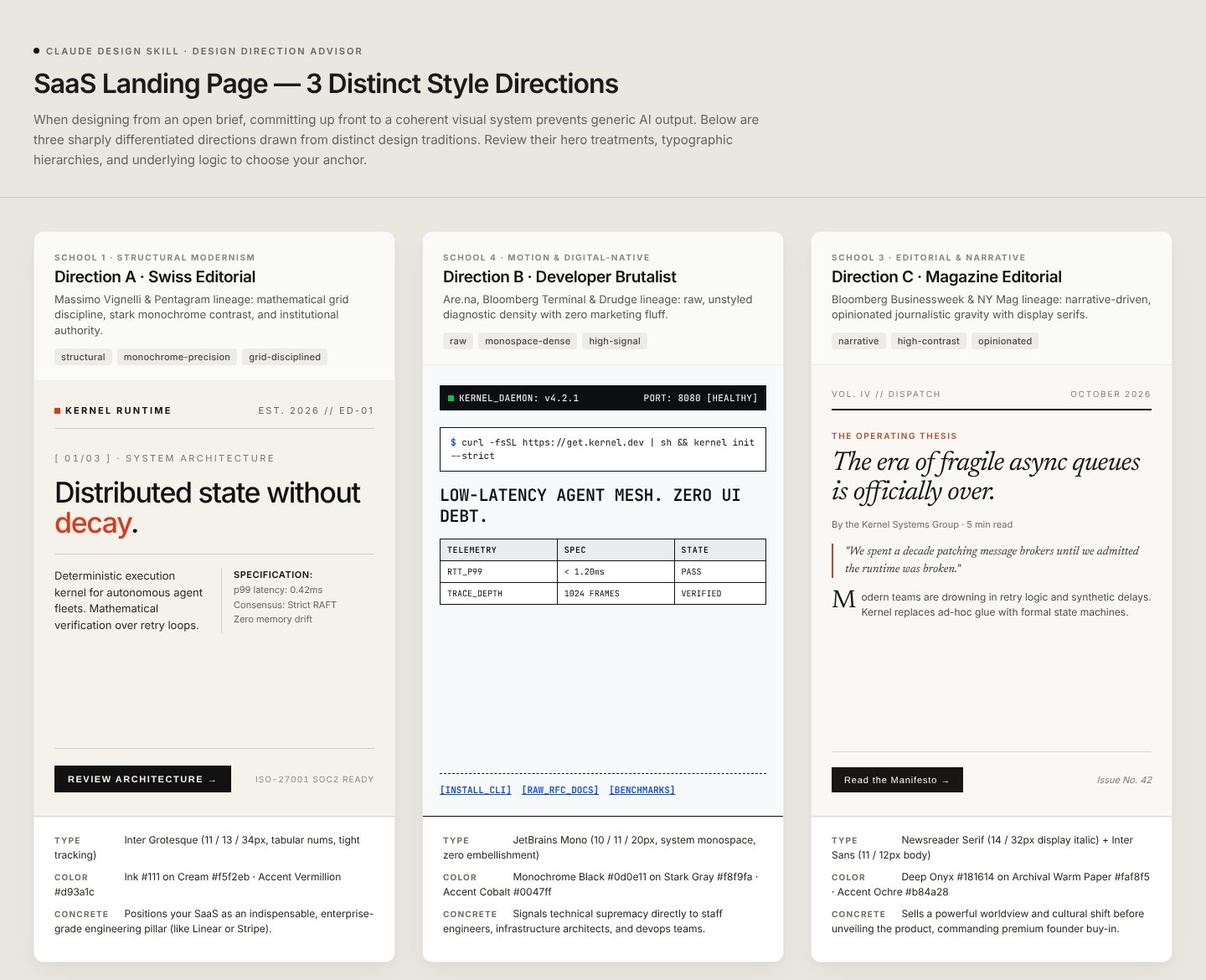
What it looks like in Antigravity 2.0
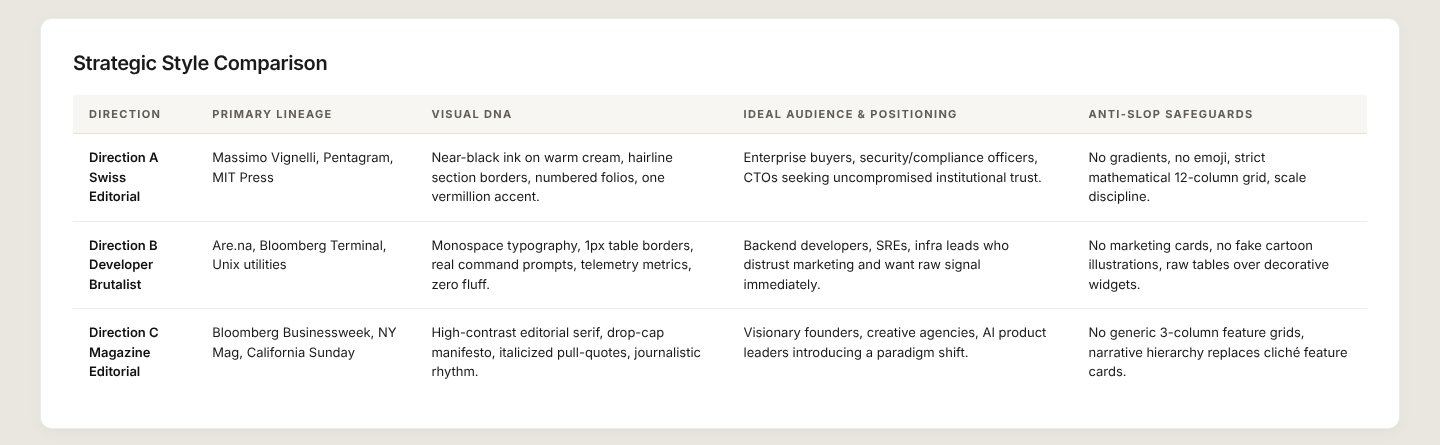
Works (steps corrected)Installed and worked, but the agent hung for about 4 minutes on a GitHub page during install and we had to stop it and say "continue". The design run itself took about 4 minutes and produced one HTML canvas with 3 directions side by side.Run by us on 2026-10-14 · desktop app, Gemini 3.8 Flash (High), Windows
How to get this result, step by step
1Open your project folder in Antigravity, start a new conversation and paste the install message. Press Enter.
Install the "Claude Design" skill for Google Antigravity.
Follow the steps at https://www.antigravityskills.org/install/claude-design-skill.md (source: https://github.com/jiji262/claude-design-skill).
Before running anything, show me what you will download and whether it includes scripts, and wait for my OK.
Install it into this project (.agents/skills/) unless I say global. When done, check that Antigravity lists it as an installed skill.
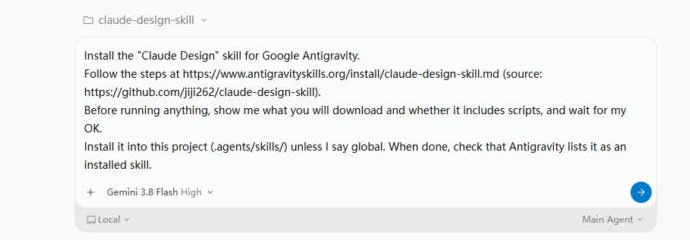
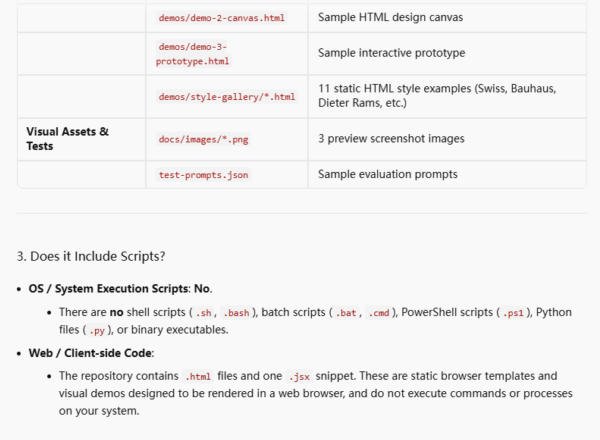
2The agent lists the files and confirms there are no scripts, then waits. Reply "OK". (If it hangs on "Checking GitHub repository", press stop and tell it to continue.)
OK
3Check it is installed: in a new conversation type /claude-de and claude-design shows up.
/claude-de
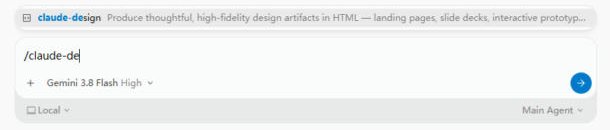
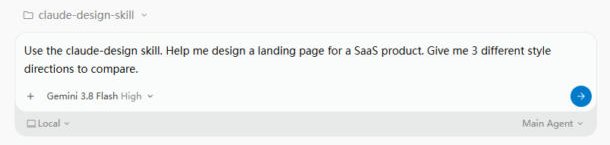
4Ask for directions to compare and name the skill.
Use the claude-design skill. Help me design a landing page for a SaaS product. Give me 3 different style directions to compare.
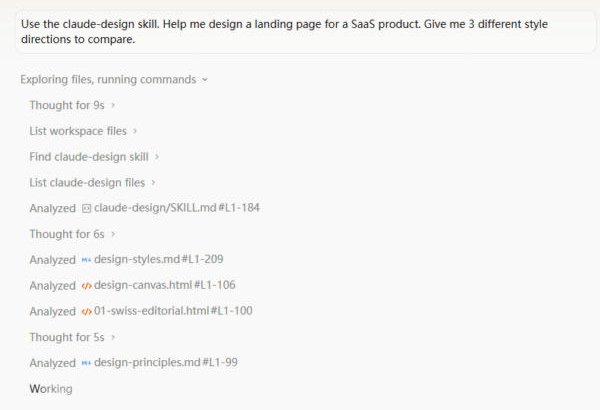
5It reads the skill, its style library and canvas template first. Just wait.
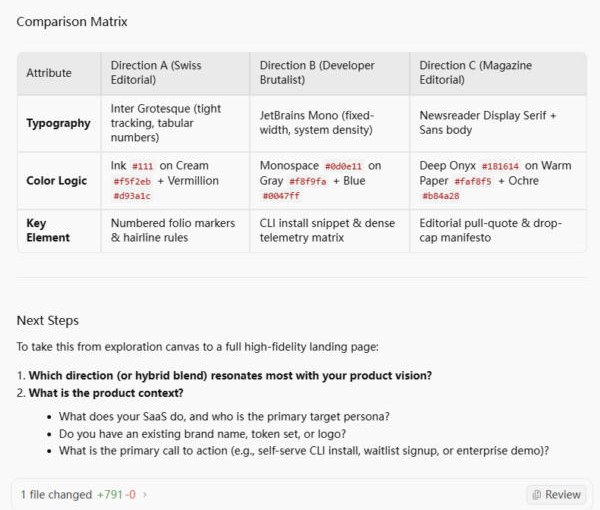
6Done in about 4 minutes: open the Style Explorations HTML file, pick a direction and tell it what your product is.
Full test log
Install method: Option 1 (pasted the agent prompt into a new conversation in an empty project folder).
- The agent read the install page, then sat on "Checking GitHub repository" for about 4 minutes. We pressed stop and wrote: "The GitHub check got stuck. Please continue: show me what you will download and whether it includes scripts, and wait for my OK."
- It then listed the files (SKILL.md, references/, assets/ with HTML canvas and deck stages, demos/ with 11 style-gallery pages, docs images, test-prompts.json) and said there are no shell, batch, PowerShell or Python scripts, only static HTML and one .jsx snippet. We replied OK.
- It cloned the repo into a temp folder, copied it to .agents/skills/claude-design/, ran git init in the project (it said this helps workspace detection) and started a "Skill Verifier" helper agent. In a new conversation, /claude-de shows claude-design in the menu.
- With the README example prompt, the agent read claude-design/SKILL.md, design-styles.md, the design-canvas.html template, a Swiss editorial demo and design-principles.md, then wrote one file: "SaaS Landing Page — Style Explorations.html" (+791 lines).
What we corrected on this page
- If the agent stalls on "Checking GitHub repository", press stop and ask it to continue; it then lists the files normally.
- It made a .git folder in the project (git init) without asking. Harmless, but delete it if you do not want a repository there.
- The output is a comparison canvas, not a finished site. The agent ends by asking which direction to build and what the product is. The product name ("Kernel") and copy are invented. The canvas loads Inter, JetBrains Mono and Newsreader from Google Fonts.
Install Claude Design in Google Antigravity
Antigravity loads skills from .agents/skills/ in your project or ~/.gemini/config/skills/ for all projects (official docs). Full guide
Install the "Claude Design" skill for Google Antigravity.
Follow the steps at https://www.antigravityskills.org/install/claude-design-skill.md (source: https://github.com/jiji262/claude-design-skill).
Before running anything, show me what you will download and whether it includes scripts, and wait for my OK.
Install it into this project (.agents/skills/) unless I say global. When done, check that Antigravity lists it as an installed skill.
The agent reads the install file, shows you what it will download and waits for your OK.
Option 2: install it yourself
- 1. Clone the repo to a temp folder
git clone --depth 1 https://github.com/jiji262/claude-design-skill /tmp/claude-design-skill
SKILL.md sits at the repo root, so the whole repo is the skill folder.
- 2. Copy it into your workspace skills folder
mkdir -p .agents/skills && cp -r /tmp/claude-design-skill .agents/skills/claude-design && rm -rf .agents/skills/claude-design/.git
Run from your project root. Antigravity reads workspace skills from <project>/.agents/skills/<folder>/. The folder name matches the skill name in SKILL.md (claude-design).
- 3. Or install it globally
mkdir -p ~/.gemini/config/skills && cp -r /tmp/claude-design-skill ~/.gemini/config/skills/claude-design && rm -rf ~/.gemini/config/skills/claude-design/.git
Global skills live in ~/.gemini/config/skills/<folder>/ and apply to every project.
- 4. Check that it loaded
Start a new conversation and ask "What skills do you have?" (Antigravity CLI: /skills). claude-design should be listed. Then try a design prompt such as the example above.
The repo README does not document Antigravity; this is the standard SKILL.md-folder install. No API keys or binaries are required, but the agent needs web access for the fact-check step and a browser to preview the HTML it produces.
Using Claude Code, Cursor or Codex? See other assistants below.
What is Claude Design?
How to use Claude Design?
Key features of Claude Design
- ✓Fact-verification rule (Priority #0): when the brief names a product, version or recent event, the agent must run WebSearch first and write findings to product-facts.md
- ✓Core Asset Protocol for branded work: a 5-step flow that treats logo, product shots and UI screenshots as first-class assets and records them in brand-spec.md
- ✓Design Direction Advisor: for vague briefs it proposes 3 directions from a library of 10 design styles in 5 schools (references/design-styles.md)
- ✓Output-format playbooks for design canvas, slide deck, interactive prototype, timeline animation and wireframe (references/output-formats.md)
- ✓Six copy-paste starters in assets/: deck-stage.html, design-canvas.html, prototype-shell.html, tweaks-starter.html, animations.jsx and device-frames.md
- ✓Anti-slop and craft rules, including scale floors (slide body text at least 24px on 1920x1080, mobile hit targets at least 44px) and a browser check before calling work done
When to use Claude Design
- 1Drafting a landing page when you have no brand yet and want 3 different style directions to compare
- 2Building a slide deck as a single HTML file with scaling, keyboard navigation and print-to-PDF
- 3Prototyping a clickable multi-screen flow as one HTML page
- 4Making a short HTML animation with a timeline and scrubber
- 5Producing several hero-section variants side by side on a design canvas
Installation & Setup Guide
Agent Rules / Prompt SetupFollow these steps (taken from the project's own docs) to configure Claude Design in your development environment.
npx skills add jiji262/claude-design-skill -g
The README calls this the recommended method. It says the skill is published on skills.sh and that the CLI installs across 40+ agents, naming Claude Code, Codex, Cursor, OpenCode, Gemini CLI and Cline. Drop -g for a project-only install; use -a claude-code or -a cursor to target one agent.
git clone https://github.com/jiji262/claude-design-skill ~/code/claude-design-skill && ln -s ~/code/claude-design-skill ~/.claude/skills/claude-design
Documented in the README for Claude Code. Symlinking means git pull updates the installed skill; start a new Claude Code session afterwards.
Usage Example & Verification
README example: "Help me design a landing page for a SaaS product. Give me 3 different style directions to compare." (test-prompts.json case 1; it is meant to trigger Advisor mode.)
Security Review
Static reviewNo scripts and no API keys needed; the main risk is the web fetching and CDN loading the instructions ask the agent to do.
Full review: scope, findings, risks
We found no executable code in the repo at commit 35a20e5: there are no .py, .sh, .js or .ts files and no package.json. SKILL.md and references/fact-verification.md tell the agent to run WebSearch before designing for any named product and warn that web content is untrusted data, to be reported rather than obeyed if it contains instructions. references/brand-context.md shows curl commands (logo SVGs, homepage HTML, product images) that the agent would run against official brand sites and save under assets/<brand>-brand/. The agent is also told to write product-facts.md and brand-spec.md into the working project. assets/prototype-shell.html loads React 18.3.1 and Babel 7.29.0 from unpkg with integrity hashes and optionally Tailwind from cdn.tailwindcss.com; references/react-babel.md shows an unpinned unpkg.com/lucide@latest script. The demos load Google Fonts and rsms.me. No environment variables or API keys are referenced. AGENTS.md and CLAUDE.md only fix the author's git commit identity and are harmless to users.
Operational Notes & Known Limitations
Known Limitations
- •It contains no scripts or tools: it only changes how the agent behaves, so output quality depends on your model and on the context you give it (brand files, UI kit, screenshots).
- •Its own rules tell the agent to run WebSearch for named products and to download brand assets with curl, so the agent needs web access and may fetch third-party pages.
- •Starter files load React 18.3.1, Babel 7.29.0 and Tailwind from unpkg.com and cdn.tailwindcss.com, and the demos load Google Fonts and rsms.me, so generated pages need internet access to render.
- •The README says it is adapted from an Anthropic product's system prompt and that the original prompt content is Anthropic's; this repository is a community rendition, not an official Anthropic release.
- •The README names Claude Code, Codex, Cursor and others for install but does not mention Google Antigravity; the .agents/skills/ install on this page is the generic SKILL.md-folder method, not a documented one.
Frequently Asked Questions
Is the Claude Design skill safe?
In our static review of commit 35a20e5, the repo has no scripts at all (no .py, .sh, .js or .ts files, no package.json): it is Markdown, HTML, one .jsx starter and a JSON test file. The risk is in what it tells the agent to do: run WebSearch, curl brand logos and images from official sites, and load React, Babel and Tailwind from CDNs in generated pages. Read references/brand-context.md before you let an agent run it unattended.
How do I install Claude Design in Antigravity?
Clone jiji262/claude-design-skill, copy the folder to .agents/skills/claude-design/ in your project (or ~/.gemini/config/skills/claude-design/ for global use), then ask "What skills do you have?" to confirm. The README does not mention Antigravity, so this is the generic SKILL.md-folder method.
Is this Anthropic's Claude Design or the frontend-design skill?
Neither. This is a community skill by jiji262 that, per its README, is adapted from Claude.ai's internal Design system prompt. Anthropic's own Claude Design (Anthropic Labs, announced 2026-04-17) is a separate Anthropic product in which you work with Claude on designs, prototypes, slides and one-pagers (Anthropic's announcement). Anthropic's frontend-design skill is a separate, smaller skill focused on distinctive frontend code; see our /skill/frontend-design page. Install this one only if you want the HTML-artifact workflow described above.
What does it produce and what do I need?
HTML files: decks, canvases with variants, clickable prototypes and animations, using the starters in assets/. You need an agent that loads SKILL.md folders, internet access for the CDN scripts and fonts the starters use, and a browser to preview the result.
Supported Platforms
Choosing between UI skills? We installed Impeccable, Frontend Design, Taste Skill and Claude Design in Antigravity 2.0 and put the results side by side: Impeccable vs Frontend Design vs Taste Skill.
Keep exploring this topic
Browse the full Antigravity skills directory for more source-linked skills with install steps and static safety reviews.
Related Skills
Impeccable
@pbakaus
Paul Bakaus's Impeccable design skill: one /impeccable skill with 24 design commands, live browser iteration and a 59-rule detector for AI-generated frontend patterns.
Frontend Design (Anthropic)
@anthropics
Anthropic's official frontend-design skill: guidance for distinctive, intentional UI design, typography and copy that avoids templated AI defaults.
UI/UX Pro Max
@nextlevelbuilder
Comprehensive UI/UX design intelligence skill for AI coding assistants. Injects structured design tokens, color theory, typography scales, accessibility guidelines, and component patterns into Claude Code, Cursor, and Windsurf.
Popular Skills
View All →Agent Manager
@sickn33
Manage multiple local CLI agents via tmux sessions.
Systematic Debugging
@sickn33
Debug systematically, not randomly. Find and fix bugs methodically.
Browser Automation (Playwright)
@sickn33
Expert browser automation for cleaning scraping and reliable testing.