Best Design Skills for Antigravity (2026): Do You Even Need One? We Tested 6
Short answer: Antigravity's own Gemini models already write clean layout and styling out of the box, so you do not need a design skill for every page. Where a design skill actually earns its keep is process, not prettier CSS: forcing a design-system spec before coding (UI/UX Pro Max), letting you pick from directions before building (Impeccable), pulling real photos and checking three viewport widths (Taste Skill), or auditing finished code line by line (Web Design Guidelines).
| Skill | Time in our run | Asks first? | What it actually adds over base Antigravity | Biggest catch |
|---|---|---|---|---|
| UI/UX Pro Max | ~1 session (7 folders, 4.8 MB) | No | Generates MASTER.md + page spec via search.py before coding | Right card panel clipped at 1280 px; loads Google Fonts |
| Frontend Design | ~5 min | No | Fastest one-sentence index.html with strong editorial typography | Invents business story, quotes, address, prices; 3 Google Fonts |
| Impeccable | ~10 min after picking direction | Yes (3 questions + 4 directions) | Interactive direction picker + built-in detector self-fix | Invents claims (e.g. "+140%") and farm/price copy |
| Taste Skill | ~15 min | No | Fetches ~7 MB real public-domain / CC photos + headless Chrome check at 3 widths | Slowest run; images uncompressed; Fontshare font |
| Claude Design | ~4 min (+ ~4 min install stall) | Ends by asking direction | 3 side-by-side HTML directions on one canvas before building | Doesn't finish the site; stalled on GitHub check during install |
| Web Design Guidelines | ~3 min | No | Audits existing files against 104 rules and outputs file:line fixes | Review-only (doesn't edit); mixes a11y bugs with Vercel copy style |
The honest question: if Antigravity is already good at UI, why install a skill?
That is the first objection anyone using Antigravity 2.0 has. Modern Gemini models inside Antigravity already know Tailwind, CSS Grid, responsive breakpoints, and decent spacing. If you ask for "a clean pricing section", you don't get broken HTML.
So when we installed and ran six popular UI/UX skills inside Antigravity 2.0 (desktop app, Gemini 3.8 Flash High, Windows and macOS, 2026-10-13 to 2026-10-14), we weren't looking for "which one makes the prettiest gradient". We wanted to see what changed in the agent's behavior compared to prompting Antigravity plain.
Three real differences showed up immediately:
1. Some skills slow the agent down on purpose. Plain Antigravity jumps straight to writing HTML. Impeccable and Claude Design stop it from guessing your brand tone by forcing a direction choice first.
2. Some skills add external tools the base model doesn't run. UI/UX Pro Max runs a local Python script (scripts/search.py --design-system) to write a MASTER.md spec first. Taste Skill launches headless Chrome across three widths until 0 checks fail.
3. Every generator skill still invents your business facts. Across our runs, every generator invented store histories, prices, testimonials, or metrics. None of them replaces your own copy or a final accessibility check.
1. UI/UX Pro Max: best when you want a repeatable design system
UI/UX Pro Max is the most searched UI skill on our site, and it behaves differently from a single-file SKILL.md. Running uipro init --ai antigravity (v2.15.0) wrote seven folders into .agents/skills/ totaling 4.8 MB (ui-ux-pro-max plus six companion skills: banner-design, brand, design, design-system, slides, and ui-styling).
When we gave it the README prompt "Build a fintech banking app with dark theme", the agent did not start with HTML. It ran scripts/search.py --design-system, saved design-system/aura-banking/MASTER.md and pages/dashboard.md, and then built index.html, css/styles.css, js/data.js, and js/app.js (4,590 added lines total).
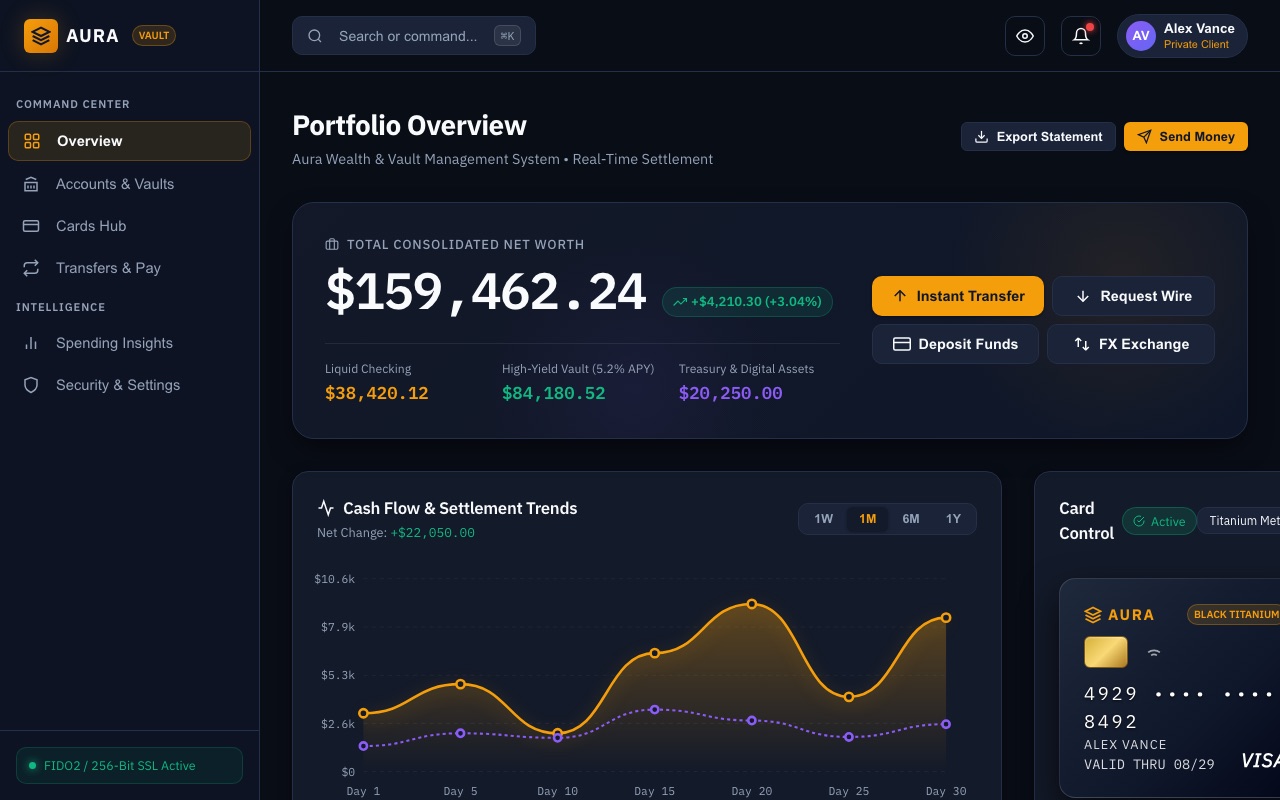
Where it beats base Antigravity: Multi-page or multi-session consistency. Because MASTER.md pins the palette (e.g. #F59E0B on #0F172A) and component rules on disk, the next session doesn't drift.
Where it fell short: In our 1280 px screenshot, the right-hand card panel clipped at the viewport edge, and the generated page loaded IBM Plex from Google Fonts.
2. Frontend Design: fastest one-shot page from a single sentence
Anthropic's Frontend Design is a single instruction file with no scripts and no back-and-forth. With one sentence for a bookshop landing page, Antigravity produced a complete index.html (1,710 lines with inline CSS) in about 5 minutes.
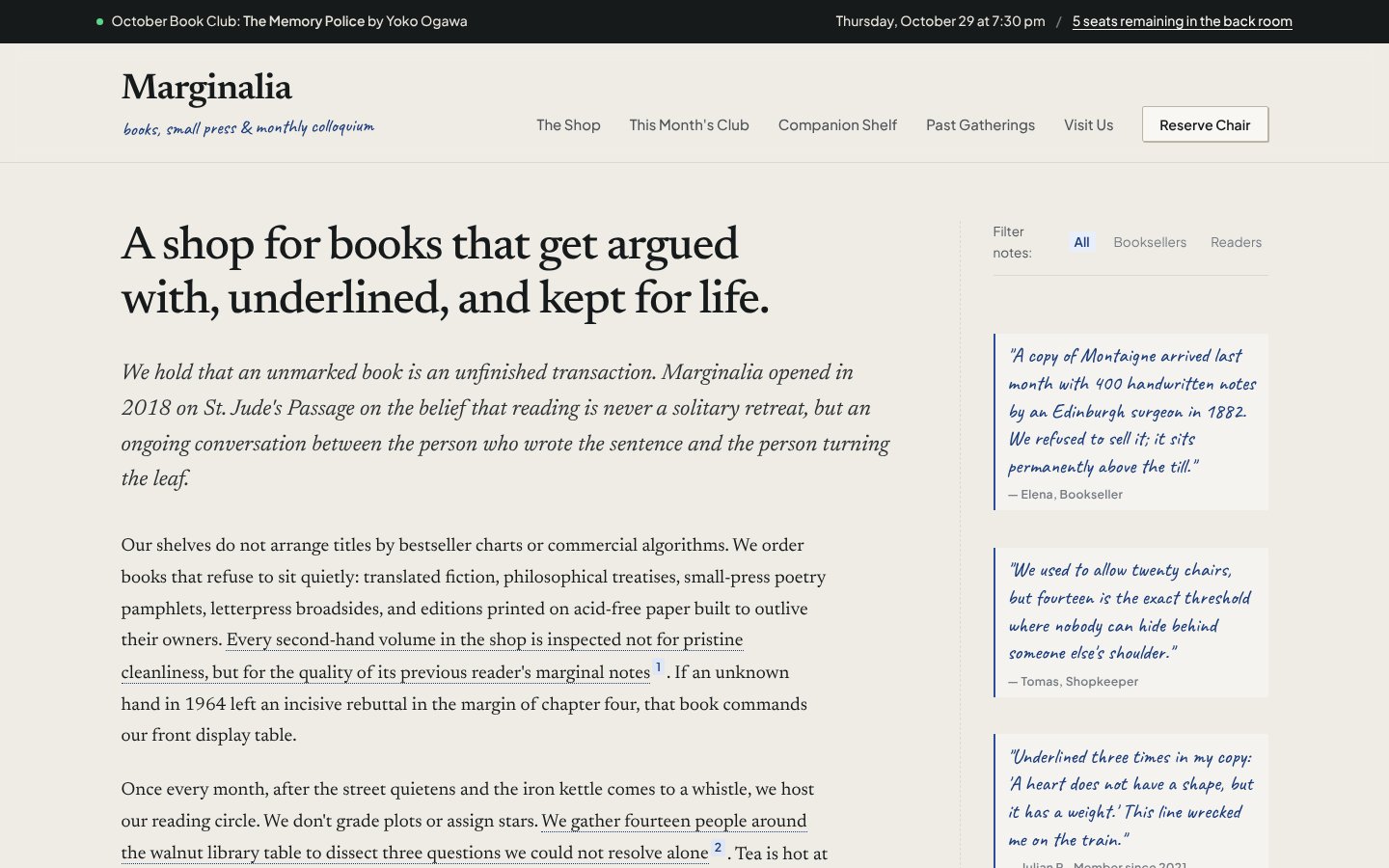
Where it beats base Antigravity: It pushes the model away from generic SaaS card grids toward stronger typography and editorial pacing.
Where it fell short: It invented the shop's story, quotes, address, and prices, and loaded three Google Fonts. We also ran Vercel's review skill on that exact 1,710-line output later — and it still found missing input name/autocomplete attributes, alert() validation, and missing prefers-reduced-motion checks.
3. Impeccable: best if you hate rewriting the first draft
Impeccable refuses to guess silently. In our run, it asked 3 clarifying questions, then opened a local browser page showing 4 distinct design directions side by side before writing the actual site. After we picked a direction, it built the landing page in about 10 minutes and ran its own detector to fix flagged issues.
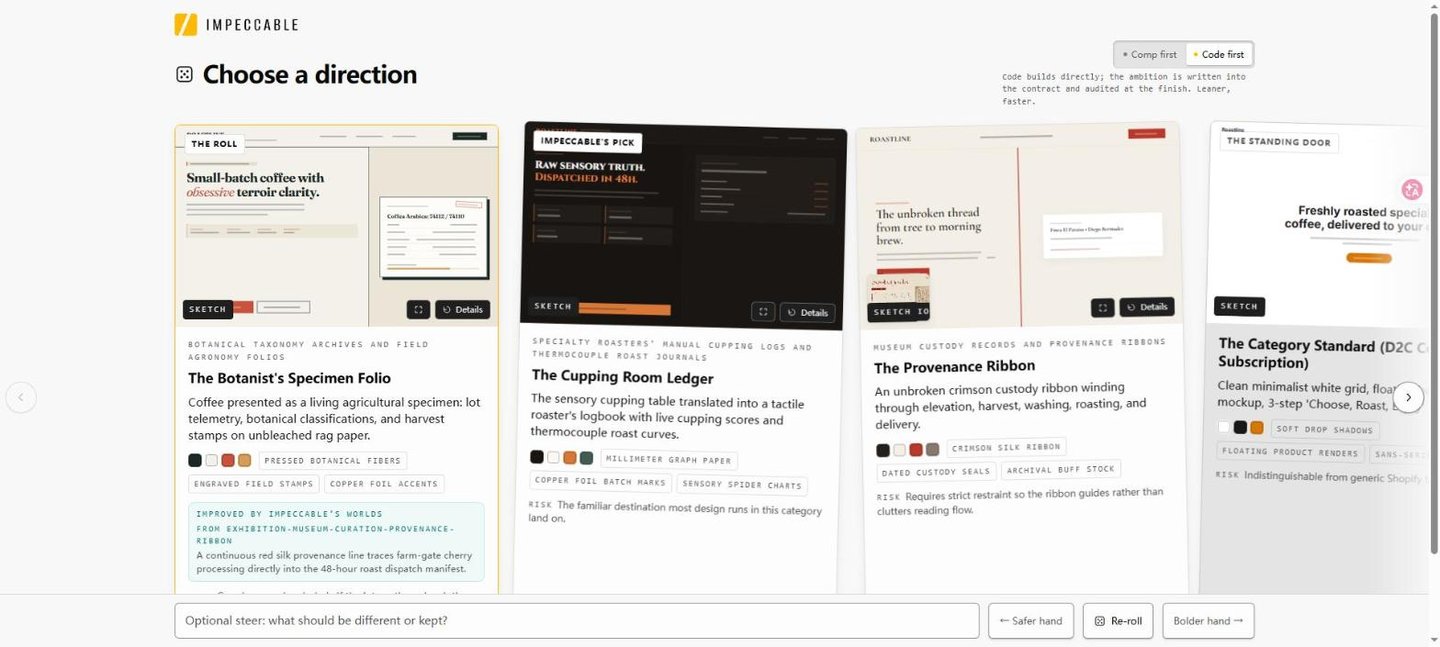
Where it beats base Antigravity: When you don't know what visual direction you want yet, picking from 4 live directions saves more time than re-prompting a whole page three times.
Where it fell short: Like Frontend Design, it loaded three Google Fonts and invented placeholder claims (farm names, scores, prices, and a +140% stat) that you must strip out before publishing.
4. Taste Skill: real photos and 3-width headless Chrome checks
Taste Skill (invoked as /taste in Antigravity) asked zero questions and took about 15 minutes — the longest run in our test. The payoff was tangible: it produced 3 files plus ~7 MB of real public-domain / CC photos and ran headless Chrome checks at three viewport widths until 0 checks failed.
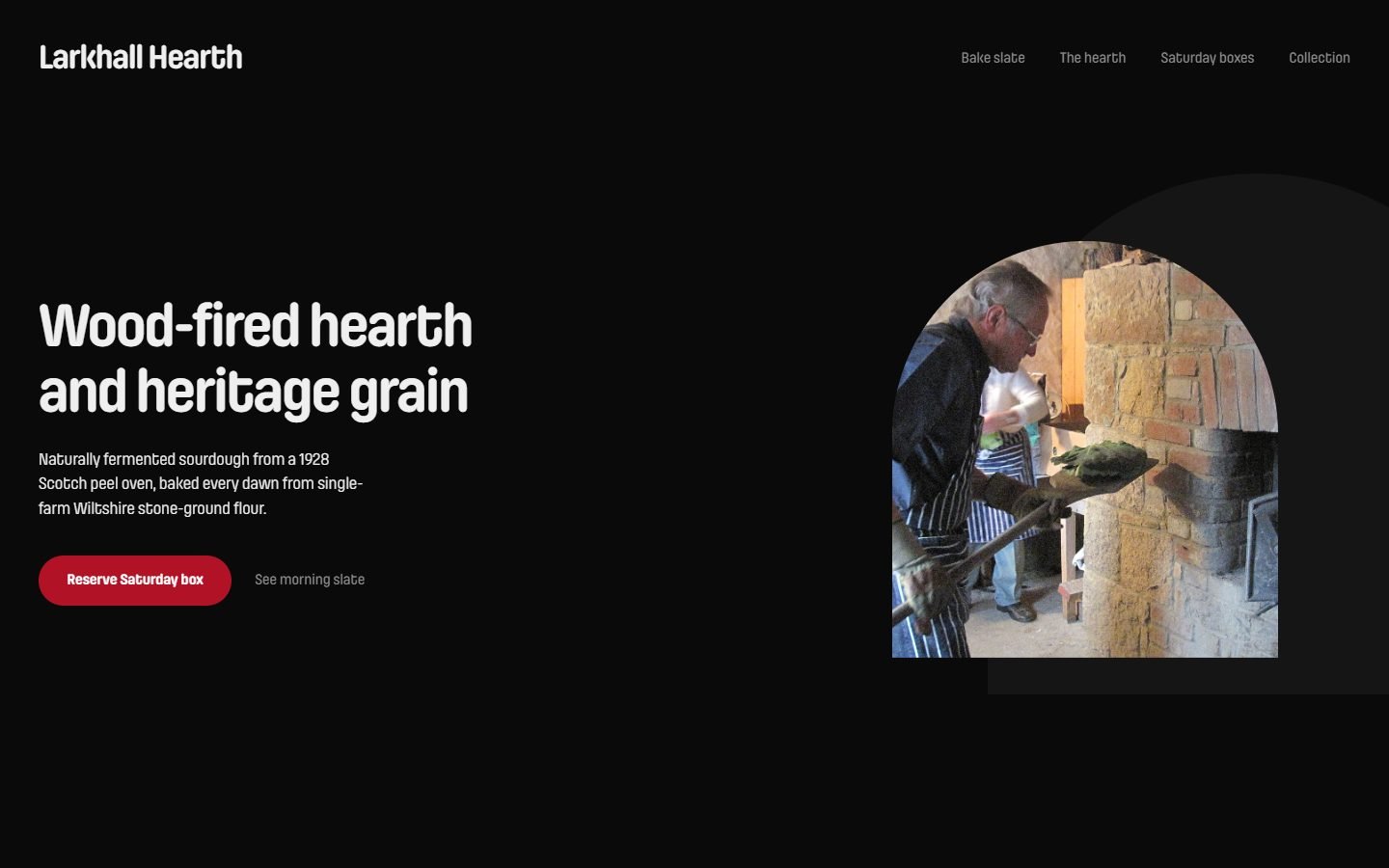
Where it beats base Antigravity: Base Antigravity rarely stops to verify its own layout in a real headless browser across mobile, tablet, and desktop widths, and usually reaches for placeholder boxes or SVG blobs instead of real photography.
Where it fell short: The ~7 MB of downloaded photos were uncompressed, it loaded fonts from Fontshare, and it still invented the bakery's name, address, prices, and history.
5. Claude Design: lightweight direction board, not a site builder
Claude Design took about 4 minutes for the design run (after stalling ~4 minutes during install on a GitHub check, where we had to press stop and type continue). It produced one HTML canvas with 3 directions side by side and then asked which direction to build.
If you already like how Antigravity writes code and only want quick visual exploration, this is lighter than UI/UX Pro Max — though Impeccable goes further by actually building and self-checking the chosen direction. (For a closer 4-way breakdown of time and quirks, see our Impeccable vs Frontend Design vs Taste Skill comparison.)
6. Web Design Guidelines: the one skill even strong models still need
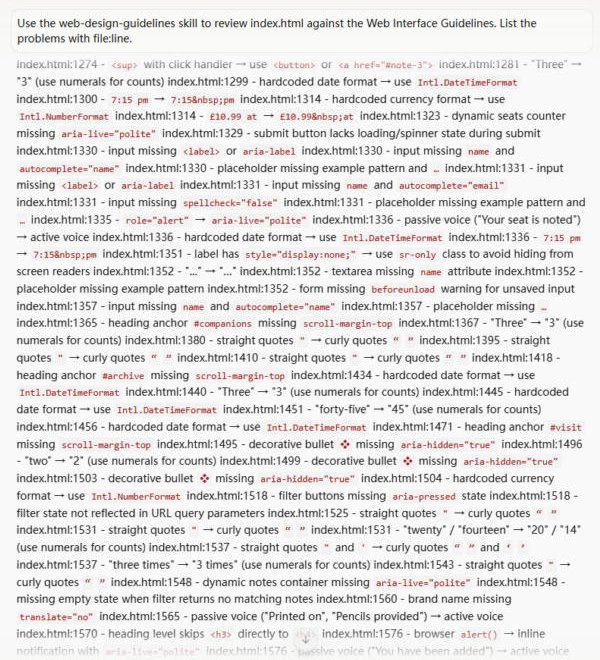
This is the surprise of the test. Web Design Guidelines from Vercel does not generate UI at all. It is a 39-line SKILL.md that fetches Vercel's 104-rule command.md and audits whatever files you point it at, printing findings as file:line.
We ran it on the 1,710-line bookshop page that Frontend Design had just built. In about 3 minutes, it returned concrete index.html:LINE catches: a label hidden with display:none, a <textarea> without name, a form using alert() instead of inline validation, missing aria-live on dynamic counters, and scrollIntoView ignoring prefers-reduced-motion. We spot-checked five line numbers (1314, 1351, 1352, 1576, 1647) and all five pointed to the exact code.
So, do you actually need design skills in Antigravity?
If you are building a quick internal tool or prototype, no — Antigravity's base Gemini model is already fast and clean enough, and extra skills add minutes and third-party font imports you don't need.
If you are shipping a real site, the winning setup we found isn't stacking five generator skills. It is one workflow:
- Need speed from a single prompt? Use Frontend Design (~5 min).
- Need a shared design system across pages? Use UI/UX Pro Max (
MASTER.md). - Want to pick a visual direction before coding? Use Impeccable.
- Want real photos and multi-width browser verification? Use Taste Skill, then compress the images.
- Before you ship anything: Run Web Design Guidelines on the generated files to catch the accessibility, form, and motion bugs that every generator leaves behind — and replace every invented price, stat, and third-party font URL.
Browse all reviewed design tools on our UI/UX skills for Antigravity hub.